
alpacachen/dsh-kanban
A shared kanban board for people and AI agents in DeepSeek Harness.
This is a DeepSeek Harness (DSH) plugin. Review its GitHub README, installation information, maintenance status, and public security signals here.
dsh-kanban
和 AI 一起规划,让每一步进展清晰可见。
一块真正由你和 AI Agent 共同维护的项目看板——从想法、任务拆解到推进交付,全程无需离开 DeepSeek Harness。




简体中文 · English
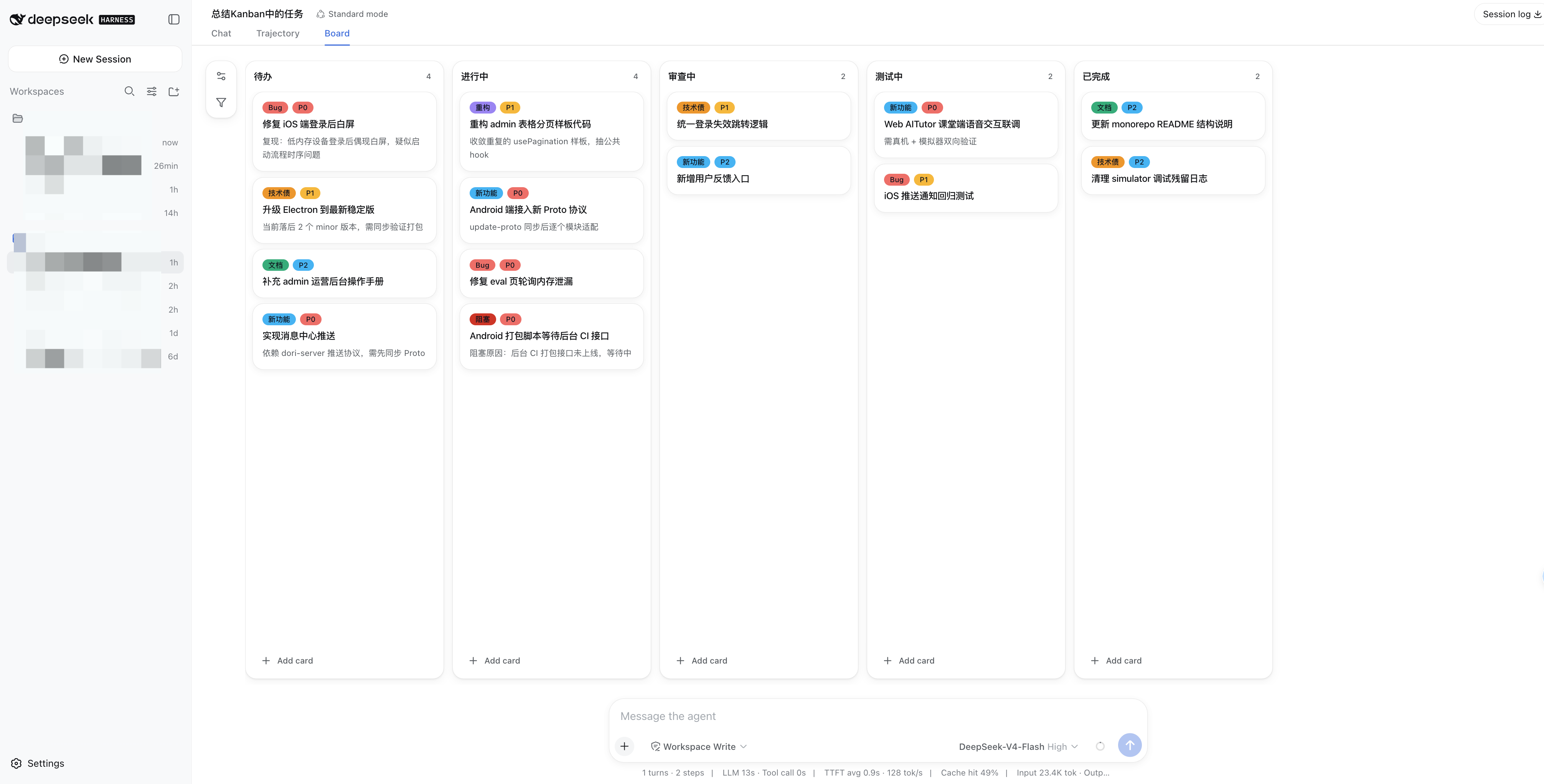
✨ 从一句话,到一块能执行的看板
不必再把 AI 生成的计划手动搬进项目管理工具。告诉 Agent 你想完成什么,它就能在 「看板」 标签页中拆分任务、创建卡片、设置优先级和更新进度。
你也可以随时接手:拖动卡片、补充备注、调整列表。你和 Agent 始终面对同一块看板、同一份进度。
| 💬 自然对话 | 🧭 随时掌控 | ⚡ 开箱即用 |
|---|---|---|
通过 14 个 kanban_* 工具直接管理任务。 | 在界面中编辑、拖拽、标记和筛选卡片。 | 浏览器端已预构建,无需配置前端环境。 |
| 🗂️ 项目隔离 | 🌓 原生体验 | 🤝 实时协作 |
| 每个 DSH 工作区都有自己的独立看板。 | 自动跟随 DSH 的语言、主题与暗色模式。 | 你做的调整,Agent 立即可见;反之亦然。 |
🚀 三步开始使用
1. 安装
dsh plugin --profile web add @alpacachen/dsh-kanban
安装后重启 dsh web,让插件 bundle 完成加载。你可以用下面的命令确认安装结果:
dsh --profile web --dump-config
如果输出中包含 dsh-kanban 配置层,就说明安装成功。
2. 打开看板
进入任意工作区,点击会话视图旁的 「看板」 标签页。新看板已经准备好四个常用阶段:
Todo → In Progress → Review → Done
3. 让 Agent 开始规划
试试这样说:
把登录功能拆成具体的实现任务,每一步创建一张卡片,并把安全审查标为 P0。
任务会直接出现在看板中。你可以继续通过对话推进,也可以切换到看板,用拖拽和编辑完善计划。
🧩 推进工作需要的能力,都在这里
在「看板」标签页中
- 创建、编辑、删除卡片,并将卡片拖到其他列表
- 为卡片补充备注、标签和 P0 / P1 / P2 优先级
- 打开卡片活动时间线,查看变更时间、具体内容,以及操作来自你还是 Agent
- 追踪卡片创建、移动、标题与备注编辑、标签变化和优先级变化
- 从任意卡片发起对话,在当前会话或新会话中让 Agent 接着处理
- 创建、重命名、排序和删除工作流列表
- 创建彩色标签,让不同任务一眼可辨
- 按优先级筛选整个看板,也可以随时手动刷新
从任意卡片继续与 Agent 协作
打开卡片并选择 「与 Agent 聊一聊」,dsh-kanban 会把卡片 ID、标题、标签和备注带入当前会话或一个新会话,让 Agent 立即获得完整上下文。内容只会填入输入框作为可编辑草稿,由你确认后发送,不会自动提交。
在对话中
插件会自动为每个工作区中的 Agent 提供以下工具:
| 范围 | 工具 |
|---|---|
| 看板 | kanban_get |
| 卡片 | kanban_get_card、kanban_add_card、kanban_update_card、kanban_delete_card、kanban_move_card |
| 列表 | kanban_add_column、kanban_rename_column、kanban_delete_column、kanban_move_column |
| 标签 | kanban_get_label、kanban_add_label、kanban_update_label、kanban_delete_label |
💡 你可以直接这样说
「总结一下目前正在进行的任务。」
「把『修复登录跳转』移到进行中,并设为 P0。」
「在进行中后面新增一个阻塞列表。」
「创建一个红色的『紧急』标签,并加到发布卡片上。」
「我是一名律师,请帮我初始化一套适合日常办案的看板,根据工作流程创建阶段列表和常用标签,并随着工作变化持续帮我维护。」
不必提前设计好工作流。只需告诉 Agent 你的职业、场景或目标,它就能为你创建合适的阶段和标签,并在后续协作中持续调整。
开源许可
MIT
Security & install evidence
This score is based solely on public repository metadata and the install evidence registered here — it is not a code security audit.
From a public plugin catalog, linked to a public GitHub repository.
The repository declares the MIT license.
Code updates within the last 180 days.
No verifiable install metadata registered yet — please review the repository instructions manually.
The inspected package metadata declares no install lifecycle scripts.