
detongz/dsh-client-ui-obsidian-memory
deepseek harness plugin obsidian memory
This is a DeepSeek Harness (DSH) plugin. Review its GitHub README, installation information, maintenance status, and public security signals here.
dsh-client-ui-obsidian-memory
🧠 DeepSeek Harness 的 Obsidian Memory 插件 — 基于本地 Markdown 的持久记忆
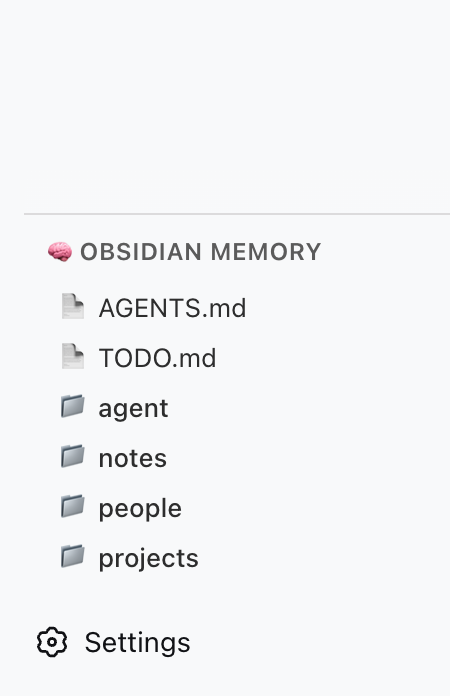
一个 DSH 插件,让你的 AI 助手拥有持久记忆,记忆内容存储在本地 Obsidian(或普通 Markdown)知识库中。插件注册 5 个文件系统工具(obsidian_memory_*),并在侧边栏显示 vault 状态和工具说明。
灵感来自 @Saccc_c 的 Codex 记忆技巧。
功能
- 5 个记忆工具 — AI 可以读取、列出、搜索、写入、追加本地 vault 文件
- 侧边栏面板 — 在 DSH 左侧边栏
sidebar.obsidian-memory插槽中显示工具说明 - 无需外部服务器 — 直接通过 DSH 的 host 运行时读写文件系统
- 兼容 Codex 结构 — 支持社区推荐的
Codex/目录结构
可用工具
| 工具 | 功能 |
|---|---|
obsidian_memory_read | 读取 Markdown 或文本文件 |
obsidian_memory_list | 列出文件和目录 |
obsidian_memory_search | 全文搜索 .md 和 .txt 文件 |
obsidian_memory_write | 写入或覆盖文件 |
obsidian_memory_append | 追加内容到文件末尾 |
快速开始
1. 准备 vault
在你的机器上创建一个 Codex/ 文件夹(例如放在 Obsidian vault 里):
~/Documents/Obsidian Vault/
└── Codex/
    ├── AGENTS.md      ← AI 操作说明书
    ├── TODO.md        ← 待办事项 / 未收尾的工作
    ├── people/
    ├── projects/
    ├── notes/
    └── daily/
2. 安装插件
一条命令即可,在任意目录执行:
dsh plugin add dsh-client-ui-obsidian-memory        # npm 发布版(推荐)
# 或直接从源码安装:
dsh plugin add detongz/dsh-client-ui-obsidian-memory
插件自带
dsh.bundle清单,dsh plugin add会同时安装并激活插件 (内置的cordis.patch.yml会自动插入ui-obsidian-memory条目), 无需手动编辑cordis.patch.yml。
3. 配置 vault 路径
让插件指向你的 Codex/ 文件夹。在 profile 的 cordis.patch.yml 中:
- id: ui-obsidian-memory
  config:
    vaultPath: /Users/你的用户名/Documents/Obsidian Vault/Codex
将 vaultPath 替换为你的 Codex/ 文件夹的绝对路径,
也可以改用环境变量 OBSIDIAN_VAULT_PATH。
4. 重启 DSH
dsh web # 或你平时启动 DSH 的方式
重启后:
- 侧边栏面板 会出现在左侧(🧠 Obsidian Memory)
- 5 个工具 在配置了
vaultPath后可供 AI 使用
配置
| 选项 | 类型 | 默认值 | 说明 |
|---|---|---|---|
vaultPath | string | — | Codex/ vault 目录的绝对路径 |
环境变量兜底(可选):
export OBSIDIAN_VAULT_PATH=/Users/你的用户名/Documents/Obsidian Vault/Codex
如果配置和 env var 都没有设置,插件会记录警告并跳过工具注册。
架构
┌─────────────────────────────────────────┐
│ DSH Web(浏览器端)                      │
│  ┌─────────────────────────────────┐    │
│  │ sidebar.obsidian-memory          │    │
│  │  ┌─────────────────────────┐    │    │
│  │  │ 🧠 Obsidian Memory      │    │    │
│  │  │  — 工具说明              │    │    │
│  │  │  — vault 结构            │    │    │
│  │  └─────────────────────────┘    │    │
│  └─────────────────────────────────┘    │
└─────────────────────────────────────────┘
                    │
┌───────────────────▼─────────────────────┐
│ DSH Host(Node.js)                     │
│  • 读写本地文件                         │
│  • 注册 5 个 obsidian_memory_* 工具     │
└─────────────────────────────────────────┘
                    │
┌───────────────────▼─────────────────────┐
│ 本地文件系统                            │
│  ~/Documents/Obsidian Vault/Codex/      │
└─────────────────────────────────────────┘
| 组件 | 职责 |
|---|---|
Host (lib/index.js) | Node 端:注册工具、读写 vault 文件 |
Client (lib/client.js) | 浏览器端:侧边栏面板,显示工具说明 |
| Vault | 数据源:本地 Markdown 文件 |
故障排查
| 现象 | 原因 | 解决 |
|---|---|---|
| Settings → Plugins 里看不到插件 | dsh plugin add 装的是 0.3.2 之前的旧版(被当作普通依赖安装,从未激活) | 重装:dsh plugin add dsh-client-ui-obsidian-memory@latest |
| AI 无法使用工具 | vaultPath 未配置 | 在 cordis.patch.yml 或环境变量中设置 vaultPath |
| 侧边栏面板不显示 | DSH 版本缺少 sidebar.obsidian-memory 插槽 | 升级 DSH 到 ≥ 0.1.0-rc.5(或带该插槽的构建) |
| "Path traversal detected" 报错 | AI 试图访问 vault 外文件 | 所有路径都被沙盒限制在 vaultPath 内 |
开发
git clone https://github.com/detongz/dsh-client-ui-obsidian-memory.git
cd dsh-client-ui-obsidian-memory
npm install
npm run build        # 输出 lib/index.js + lib/client.js
npm run watch        # 开发模式自动重建
构建产物说明:
lib/index.js— host 入口(工具注册 + 文件读写)lib/client.js— browser bundle(DSH closure-factory 格式,CSS 内联)
许可证
MIT
Security & install evidence
This score is based solely on public repository metadata and the install evidence registered here — it is not a code security audit.
From a public plugin catalog, linked to a public GitHub repository.
The repository declares the MIT license.
Code updates within the last 180 days.
No verifiable install metadata registered yet — please review the repository instructions manually.
Detected prepare — review the scripts before installing.
lifecycle-scripts