
huihuisire/harness-hub
A native desktop client for DeepSeek Harness with built-in plugin manager.
This is a DeepSeek Harness (DSH) plugin. Review its GitHub README, installation information, maintenance status, and public security signals here.
 Harness Hub
Harness Hub — DeepSeek Harness Desktop App
DeepSeek Harness(dsh)桌面端:免命令行、免环境配置,双击即用;开源插件一站式集成——不用你自己搜、自己装,应用内逛市场、一键安装、自动激活。 A native desktop client for DeepSeek Harness (dsh) with a built-in, one-stop open-source plugin marketplace — browse, install and activate community plugins in one click. No CLI, no Node.js setup, no Docker.




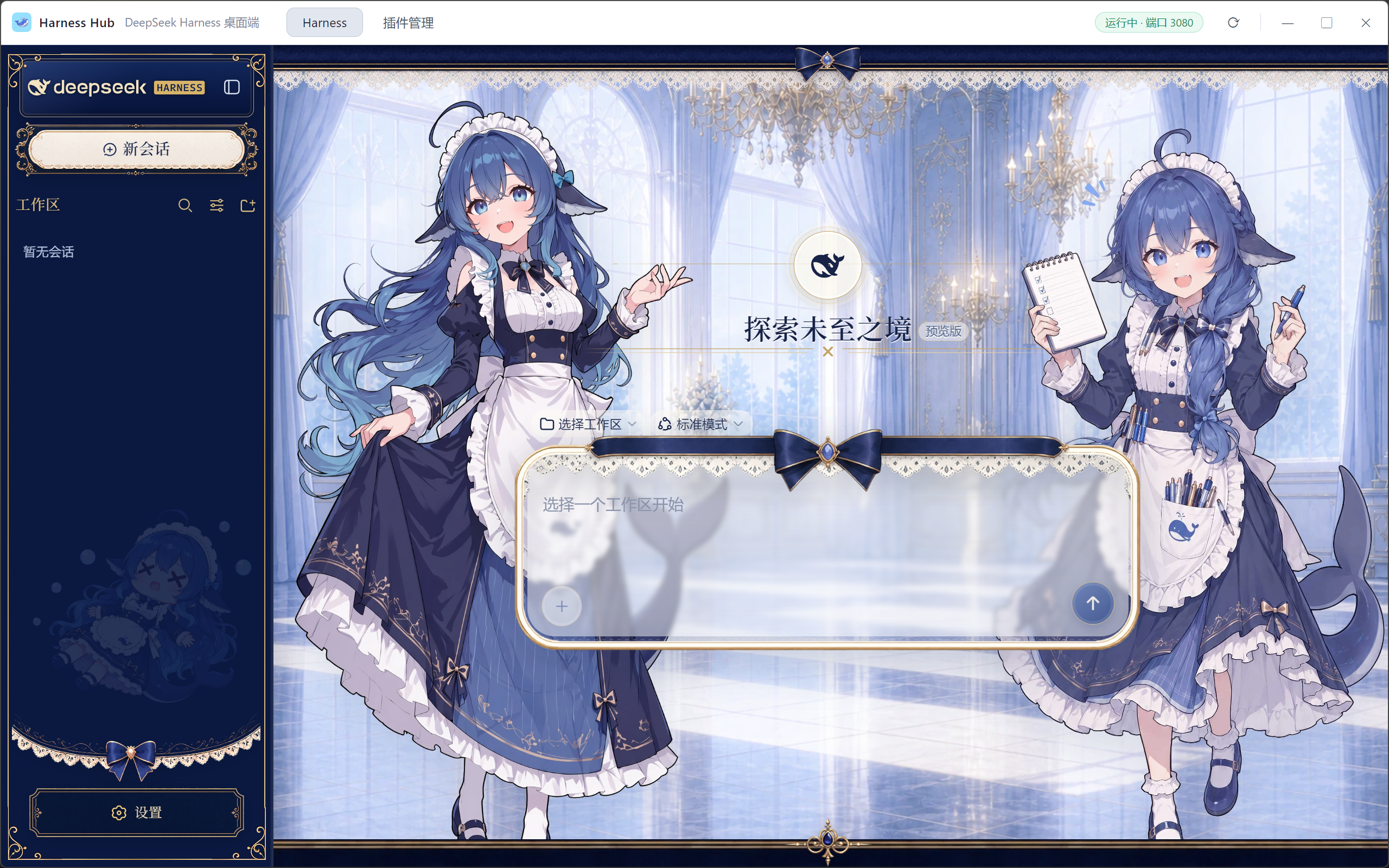
社区开源皮肤插件「黑鲸鱼娘」(dsh-deep-whale)一键安装并自动激活后的 dsh 界面 —— 你的 Agent 工作台,也可以有自己的风格。 A community open-source skin plugin (dsh-deep-whale) installed and activated with one click.
开源插件,一站式集成|One-Stop Plugin Integration
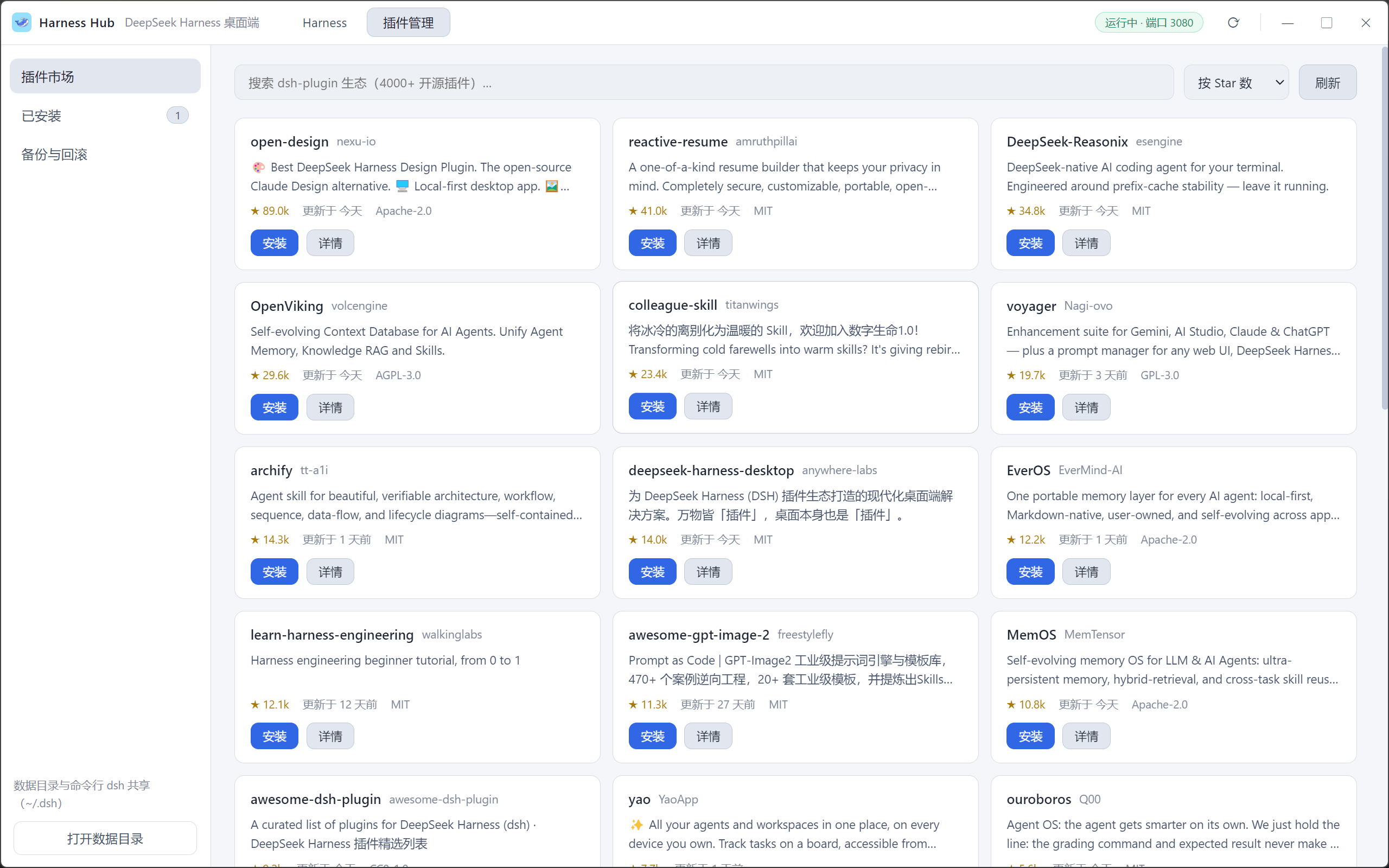
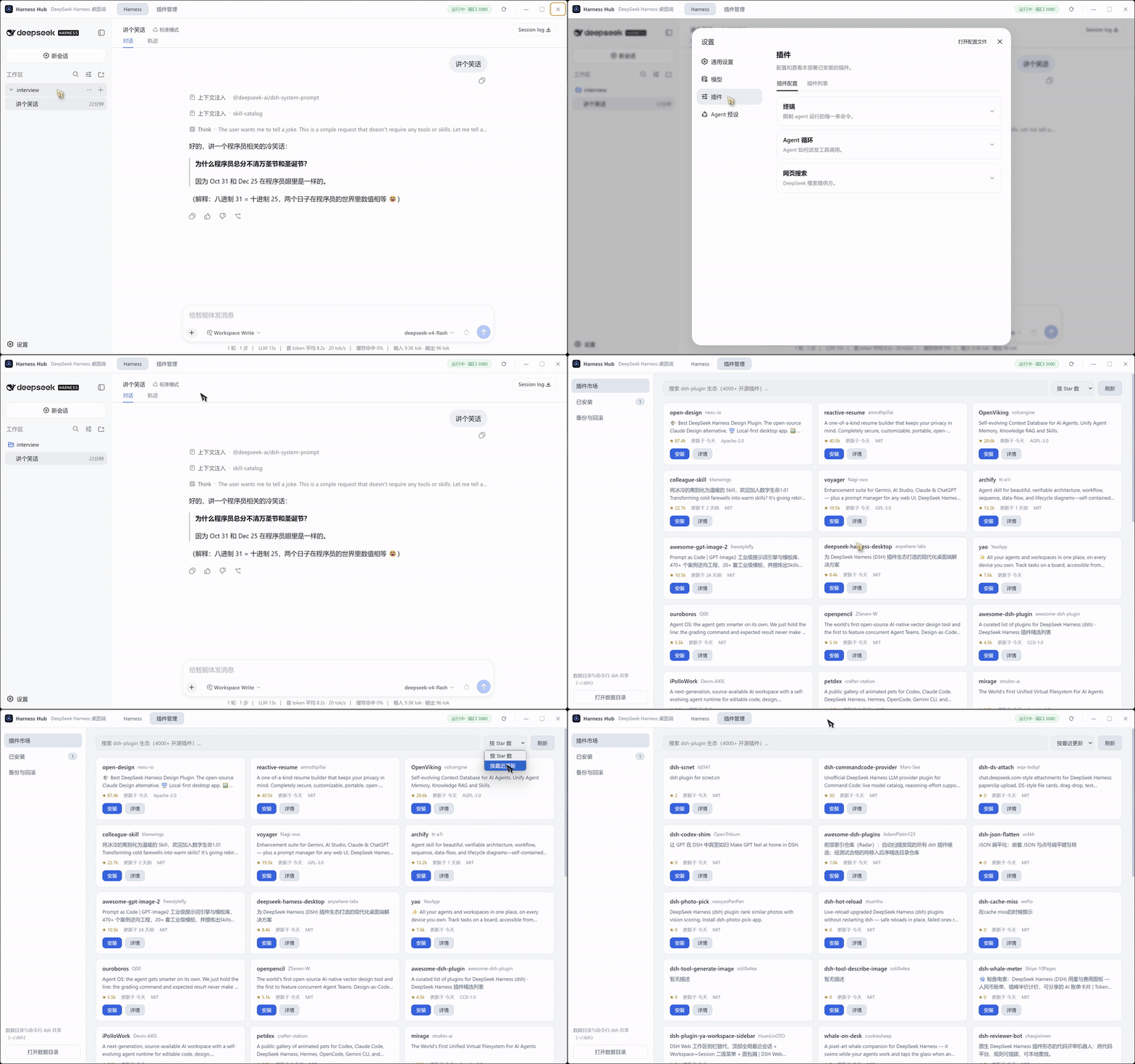
DeepSeek Harness 的「万物皆插件」生态在 GitHub 上有数千个开源作品,但自己搜仓库、敲命令、处理依赖、排查激活,门槛太高。Harness Hub 把整条链路收进应用内:
- 逛(Browse) — 内置插件市场,实时聚合 GitHub
dsh-plugin标签下的开源插件,按 Star 数 / 最近更新排序,支持搜索与翻页,详情抽屉直接预览仓库 README; - 装(Install) — 一键安装,不用你找仓库地址、不用敲命令;自动解析仓库真实默认分支,内置 pnpm 完成依赖安装;也支持粘贴 npm 包名 /
owner/repo/ GitHub 链接手动安装; - 激活(Activate) — 安装完成自动重启服务加载新插件,无需任何手动操作;「已安装」页实时显示启用状态;
- 放心(Safe) — 每次安装/卸载前自动备份 profile 配置,失败自动回滚,历史备份可随时一键回退,玩坏也能秒恢复。
界面展示|Demo
为什么选择 Harness Hub?|Why Harness Hub
DeepSeek Harness 是一个「万物皆插件」的 AI Agent 运行时,但命令行安装、Node 环境、端口排查把很多用户挡在门外。Harness Hub 把这些全部藏到桌面应用背后:
DeepSeek Harness is an "everything is a plugin" AI agent runtime — but CLI installs, Node environments and port debugging keep many users out. Harness Hub hides all of that behind a native desktop app.
- 零配置启动(Zero setup) — 内置 Node 运行时与 pnpm,不需要你机器上装任何环境;双击安装包即用。
- 服务全自动托管(Managed service) — 自动启动
dsh web服务、探测与复用端口、崩溃自动恢复,托盘常驻后台。 - 按需联网,启动零等待(On-demand network) — 启动过程不请求任何外部网络;插件市场只在你打开它时才加载,慢网络 20 秒自动中断,绝不卡住首屏。
- 主题跟随(Theme sync) — 自动跟随你在 dsh 设置里选择的浅色/深色主题。
- 与命令行 dsh 共享数据(Shared profile) — 使用同一个
~/.dsh目录,桌面端装的插件在命令行里同样生效,反之亦然。
架构一览|How It Works
┌─────────────────────────── Harness Hub (Electron) ───────────────────────────┐
│                                                                              │
│   Renderer(插件市场 / 已安装 / 备份回滚 / 主题)                               │
│        │  preload (contextBridge)                                            │
│   Main process ──► DshServiceManager:启动/复用/自愈 dsh web,仅绑定 127.0.0.1 │
│        │         └► PluginManager:市场搜索、一键安装、自动备份/回滚(内置 pnpm)│
│        ▼                                                                     │
│   内嵌 webview ──► http://127.0.0.1:3080 (dsh web UI,仅本地回环)             │
└──────────────────────────────────────────────────────────────────────────────┘
快速开始|Quick Start
直接使用:到 Releases 页下载对应平台安装包(Windows:Harness Hub Setup x.x.x.exe;macOS:.dmg;Linux:.AppImage / .deb)。
从源码运行(开发):
npm install          # 安装依赖(含 @deepseek-ai/dsh 与内置 pnpm)
npm run fetch-node   # 下载内置 Node 运行时(约 80MB,仅首次)
npm start            # 启动桌面应用
打包发行版:
npm run dist         # Windows(NSIS 安装包 + 便携版)
npm run dist:mac     # macOS(dmg / zip)
npm run dist:linux   # Linux(AppImage / deb)
系统要求|Requirements
| 项目 | 要求 |
|---|---|
| 操作系统 | Windows 10+ / macOS 11+ / 主流 Linux 发行版(x64) |
| Node.js | 无需安装(应用内置) |
| 网络 | 仅逛市场/装插件时需要;启动与服务运行完全本地 |
隐私与安全|Privacy & Security
- dsh web 服务仅绑定
127.0.0.1本地回环地址,不对外暴露; - 所有数据保存在你本机的
~/.dsh目录,与命令行 dsh 完全一致,应用不上传任何内容; - 外部链接一律交给系统浏览器打开,应用内 webview 禁止跨源导航;
- 插件为社区开源作品,安装前可在详情抽屉查看仓库 README 自行审查。
常见问题|FAQ / Troubleshooting
| 现象 | 处理 |
|---|---|
| 首次启动较慢 | 首次需初始化运行环境,通常几秒;插件市场不在此阶段联网 |
| 端口被占用 | 自动探测 3080–3090 空闲端口,或复用已在运行的 dsh web |
| 插件安装失败 | 配置已自动回滚,不影响现有环境;可在「备份与回滚」页一键回退 |
| Windows SmartScreen 提示 | 社区版未做代码签名,选择「仍要运行」即可 |
| 界面异常/白屏 | 应用会自动重试并记录日志,日志位于 %APPDATA%\Harness Hub\logs\main.log |
关注与交流|Follow & Community
扫码关注作者公众号「回血氧」,获取版本更新、插件推荐与使用技巧的第一手信息:

生态|Ecosystem & Related
- 上游项目:deepseek-ai/deepseek-harness — DeepSeek Harness: Everything is a Plugin.
- 插件精选列表:awesome-dsh-plugin
- 插件开发主题标签:
dsh-plugin(GitHub topic)
开发|Development
npm test # 核心模块无界面自测(服务/端口/插件管理/市场)
代码结构:src/main(主进程:服务管理、插件管理、托盘、IPC)、renderer(渲染层 UI)、scripts(内置运行时下载、图标生成、自测)。
免责声明|Disclaimer
Harness Hub 是社区维护的第三方封装项目,不是 DeepSeek 官方产品。上游 dsh 处于开发者预览阶段,接口可能发生破坏性变更。
许可证|License
Security & install evidence
This score is based solely on public repository metadata and the install evidence registered here — it is not a code security audit.
From a public plugin catalog, linked to a public GitHub repository.
The repository declares the MIT license.
Code updates within the last 180 days.
No verifiable install metadata registered yet — please review the repository instructions manually.
The inspected package metadata declares no install lifecycle scripts.