
Kaixxrua/dsh-aigc-radar
AIGC Radar for DeepSeek Harness — curated AI project search with native search cards, powered by the AIGC_NEWS library
This is a DeepSeek Harness (DSH) plugin. Review its GitHub README, installation information, maintenance status, and public security signals here.
dsh-aigc-radar
English | 简体中文
面向 DeepSeek Harness(dsh)的 AIGC Radar 项目搜索插件。
别再重复造轮子。 在你规划与实现的过程中,agent 会主动检索 AIGC Radar 精选项目库,在你写下第一行代码之前,找出已经解决同类问题的成熟、经实战验证的项目。检索结果以 dsh Web UI 原生搜索卡片 呈现——不是原始 markdown——并且在会话回放中完整保留。
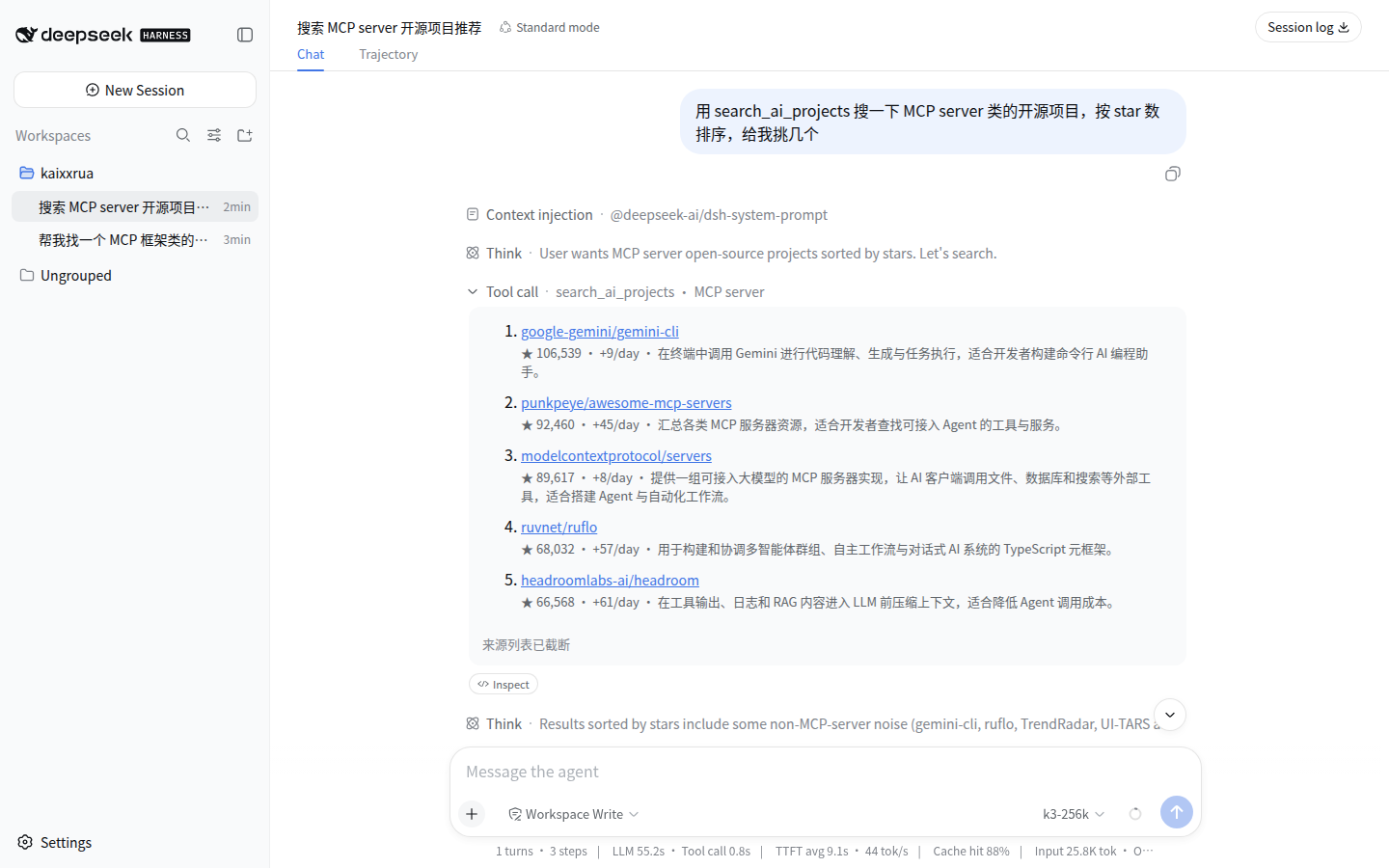
功能一览
| 工具 | 作用 |
|---|---|
search_ai_projects | 检索 AIGC Radar 精选项目库:500 星以上准入的 GitHub 项目,附带分类、中英双语标签与描述、每日星增指标 |
get_project_categories | 列出分类体系(一级分类 + 二级分类计数),用于筛选条件发现 |
两层路由让发现成为自动行为,而非需要主动点用:
- 显式发现——直接问「找个能做 deep research 的开源框架」,agent 即返回带星标、带分类的结果,无需说「用一下这个工具」
- 主动复用检查——在 agent 动手实现大型模块或子系统之前(认证、支付、工作流引擎、搜索/索引、协议实现、端到端 RAG/Agent 管线……),它会自发先查一次库,让成熟方案在任何人重造之前浮出水面。细粒度工作(修 bug、改名、调样式、CRUD)被刻意排除在外
为什么是原生插件而不是 MCP server?
AIGC Radar 本身也提供 MCP server——而本插件现在就跑在同一个 MCP 端点之上(POST /api/mcp),每次调用都计入同一套限速与配额。插件在此之上额外提供:
- 原生
web搜索卡片——结构化结果在 Web UI 中渲染为卡片,并在会话回放时忠实重建(presentationMeta),这是 MCP 传输无法表达的 - 带类型的规范化输出——结果是一个经过校验的 JSON 值,Code Mode 可以直接编程组合(
await tools.search_ai_projects({ q: 'mcp' })),带完整类型推断 - 第一方提示词路由——发现路由指引写在系统提示词装配层,而不是可能被客户端截断的 MCP instructions 里
实测性能
搜索工具就是一次到 AIGC Radar 公共边缘的 HTTPS 调用——下面的数字测量的是完整链路,2026-08-18 测自中国家庭宽带(GeoDNS → 国内边缘),使用 scripts/benchmark-search.sh(10 条代表性中英查询 × 3 轮,打向 https://aigcnews.cn/api/mcp):
| 指标 | 数值 |
|---|---|
| 搜索延迟 p50 | 355 ms |
| 搜索延迟 p95 | 810 ms |
| 在库精选项目 | 18,426 个——全部高于 500 星准入线 |
| 分类体系 | 11 个一级分类,中英双语标签与描述 |
基于 MCP 接口测量的索引质量基准——端到端比 WebSearch 快 3.5×(中位 7.4 s vs 25.8 s)、首工具路由准确率 98.3%(59/60 次试验)——见主仓 benchmark 章节;本插件用同一套 API 服务同一份数据集,这些数字同样成立。
安装
需要 dsh(npx @deepseek-ai/dsh web)。
推荐——从 npm 安装预构建包:
dsh plugin --profile web add dsh-aigc-radar
需要可复现安装时,可固定已发布版本:
dsh plugin --profile web add dsh-aigc-radar@0.2.0
源码兜底——从 GitHub 安装:
dsh plugin --profile web add github:Kaixxrua/dsh-aigc-radar
从 Git 安装会运行包内的 prepare 构建,pnpm ≥10 默认拒绝,需要先放行:把 pnpm 打印出来的包名写进 profile 的 pnpm-workspace.yaml:
allowBuilds:
  dsh-aigc-radar: true
然后重跑 GitHub add。想让源码安装保持不可变,可以固定提交(github:Kaixxrua/dsh-aigc-radar#<sha>)。
不启动即可验证:
dsh --profile web --dump-config # 能看到 "# == dsh-aigc-radar" 配置层
推荐:去源站注册并领一个免费 token。 插件开箱即可匿名使用,但匿名调用共享 100 次/日/IP 的桶。在 aigcnews.cn 注册免费账号即可获得按账号计的月配额——在 /mcp 页面创建 MCP token(搜索不需要任何特殊 scope),粘贴为下方配置里的 mcpToken。详见配额与 MCP token。
配置
默认指向公共部署。在你 profile 的 cordis.patch.yml 中覆盖该行(patch 会整体替换该行的 config):
- replace:
    - id: aigc-radar
      name: dsh-aigc-radar
      config:
        apiBase: 'https://aigcnews.cn'   # 或你自托管的 AIGC_NEWS 源站
        mcpToken: ''                     # 在 {apiBase}/mcp 创建的 MCP token;留空 = 匿名
        timeoutMs: 20000
        maxPageSize: 10                  # MCP 契约上限为 20
配额与 MCP token
每次调用都落在 MCP 端点的配额域内——匿名调用按 IP 分桶,token 调用按账号分桶:
| 调用方 | 配额 | 窗口 |
|---|---|---|
匿名(无 mcpToken) | 100 次工具调用 | 每日,按 IP |
| 免费账号 token | 2,000 次工具调用 | 30 天滚动 |
| 会员 token | 20,000 次工具调用 | 30 天滚动 |
要跳出匿名桶,到 aigcnews.cn/mcp 创建 token(搜索不需要特殊 scope)并设为 mcpToken。token 以明文保存在你的 dsh profile 配置里,与你的 LLM key 同级。配额耗尽时工具会返回可操作的错误信息——哪个桶、限额多少、要等多久或去哪升级——agent 可以把它转述给你,而不是静默失败。
开发
pnpm install
pnpm build        # tsdown → dist/
pnpm typecheck    # tsc --noEmit
pnpm test         # node --test(针对构建产物的 client 单测)
pnpm smoke        # 通过构建后的 client 打真实 MCP 端点
从 dsh 源码 checkout 直接加载而无需安装:
pnpm dsh --profile web --patch /path/to/dsh-aigc-radar/cordis.dev.yml
其中 cordis.dev.yml 以绝对路径插入该行:
- insert:
    - id: aigc-radar
      name: /absolute/path/to/dsh-aigc-radar/dist/index.mjs
数据与归因
数据由 AIGC Radar 提供——你的 dsh 实例调用的是与 AIGC Radar MCP server 相同的 MCP 端点,配额与限速也完全相同。精选库只覆盖 500 星以上的 GitHub 项目;通用非 AI 的 GitHub 搜索(带直连 GitHub 兜底)按设计仍属 MCP server 的能力。
许可证
Security & install evidence
This score is based solely on public repository metadata and the install evidence registered here — it is not a code security audit.
From a public plugin catalog, linked to a public GitHub repository.
The repository declares the MIT license.
Code updates within the last 180 days.
No verifiable install metadata registered yet — please review the repository instructions manually.
Detected prepare — review the scripts before installing.
lifecycle-scripts