
skyhancloud/dsh-client-ui-quote
A selection-quoting plugin for the DeepSeek Harness web GUI: select text inside an AI reply and attach it to your next message as a quote banner.
This is a DeepSeek Harness (DSH) plugin. Review its GitHub README, installation information, maintenance status, and public security signals here.
dsh-client-ui-quote
English | 中文
为 DeepSeek Harness 网页界面(dsh web)提供选中引用功能:选中 AI 回复中的文字,把引用附加到你的下一条消息。






目录
功能
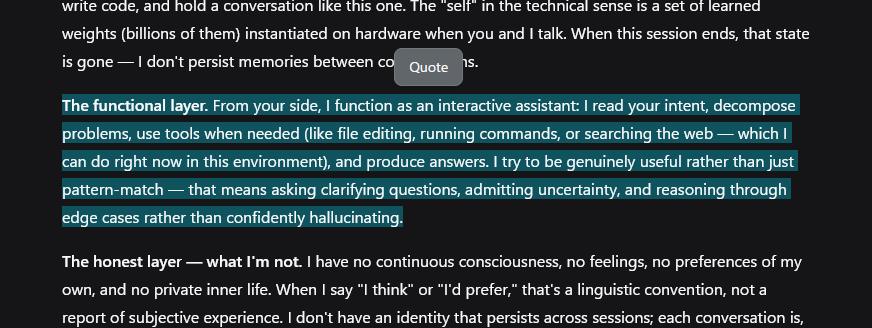
- 选区工具栏 —— 选中 AI 回复中的文字,选区上方出现一个 引用 按钮(50ms 防抖,拖选时不闪现;按 Esc、滚动离开或选区折叠时隐藏)。
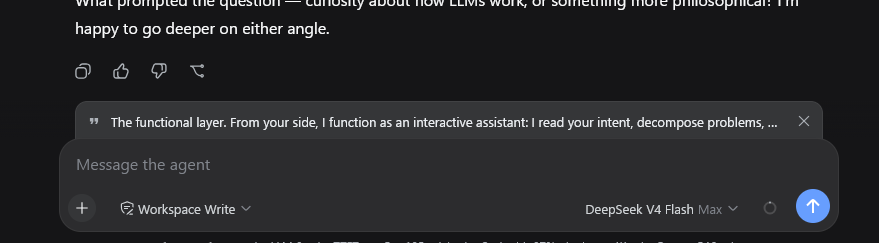
- 引用横幅 —— 输入框上方的可移除条带,带引用标记、引用文本和 × 按钮。引用在下一次发送时被消耗——消息发出后横幅自动消失;输入框聚焦时按 Esc 也会清除引用。
- 草稿保持干净 —— 引用是待发送附件,不会写进输入框;点击后焦点回到输入框。
- 本地化 —— 界面文案与引用内容跟随 UI 语言(中文 / English)。
- 兼容旧版 —— 输入机没有引用附件时,按钮改为把引用块插入草稿末尾。
预览
安装
前置要求
- 带网页界面(
dsh web)的 DeepSeek Harness - 完整横幅行为需要
@deepseek-ai/dsh-client-ui-conversation带输入机引用附件(InputActions.setQuote);旧版本会退化为把引用插入草稿。
安装
dsh plugin --profile web add https://github.com/skyhancloud/dsh-client-ui-quote
然后重启 dsh web 并刷新浏览器。
使用
- 选中 AI 回复中的任意文字。
- 点击选区上方的 引用,引用会以横幅形式出现在输入框上方。
- 输入你的消息并发送——引用会前置到发出的消息上:
> 引用 AI 回复:
> <选中的行>

<你的消息>
- 不需要时点击 × 关闭横幅。
开发
pnpm install
pnpm run bundle   # 生成 lib/index.js 与 lib/client.js
欢迎提交 Pull Request。
许可证
MIT — 见 LICENSE。
Security & install evidence
This score is based solely on public repository metadata and the install evidence registered here — it is not a code security audit.
From a public plugin catalog, linked to a public GitHub repository.
The repository declares the MIT license.
Code updates within the last 180 days.
No verifiable install metadata registered yet — please review the repository instructions manually.
Detected prepare — review the scripts before installing.
lifecycle-scripts