
springbrand-lab/dsh-plugin-market
Plugin marketplace for DeepSeek Harness Web settings: install, update and remove plugins across any local profile.
This is a DeepSeek Harness (DSH) plugin. Review its GitHub README, installation information, maintenance status, and public security signals here.

@springbrand/dsh-plugin-marketplace
English | 中文


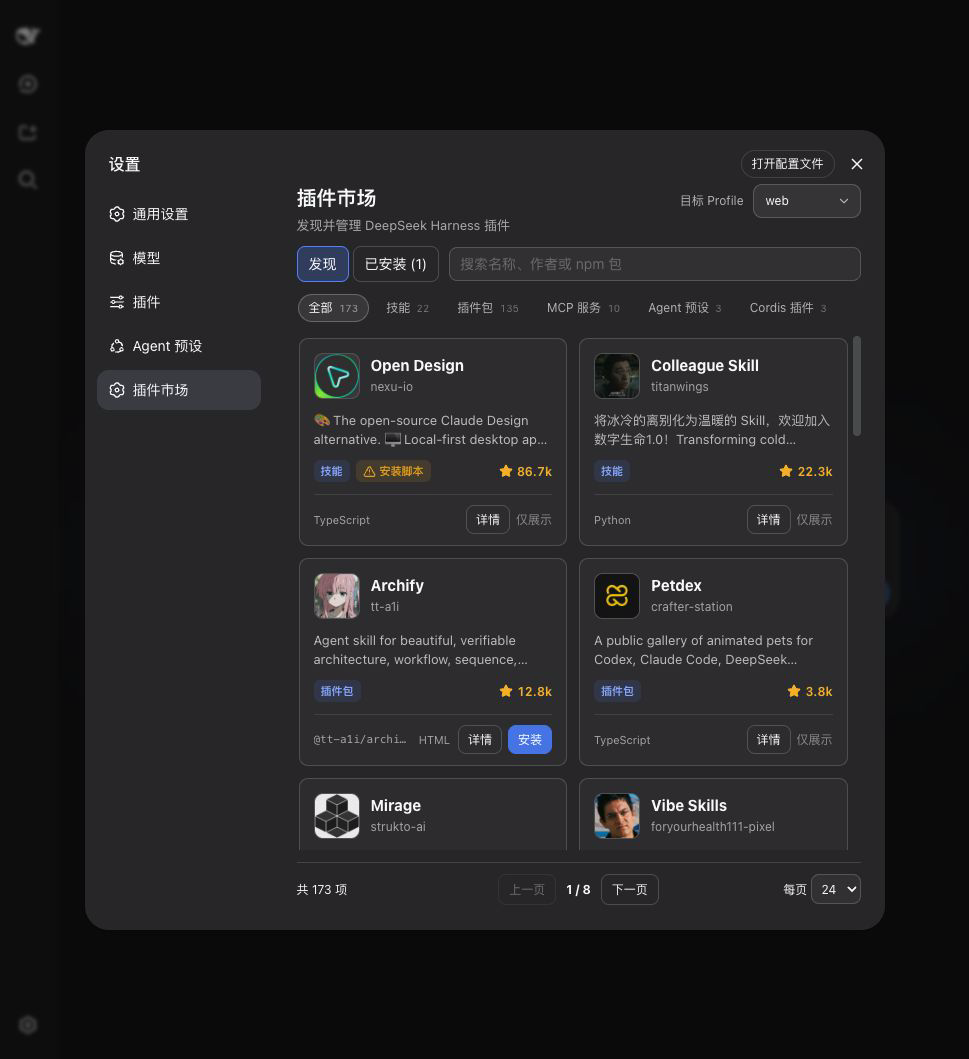
装在 DeepSeek Harness Web 设置页、并随 SpringBrand Desktop 内置的可视化插件市场。打开 设置 → 插件市场,即可浏览目录、搜索插件,并安装、更新或卸载插件。
从零开始安装
即使没有安装过 DSH,也可以按照下面步骤完成。
-
打开 Node.js 官网,下载并安装 LTS 版本,然后关闭并重新打开终端。macOS 使用“终端”,Windows 使用 PowerShell。
-
安装 DSH 和 pnpm:
npm install --global pnpm @deepseek-ai/dsh -
确认 DSH 已安装:
dsh --version -
安装插件市场:
dsh plugin --profile web add @springbrand/dsh-plugin-marketplace -
启动 DSH Web:
dsh web
保持终端窗口开启。浏览器通常会自动打开;如果没有,请打开终端中显示的 http://127.0.0.1:端口号。进入 设置 → 插件市场 即可开始使用。
如果重新打开终端后仍提示 dsh: command not found,请改用:
npx @deepseek-ai/dsh plugin --profile web add @springbrand/dsh-plugin-marketplace
npx @deepseek-ai/dsh web
已经安装过 DSH
dsh plugin --profile web add @springbrand/dsh-plugin-marketplace
dsh web
你会得到
- 浏览与搜索:按名称、作者、描述或 npm 包名搜索,并显示插件分类、仓库头像和紧凑的 GitHub Star 数。
- Profile 管理:普通 DSH 可以在
web、headless或其他本地 Profile 间切换目标;SpringBrand Desktop 只允许操作当前激活的 Profile。 - 一处完成安装、更新与卸载:显示实际安装版本、可更新数量与状态,并可一键更新到最新发布版本。
- 已安装视图:同时展示目录插件和 Profile 中已有、但目录未收录的依赖。
- SpringBrand Desktop 中的市场自更新:把最新版本安装到当前 Profile;移除该 Profile 覆盖后会回退到应用内置版本。
- 明确的生效时机:当前 Profile 变更后自动重启;其他 Profile 在下次启动时生效。
安全
- 只允许安装目录中标记为
bundle、installable、npm的条目。 - 服务端会重新从目录解析 npm 包名,不接受浏览器提交任意安装源。
- 更新与卸载只接受当前 Profile 中已安装的合法 npm 包名。
- 所有变更接口只接受同源 JSON POST,请求体限制为 8 KiB。
- 普通 DSH 指令通过参数数组直接启动,不经过 shell;SpringBrand Desktop 会把操作交给自身受管的 package operation service。同一时间只执行一个插件操作。
插件属于第三方代码。目录收录不代表安全背书,请只安装你信任的来源。
工作方式
[Web 设置页]
      |
      v
[本插件的本地 HTTP 接口]
      |
      +--> [dshplugin.market/api/catalog]
      |
      +--> 普通 DSH:dsh plugin --profile <profile> add|update|remove <package>
      |
      +--> SpringBrand Desktop 插件:desktopPnpm.runPlugin()
      |
      +--> SpringBrand Desktop 市场覆盖:desktopPnpm.run()
在普通 DSH 中,市场默认操作当前运行的 Profile,也可以在页面中选择其他 Profile。SpringBrand Desktop 只暴露当前激活的 Profile,通过 desktopPnpm 执行 package operation,并通过 desktopProfiles 请求应用有序重启。第三方插件使用 runPlugin(),由 DSH reconcile 其 bundle layer;市场自身的 Profile 覆盖直接使用 run(),因为其 row 已归 Desktop 所有,再作为 bundle reconcile 会产生重复 row。该插件不提供任意 Hot-mount 或无缝端口交接。
哪些 Profile 会出现在目标列表里
普通 DSH 下的列表是:web、headless、本进程启动时使用的 Profile,以及 <DSH home>/profiles 下的每个目录,按名称排序。DSH home 取 DSH_HOME,未设置时为 ~/.dsh。profiles/node_modules 不会作为目标出现。
Profile 在初始化之前就会出现在列表中,因此可以在 web 会话里直接把插件装进 headless,无需先创建该 Profile。已安装视图针对每个 Profile 读的是它自己的 package.json dependencies——这也是它会列出目录中没有、由本市场之外的途径安装的包的原因。SpringBrand Desktop 还会报告应用内置的市场版本;首次自更新会创建一个 Profile 依赖,并在重启后优先使用它。
配置
在 Profile 的 Cordis 配置中可以覆盖:
config:
  profile: web
  catalogUrl: https://dshplugin.market/api/catalog
  restartDelayMs: 1500
profile:普通 DSH 进程使用的 Profile;默认从启动参数读取。SpringBrand Desktop 始终使用当前激活的 Profile。catalogUrl:插件目录 JSON 地址,必须使用 HTTP 或 HTTPS。restartDelayMs:普通 DSH 进程的重启等待时间,范围为 500–30000 毫秒。SpringBrand Desktop 自行持有重启时序。
卸载
可以在市场的“已安装”页面卸载,也可以运行:
dsh plugin --profile web remove @springbrand/dsh-plugin-marketplace
开发
npm install
npm run check
License
MIT
Security & install evidence
This score is based solely on public repository metadata and the install evidence registered here — it is not a code security audit.
From a public plugin catalog, linked to a public GitHub repository.
The repository declares the MIT license.
Code updates within the last 180 days.
No verifiable install metadata registered yet — please review the repository instructions manually.
The inspected package metadata declares no install lifecycle scripts.