
temotee2103/dsh-overdrive#gateway-core
The OpenClaw of DeepSeek Harness — turn DSH into a multi-platform chat agent with in-chat trajectory tracing, subagents & cron, and one-command deploy.
This is a DeepSeek Harness (DSH) plugin. Review its GitHub README, installation information, maintenance status, and public security signals here.
⚡ dsh-overdrive
DSH 界的 OpenClaw:把 DeepSeek Harness 变成"看得见思考过程、可以随时指挥"的聊天智能体。
English | 中文
dsh-overdrive 是 Hermes Agent / OpenClaw 的多平台平替,但基于 DeepSeek Harness —— 桥接进 WhatsApp · Telegram · Discord · Slack · 飞书 · 钉钉 · 企业微信 —— 做到了它们做不到的事:每一步思考和工具调用都在聊天里可见,危险操作永远等你点头。





为什么不用 OpenClaw?
Hermes / OpenClaw 是"终端智能体 + 20 多个聊天频道",但它是黑盒——你只看到答案,看不到过程。
DSH 的 append-only session log 是它们抄不走的。dsh-overdrive 把这份能力变成聊天原生的体验:
- 🧠 看得见思考 ——
/trace把 agent 的推理与工具调用轨迹回放成摘要卡片,就在聊天里 - 🤖 指挥一个团队 ——
/task派发并行子任务,/cron 0 9 * * * …用自带调度器安排定时任务 - 🔒 危险操作你说了算 —— 危险工具调用会暂停,直到你点 ✅ 同意 / 🚫 拒绝(Telegram / Discord / Slack / WhatsApp 原生按钮)
- 🚀 一条命令部署 ——
docker compose up,扫码即用。多数平台无需公网 URL。
效果长这样
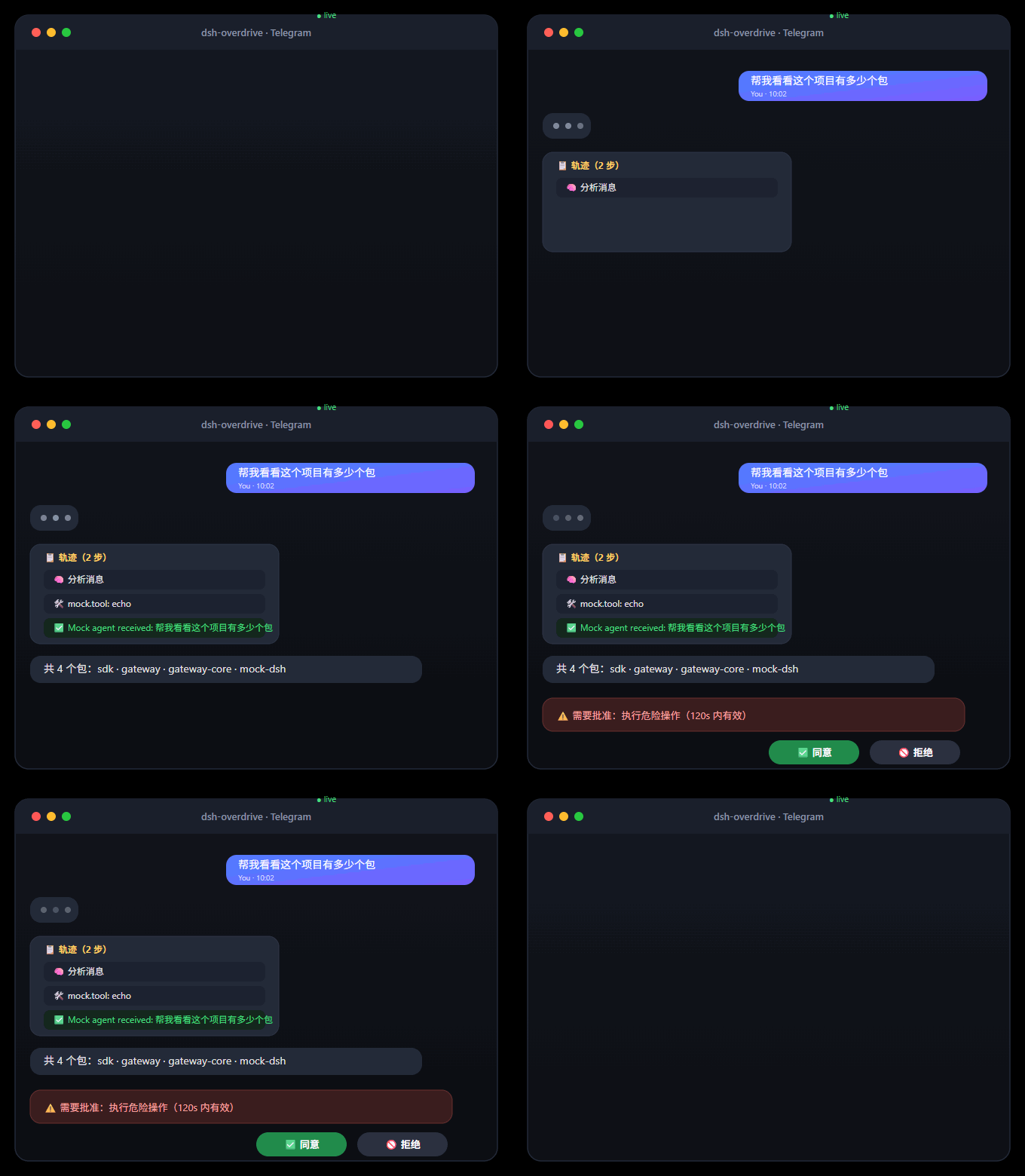
纯文本版
你:  帮我看看这个项目有多少个包
Agent:
       📋 轨迹(2 步)
       🧠 分析消息
       🛠️ mock.tool: echo
       ✅ Mock agent received: 帮我看看这个项目有多少个包

你:  /task 写一句营销口号
Agent:
       🤖 子任务已派出
       ✅ 任务完成 5c399346…

你:  /cron 0 9 * * * 每天给我一条技术新闻
Agent:
       ⏰ 定时任务已注册

你:  dangerous rm -rf /
Agent:
       ⚠️ 需要批准:执行危险操作(120s 内有效)
       [✅ 同意] [🚫 拒绝]   ← 点一下,agent 继续或停止
🎬 完整演示剧本 → docs/demo.md(中英双语)
按 docs/demo.md 的 3 分钟剧本录制:普通对话 → /trace 轨迹回放 → /task 子任务 → /cron 定时任务 → 审批按钮 → 收尾。
支持的平台
| 平台 | 接入方式 | 状态 |
|---|---|---|
| Telegram | Bot API(长轮询) | ✅ 真机验证通过(2026-08-16) |
| Baileys + 扫码配对,原生交互按钮 | ✅ | |
| Discord | Bot token,原生按钮 | ✅ |
| Slack | Socket Mode(免公网 URL) | ✅ |
| 飞书 | 官方 SDK,长连接 | ✅ |
| 钉钉 | Stream 模式(WebSocket,免公网 URL) | ✅ |
| 企业微信 | 回调 API(AES 加解密) | ✅ |
| CLI | stdin/stdout(开发与 E2E) | ✅ |
快速开始
Docker 一条命令(推荐):
git clone https://github.com/temotee2103/dsh-overdrive && cd dsh-overdrive
cp deploy/.env.example .env        # 填 DEEPSEEK_API_KEY + TELEGRAM_BOT_TOKEN
docker compose -f deploy/docker-compose.yml up -d --build
# 控制台 http://localhost:3190/   DSH Web UI http://localhost:3080/
已有 DSH?一行装完:
npx dsh-overdrive-setup        # 引导向导:API key + 平台凭据(实时验证)
dsh plugin --profile web add @dsh-overdrive/gateway-core   # 装插件
npx dsh-overdrive-gateway                                   # 起 gateway
给 bot 发第一条消息后,输入 /help 查看全部命令。完整方案见 docs/quickstart.md
不会写代码?这样上手
不需要会编程。dsh-overdrive 的设计是:一个人装好,全家都能用。
-
找一位懂行的朋友,花 10 分钟
-
把下面这条发给他:
macOS / Linux:
curl -fsSL https://raw.githubusercontent.com/temotee2103/dsh-overdrive/main/install.sh | bashWindows: 下载 install.ps1,右键 → "使用 PowerShell 运行"(或双击)
-
安装器只问你 3 个问题(API key → 平台 → bot token),然后自动全部搞定
-
之后你只需要聊天:发消息、
/help看命令、危险操作点 ✅ 同意 / 🚫 拒绝
English: No coding needed — have a friend run the 10-minute installer once; afterwards you just chat.
聊天命令
| 命令 | 作用 |
|---|---|
/help | 命令列表 |
/trace | 回放最近一轮轨迹(思考 + 工具调用) |
/task <需求> | 派发子任务 |
/cron <分 时 日 月 周> <需求> | 定时任务(自带 5 字段调度器) |
/crons | 查看已注册的定时任务列表 |
/cronrm <任务id> | 删除定时任务 |
/agents | 子任务状态(简化) |
/new | 重置会话 |
架构
flowchart LR
    subgraph PLAT["你的聊天软件"]
      WA[WhatsApp] & TG[Telegram] & DC[Discord] & SL[Slack]
      FS[飞书] & DT[钉钉] & WM[企业微信]
    end
    subgraph GW["dsh-overdrive gateway(独立 Node 进程)"]
      AD[平台适配器] --> CORE[会话映射 · 白名单 · 命令 · 轨迹卡片]
    end
    subgraph DSH["DeepSeek Harness(docker)"]
      PLUGIN[gateway-core 插件] --> AG[DSH Agent]
      AG --> LLM[DeepSeek / 任意模型]
      AG --> TOOLS[工具 · 沙箱]
    end
    PLAT <-->|Remote Session Driver / HTTP+WS+token| GW
    GW <-->|协议| PLUGIN
    AG -. session/event .-> PLUGIN
packages/gateway-core 是一个 DSH 插件(已备好 dsh.bundle.patch),对外暴露 Remote Session Driver API;packages/gateway 是独立的多平台网关。"灵魂"——轨迹、审批、多智能体——都在插件里,不依赖平台适配器,经得起插件 API 变动。
开发
npm install
npm run build
npx vitest run     # 128+ 单元测试
npm run e2e        # 全链路 mock E2E(消息 / 审批 / 白名单)
文档
路线图
- M1–M2b:协议、真实 DSH 桥接、国际平台
- M3:飞书 / 钉钉 / 企业微信
- M4:轨迹卡片、
/task/cron、流式打字、图片收发、WhatsApp 原生审批按钮 - M5:docker-compose 一键部署、Web 控制台、MIT + CI、npm 分发
- v0.2a:语音转写 ASR(OpenAI 兼容端点,
ASR_API_KEY)、飞书原生交互审批卡片、钉钉 actionCard 审批 - v0.2b:个人微信(实验性)
开源协议
MIT © dsh-overdrive contributors
Security & install evidence
This score is based solely on public repository metadata and the install evidence registered here — it is not a code security audit.
From a public plugin catalog, linked to a public GitHub repository.
The repository declares the MIT license.
Code updates within the last 180 days.
No verifiable install metadata registered yet — please review the repository instructions manually.
The inspected package metadata declares no install lifecycle scripts.