
护眼主题
A DeepSeek Harness Web profile bundle that replaces cool white interface colors with six warm semantic themes while leaving the native Appearance preference intact.
これは DeepSeek Harness(DSH)プラグインです。当サイトは GitHub README、インストール情報、メンテナンス状況、公開セキュリティシグナルをまとめています。
上流で中国語 README が提供されていないため、リポジトリのオリジナルコンテンツを表示しています。
DSH Eye Care
English | 中文
Warm Light, Warm Dark, System-Aware.
A DeepSeek Harness Web profile bundle that replaces cool white interface colors with six warm semantic themes while leaving the native Appearance preference intact.
What it does
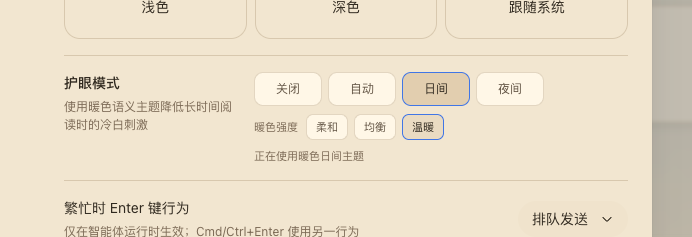
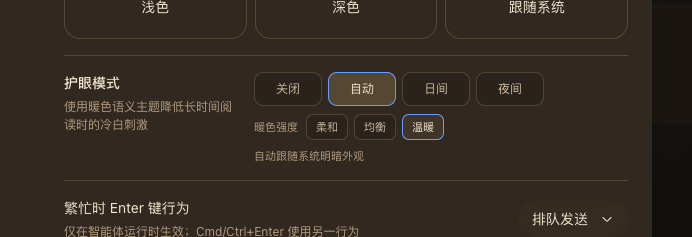
DSH Web's built-in Light and Dark themes are cool-toned. Eye care adds a warm light palette, a warm dark palette, and an automatic scheme without a global sepia filter or image transform.
- Four operating modes:
off,auto,light, anddark. - Three warmth levels:
soft,balanced, andwarm. - Six concrete themes registered through the official ThemeService.
- Real semantic tokens for backgrounds, text, borders, buttons, sidebar, bubbles, inputs, code blocks, scrollbars, and Shiki colors.
- Native Appearance stays authoritative: choosing Light, Dark, or System turns eye care off and keeps that newly selected theme.
- Loopback persistence stores the selection in Host settings; remote browsers keep the selection in the current process.
Preview
The screenshots above show the General settings row in warm day mode and warm night mode. Day and Night are explicit; Auto follows prefers-color-scheme at the selected warmth. The row also renders an aria-live status and keyboard-visible focus states.
Install
Install the public npm package into the Web profile:
dsh plugin --profile web add @anionex/dsh-eye-care
For local development, replace the package name with the checkout's absolute path or a locally packed tarball. DSH_HOME defaults to ~/.dsh; point it at a temporary directory to try the bundle without changing your main profiles.
Restart or start the Web UI:
dsh web
Open Settings → General → Eye care and choose a mode and warmth.
Theme matrix
| Scheme | Soft | Balanced | Warm |
|---|---|---|---|
| Light | eye-care-light-soft | eye-care-light-balanced | eye-care-light-warm |
| Dark | eye-care-dark-soft | eye-care-dark-balanced | eye-care-dark-warm |
How it works
The Host half registers the eye-care Settings namespace and exposes a loopback-only Connection RPC channel /eye-care. Writes are serialized and fenced by expectedRevision; a conflict re-reads the Host snapshot and retries the latest intent.
The browser half registers the six themes, injects the General-settings row, and owns the controller lifecycle. The controller subscribes to theme/change and prefers-color-scheme, restores the pre-eye-care theme on disable or unload, and unregisters every theme on dispose. Remote browsers do not inject the Host RPC and therefore stay process-local.
Compatibility and limitations
- Requires a DeepSeek Harness Web profile with the standard
settings,connection,locale,slots, andthemeservices. - A native Appearance change is treated as an explicit opt-out by design.
- Remote browser sessions do not persist eye care back to the Host.
- There is no global color filter; all colors come from named semantic tokens.
- The package is pre-release and follows the profile bundle format; its generated theme ids are stable while the bundle is installed.
Development
cd dsh-eye-care
pnpm install --frozen-lockfile
pnpm run check
pnpm run test
pnpm run build
Run the optional clean-profile installation test:
DSH_EYE_CARE_PROFILE_E2E=1 pnpm exec vitest run tests/profile-install.e2e.spec.ts
License
セキュリティとインストールエビデンス
このスコアは公開リポジトリメタデータと当サイトに登録されたインストールエビデンスのみに基づくもので、コードセキュリティ監査とは異なります。
公開プラグインカタログから取得し、公開 GitHub リポジトリにリンクしています。
リポジトリは MIT ライセンスを宣言しています。
過去180日以内にコードの更新があります。
再現可能な正確なインストールメタデータはまだ登録されていません。リポジトリの説明に従って手動で確認してください。
確認したパッケージメタデータにインストールライフサイクルスクリプトは宣言されていません。