
Markdown 大纲
A minimal but practical DeepSeek Harness plugin that adds an md outline tool. It outlines and lints Markdown documents: a nested heading tree plus structural warnings that are tedious to check by hand and easy to get wrong in long docs (book drafts, skill sets, specs).
これは DeepSeek Harness(DSH)プラグインです。当サイトは GitHub README、インストール情報、メンテナンス状況、公開セキュリティシグナルをまとめています。
上流で中国語 README が提供されていないため、リポジトリのオリジナルコンテンツを表示しています。
dsh-plugin-md-outline
🇨🇳 中文文档 | 🇺🇸 English
A minimal but practical DeepSeek Harness plugin that adds an md_outline tool.
It outlines and lints Markdown documents: a nested heading tree plus structural
warnings that are tedious to check by hand and easy to get wrong in long docs
(book drafts, skill sets, specs).
Topic:
dsh-plugin— add this topic to the GitHub repo so the ecosystem can discover it (see Publishing thedsh-plugintopic below).
What it does
| Check | Why it matters |
|---|---|
| Heading tree (H1–H6, with line numbers) | Navigate and audit long documents at a glance. |
| Heading-level skips (e.g. H1 → H3) | Catches broken document hierarchy. |
| Duplicate heading text | Flags accidental repeats that break anchors/TOC. |
| Missing H1 / multiple H1 | Enforces a single document title. |
| Unclosed code fences | The classic long-doc bug — a fence left open makes everything after it "code". Headings inside fences are correctly ignored. |
Preview
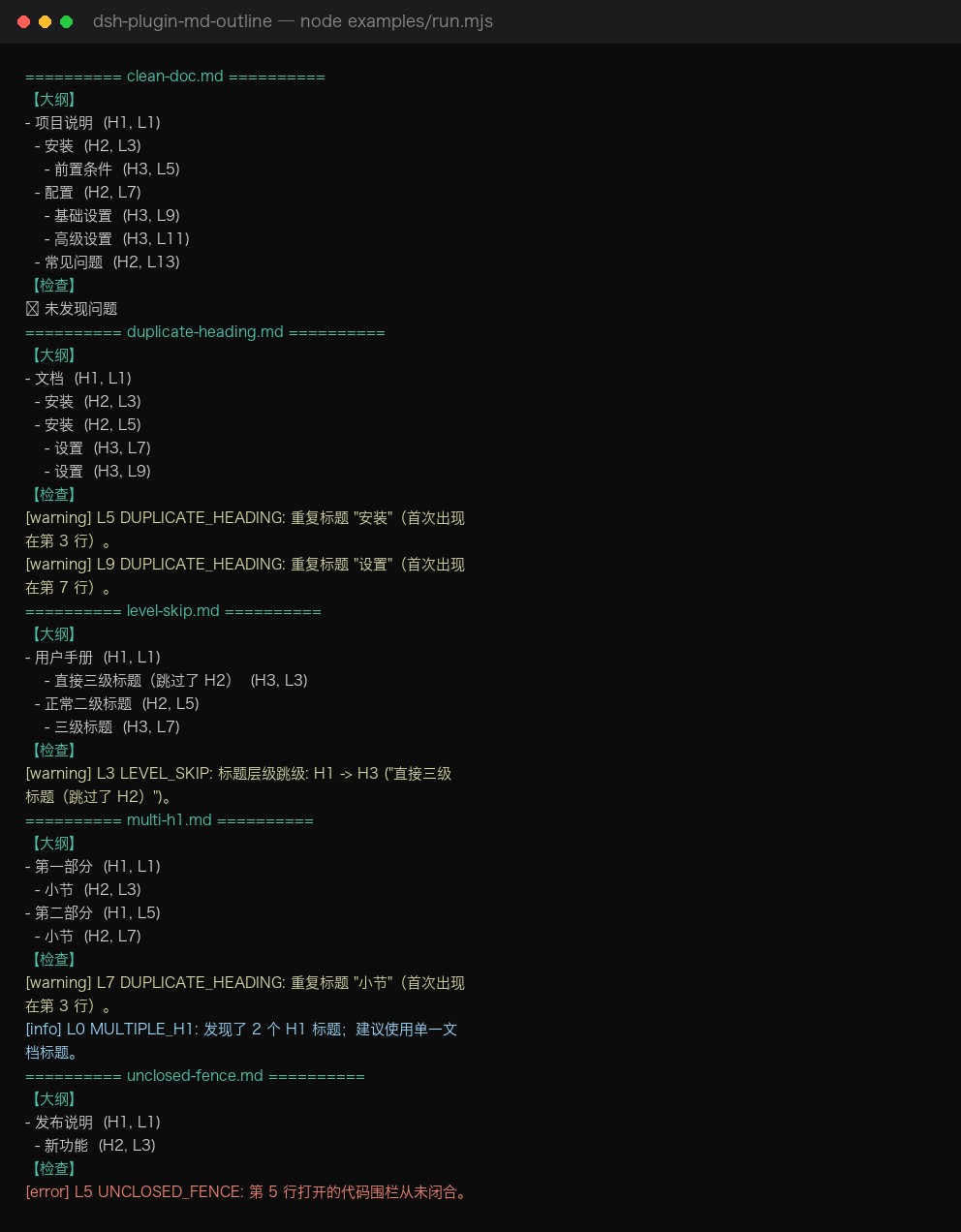
Terminal preview from node examples/run.mjs (covers all 5 sample docs
— clean, level skip, duplicate headings, multiple H1, unclosed fence):
What a bad doc looks like — examples/level-skip.md
The left side is the source as written; the right side is what md_outline reports.
The H1 → H3 jump on line 3 is flagged with line number and reason.
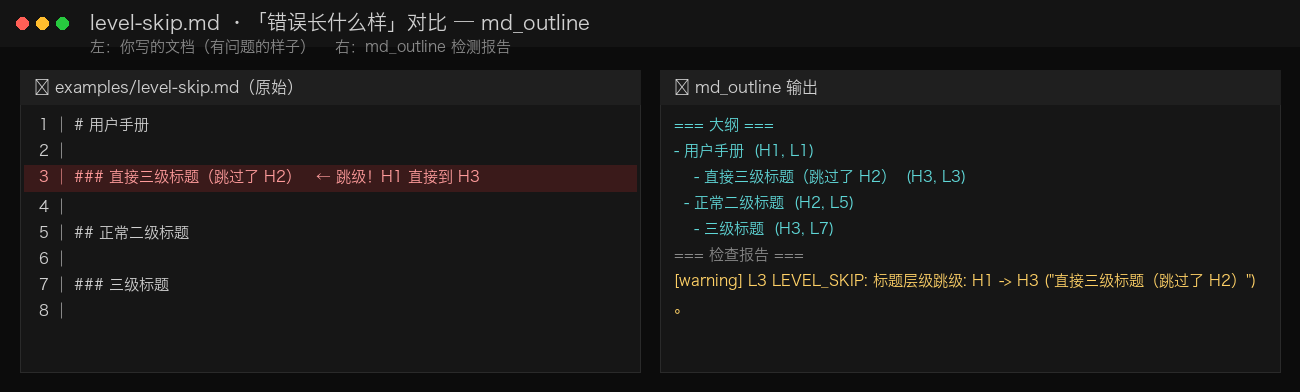
To regenerate: python3 docs/gen_screenshot.py (writes docs/screenshot.png).
Install
One-click install (any machine, any profile):
dsh plugin add https://github.com/d-ouyang/dsh-plugin-md-outline.git
dsh --profile demo --dump-config | grep -i md-outline   # confirm the layer is present
Requires the dsh CLI (DeepSeek Harness). This plugin is plain ESM JavaScript:
no build step, no allowBuilds prompt, installs straight from a git repo.
Local checkout also works:
dsh plugin --profile demo add /path/to/dsh-plugin-md-outline
To remove:
dsh plugin remove dsh-plugin-md-outline
Usage
In the Web UI (or any surface with tools), just ask the model:
Outline
~/book/draft.mdand tell me about structural issues.
Or call it directly in Code Mode:
await tools.md_outline({ path: '~/book/draft.md', mode: 'both' })
await tools.md_outline({ path: '~/skills', mode: 'lint', recursive: true })
await tools.md_outline({ path: '~/notes/spec.md', mode: 'outline', maxDepth: 2 })
Parameters
| Name | Type | Required | Notes |
|---|---|---|---|
path | string | yes | A .md/.markdown/.mdx file, or a directory. |
mode | 'outline' | 'lint' | 'both' | no | Default both. |
maxDepth | number (1–6) | no | Limit outline nesting. |
recursive | boolean | no | Scan subdirectories when path is a dir (default true). |
The canonical return value is structured ({ files, summary }) for programmatic
use in Code Mode; the model-facing card shows the human-readable summary.
How it is built (cookbook recap)
This plugin follows the official authoring path:
- Tool contract —
docs/user/develop/basic/tool.mdanddocs/cookbook/adding-a-tool.md:defineTool({ name, description, parameters, output, execute })registered viactx.tools.register(...). - Bundle packaging —
docs/user/develop/basic/publish.md: a bundle is an npm package with adsh.bundlemanifest and acordis.patch.ymllayer that inserts the plugin row by package name. - No build — written in plain ESM JavaScript so a
github:install loads without running anypreparescript.
dsh-plugin-md-outline/
├── package.json        # dsh.bundle manifest + peer dep on @deepseek-ai/dsh-tools
├── cordis.patch.yml    # the layer applied when a profile adds this bundle
├── index.js            # plugin entry: name / inject / apply -> registers md_outline
├── md-outline-core.js  # pure, dependency-free analysis (unit-tested)
├── test.mjs            # `node test.mjs` validates the core logic
├── examples/           # sample docs + run.mjs (real output shown in docs/USAGE.md)
├── docs/USAGE.md       # 🇨🇳 full usage guide with real test results
├── README.md
└── README.zh-CN.md
Develop
node test.mjs                 # unit-test the pure logic
node examples/run.mjs         # run all sample docs and print real outlines + warnings
node --check index.js        # syntax check the plugin entry
See docs/USAGE.md (中文) for the full usage guide and real test output.
The runtime contract depends on @deepseek-ai/dsh-tools being present in the dsh
installation (it is — the harness itself uses it). Declared as a peerDependency,
so it is never fetched from a registry.
Publishing the dsh-plugin topic
The dsh-plugin GitHub topic is what makes community plugins discoverable. Add it
in repo Settings → Topics, or via the API once the repo exists:
# after `git push`, set the topic through the GitHub API (needs a token)
curl -X PUT -H "Authorization: Bearer $GITHUB_TOKEN" \
  -H "Accept: application/vnd.github+json" \
  https://api.github.com/repos/d-ouyang/dsh-plugin-md-outline/topics \
  -d '{"names":["dsh-plugin","markdown","deepseek-harness"]}'
License
MIT
セキュリティとインストールエビデンス
このスコアは公開リポジトリメタデータと当サイトに登録されたインストールエビデンスのみに基づくもので、コードセキュリティ監査とは異なります。
公開プラグインカタログから取得し、公開 GitHub リポジトリにリンクしています。
リポジトリは MIT ライセンスを宣言しています。
過去180日以内にコードの更新があります。
再現可能な正確なインストールメタデータはまだ登録されていません。リポジトリの説明に従って手動で確認してください。
確認したパッケージメタデータにインストールライフサイクルスクリプトは宣言されていません。