
Token 用量
DeepSeek Harness Web UI
これは DeepSeek Harness(DSH)プラグインです。当サイトは GitHub README、インストール情報、メンテナンス状況、公開セキュリティシグナルをまとめています。
上流で中国語 README が提供されていないため、リポジトリのオリジナルコンテンツを表示しています。



The shipped DeepSeek Harness web UI squeezes token usage into one cramped line of text under the composer. dsh-token-usage replaces it with a glanceable chip bar plus a details panel with the full breakdown — and it follows your theme, light or dark.
🎯 Token usage shouldn't have to be decoded — it should be readable at a glance.
Screenshots

The token-usage bar under the composer.
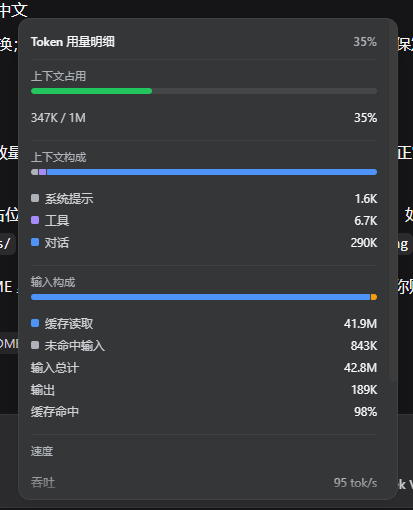
The details panel — click the bar to open it.
Contents
Highlights
- Context at a glance — a thin occupancy bar that turns green → amber → red as you fill the context window.
- Input, output, and cache, separated — billed input splits into cache-read / cache-write / uncached, with the cache-hit rate shown up front.
- Speed where you need it — decode throughput (
tok/s) and average first-token latency (TTFT) right on the bar. - A details panel on click — context composition (system / tools / messages), a stacked input split, and session turn / step / model / tool time.
- Natural edge fades — the panel's top and bottom edges fade and blur while there's more to scroll, and vanish at the ends.
- Theme-adaptive and bilingual — styled only with
--dsw-*tokens (light/dark), shipped in Chinese and English.
What it shows
The bar under the composer shows these chips, left to right:
| Chip | Meaning |
|---|---|
| Context | Used / window tokens, with a color-coded occupancy bar |
| Input | Total billed input (cache read + cache write + uncached) |
| Output | Provider-reported output tokens |
| Hit rate | Cache-read share of billed input |
| tok/s | Decode throughput over usage-reporting steps |
| TTFT | Average first-token latency |
Clicking the bar opens a panel with context occupancy + composition, the input-split stack, throughput / TTFT, and session counts. The whole line hides itself when there is no data yet.
Install
From GitHub (recommended):
npx -p @deepseek-ai/dsh dsh plugin --profile web add github:hashdiana/dsh-token-usage
From a local checkout:
npx -p @deepseek-ai/dsh dsh plugin --profile web add <path-to-this-repo>
Then restart the profile:
dsh web
The Git path ships the built
lib/(see Build & develop), so no build script runs at install time.
Uninstall / Disable
Temporarily disable without uninstalling — add to $DSH_HOME/profiles/web/cordis.patch.yml:
- id: dsh-token-usage
  disabled: true
Restart dsh web; the default stats line returns. Remove those lines to re-enable.
Build & develop
pnpm install
pnpm typecheck   # tsc -b
pnpm build       # tsc -b + tsdown → lib/index.js (host) + lib/client.js (browser)
pnpm test        # vitest: folds, locale parity, jsdom render, slot registration/dispose
The client bundle is emitted as window.__ModuleLoader__.load({ id, factory }); CSS Modules are hashed by lightningcss and injected as a <style data-plugin="dsh-token-usage"> tag. Commit lib/ — Git installs consume the built output, not src/.
How it works
- Pure client plugin — the host half is an empty
apply(); the browser half ships viaexports["./client"]. - Slot — registers into
conversation.composer.dock(cellid: "stats",priority: -1), shadowing the shipped text line; the registration is withdrawn with the plugin fiber. - Data — reads the durable projections
tokenUsage,contextPressure,contextBreakdown, andsessionStats; a window fold serves only as the no-projection fallback. - Locale — owns the
tokenUsagenamespace, Chinese and English.
License
セキュリティとインストールエビデンス
このスコアは公開リポジトリメタデータと当サイトに登録されたインストールエビデンスのみに基づくもので、コードセキュリティ監査とは異なります。
公開プラグインカタログから取得し、公開 GitHub リポジトリにリンクしています。
リポジトリは MIT ライセンスを宣言しています。
過去180日以内にコードの更新があります。
再現可能な正確なインストールメタデータはまだ登録されていません。リポジトリの説明に従って手動で確認してください。
確認したパッケージメタデータにインストールライフサイクルスクリプトは宣言されていません。