
计划图谱
another version of the DeepSeek Harness trajectory (DIY): an interactive flow graph of a session's tool calls and messages, distributed as an out-of-tree DeepSeek Harness plugin bundle.
これは DeepSeek Harness(DSH)プラグインです。当サイトは GitHub README、インストール情報、メンテナンス状況、公開セキュリティシグナルをまとめています。
上流で中国語 README が提供されていないため、リポジトリのオリジナルコンテンツを表示しています。
DSH-Plan-Graph
English | 中文
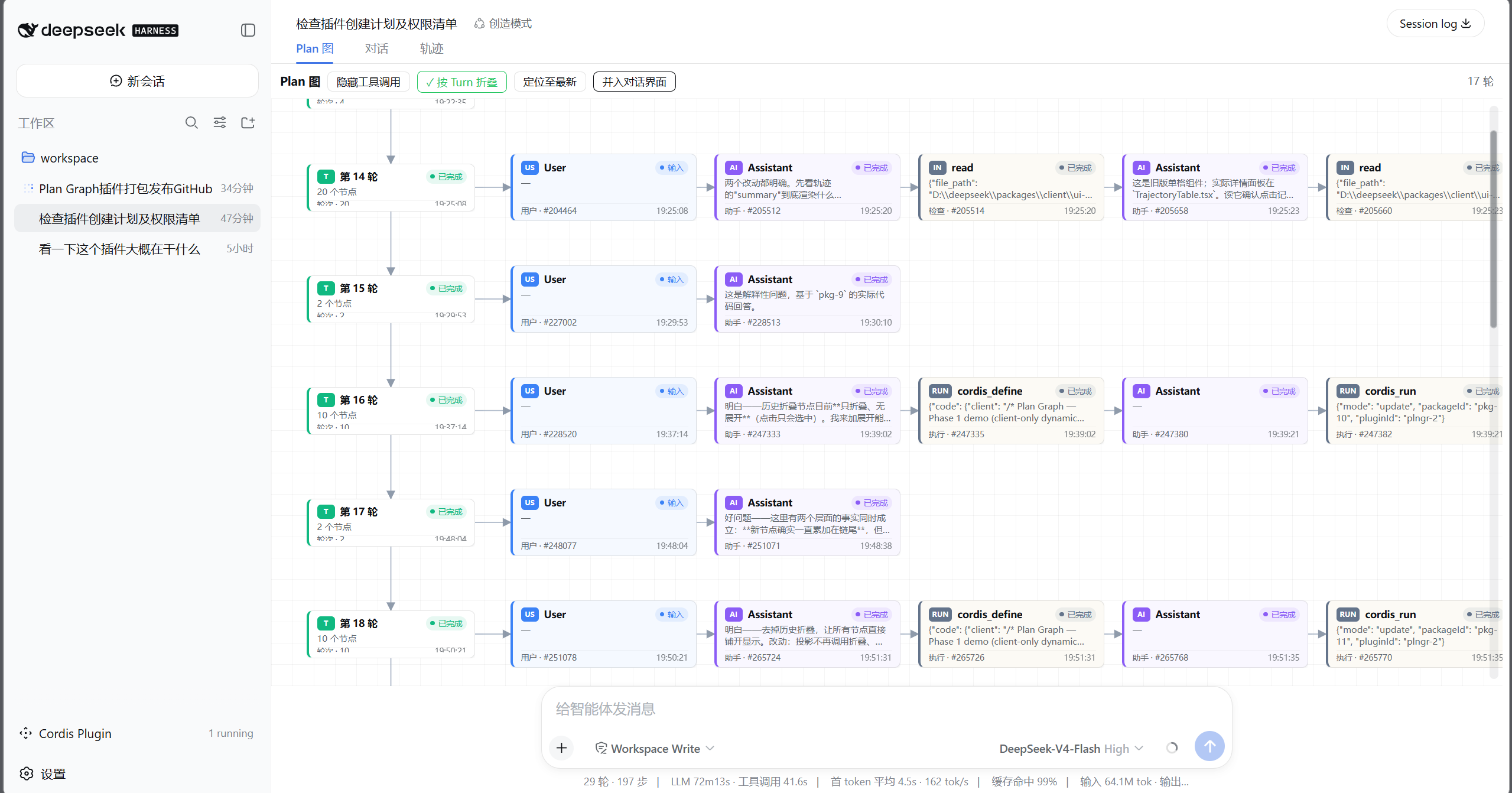
another version of the DeepSeek Harness trajectory (DIY): an interactive flow graph of a session's tool calls and messages, distributed as an out-of-tree DeepSeek Harness plugin bundle.
The plugin adds a Plan Graph tab to the session view ring: a pan/zoom canvas with status-colored node cards (inspect / run / wait / verify classes, durations, reasoning), a details panel for the selected node, and a toolbar with hide tool calls, group by turn, locate latest, and merge into conversation (renders the graph in the real right sidebar of the conversation page).
The browser half is the original plan-graph dynamic-plugin code (pkg-20), wrapped in the web module loader's handoff format — plain JavaScript with zero build-time dependencies. scripts/build-client.mjs (run by prepare after a git install) regenerates client.js from client.body.js.
Install
From anywhere:
dsh plugin --profile demo add github:HR2AY/DSH-Plan-Graph#<sha>
dsh --profile demo
-
From GitHub (this repo): pnpm fetches sources, not built artifacts, and refuses to run the package's
preparescript until it is explicitly allowlisted — copy the exact package key pnpm printed into the profile'spnpm-workspace.yaml:allowBuilds: dsh-plan-graph: truethen re-run the
add. That allowance is permission to execute this package's code on your machine at install time — pin a commit (#<sha>) and only install sources you trust. -
From a local checkout:
dsh plugin --profile demo add ./DSH-Plan-Graph -
From a tarball (no build permission needed):
pnpm packin this directory, thendsh plugin --profile demo add ./dsh-plan-graph-0.1.0.tgz -
From npm (once published):
dsh plugin --profile demo add dsh-plan-graph
Verify the layer without booting: dsh --profile demo --dump-config shows a # == dsh-plan-graph layer.
What it needs
- The browser half registers into
conversation.view/detailsthrough the standard client plugin services (slots,locale,layout), all provided by the dsh web surface. - "Hide tool calls" provides the optional
chatNodeVisibilityservice. The shipped ui-conversation does not consume it yet, so against an unpatched dsh the toggle hides nothing on the chat page (the graph itself honors it); deployments with a ui-conversation that consumes the service get the live chat filtering. - Fresh sessions keep Chat as the default view; the Plan Graph tab is one click away. A deployment that wants the graph front and center provides the upstream
conversationDefaultViewservice itself ({ id: 'plan-graph' }).
Regenerating the client bundle
npm run prepare (or node scripts/build-client.mjs) rewrites client.js from client.body.js. Edit the body, never the generated file.
Layout
├── package.json            # dsh.bundle + dsh.client manifests
├── index.js                # empty host half (browser-only plugin)
├── client.js               # generated: loader handoff + the plugin body
├── client.body.js          # the plugin function body (source of truth)
├── cordis.patch.yml        # the layer inserted when a profile lists this bundle
├── scripts/build-client.mjs
└── README.md
セキュリティとインストールエビデンス
このスコアは公開リポジトリメタデータと当サイトに登録されたインストールエビデンスのみに基づくもので、コードセキュリティ監査とは異なります。
公開プラグインカタログから取得し、公開 GitHub リポジトリにリンクしています。
リポジトリは MIT ライセンスを宣言しています。
過去180日以内にコードの更新があります。
再現可能な正確なインストールメタデータはまだ登録されていません。リポジトリの説明に従って手動で確認してください。
確認したパッケージメタデータにインストールライフサイクルスクリプトは宣言されていません。