
qzhqzh/dsh-quickstart
Desktop launcher for DeepSeek Harness - start dsh web with no console window and auto-open the browser. Tested on Windows; macOS/Linux in progress.
これは DeepSeek Harness(DSH)プラグインです。当サイトは GitHub README、インストール情報、メンテナンス状況、公開セキュリティシグナルをまとめています。
上流で中国語 README が提供されていないため、リポジトリのオリジナルコンテンツを表示しています。
dsh-quickstart

Launch DeepSeek Harness from a
desktop icon — dsh web starts without a console window, then the browser
opens automatically once the web UI is ready.
Status: implemented and tested on Windows. macOS and Linux are in the codebase but not yet tested — see Roadmap.
No more typing npx @deepseek-ai/dsh web and waiting for the page by hand — this
double-click-and-go wrapper handles startup, readiness polling, and browser opening.
Preview
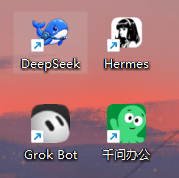
The desktop shortcut you get — double-click the icon to launch:
Why
dsh webblocks a terminal window and gives no feedback on when it is ready.- Starting it from a desktop shortcut shows an ugly console box.
- Users who double-click and see nothing think the tool is broken.
dsh-quickstart starts dsh web detached and hidden, polls http://127.0.0.1:<port>
until it answers, then opens your default browser. A desktop shortcut created with
dsh-quickstart shortcut shows no console window at all.
Install
# the launcher
npm i -g dsh-quickstart

# the harness itself (required)
npm i -g @deepseek-ai/dsh
Usage
# start dsh web, wait for readiness, open the browser
dsh-quickstart

# custom port / timeout
dsh-quickstart --port 3000 --timeout 120000

# wait but do not open the browser
dsh-quickstart --no-open

# spawn and exit immediately (no polling)
dsh-quickstart --no-wait

# pass extra args to dsh
dsh-quickstart -- web --port 3000
Install a desktop shortcut — the primary way to use it on Windows. Double-click to launch, no console window, and it uses the bundled DSH icon by default:
# Windows (.lnk)
dsh-quickstart shortcut --name "DeepSeek" --working-dir "D:\your\workdir"
macOS (
.command) and Linux (.desktop) shortcuts are implemented but untested (TODO) — Windows is currently the only fully verified platform.
Options
| Option | Default | Description |
|---|---|---|
--port <n> | 3080 | Port to poll |
--timeout <ms> | 90000 | How long to wait for readiness |
--command <cmd> | dsh | Command used to start dsh (e.g. npx @deepseek-ai/dsh) |
--no-open | — | Do not open the browser |
--no-wait | — | Exit immediately after spawning |
Shortcut-only: --name, --icon, --working-dir, --output.
How it works
startDshspawnsdsh webso it inherits the launcher's (hidden) console.waitForServerpolls the port every second until the server answers (or times out).openBrowseropens the URL with the platform default (start/open/xdg-open).- On Windows,
shortcutwrites a tiny.vbsthat runs the launcher inside a hidden console, plus a.lnkpointing at it — so double-clicking shows nothing but the browser.
Icons / assets
The project ships its icon assets in assets/:
| File | Description |
|---|---|
assets/dsh.png | Source icon — transparent background, 1254×1254 |
assets/dsh.ico | Multi-size Windows icon (256/128/64/48/32/16) generated from dsh.png |
assets/desktop-icon.png | Real screenshot of the desktop shortcut (shown in the Preview above) |
dsh-quickstart shortcut uses the bundled icon by default, so a shortcut created
on Windows already carries the DSH look. Override it with --icon <path> if you
want your own. More icon assets (alternate sizes, variants) can be dropped into
assets/ following the same dsh.png / dsh.ico convention.
Roadmap
- Windows — hidden-console launch, readiness polling, auto-open browser, desktop shortcut
- macOS — verify and polish the
.commandshortcut flow - Linux — verify and polish the
.desktopshortcut flow
License
MIT
セキュリティとインストールエビデンス
このスコアは公開リポジトリメタデータと当サイトに登録されたインストールエビデンスのみに基づくもので、コードセキュリティ監査とは異なります。
公開プラグインカタログから取得し、公開 GitHub リポジトリにリンクしています。
リポジトリは MIT ライセンスを宣言しています。
過去180日以内にコードの更新があります。
再現可能な正確なインストールメタデータはまだ登録されていません。リポジトリの説明に従って手動で確認してください。
確認したパッケージメタデータにインストールライフサイクルスクリプトは宣言されていません。