
文件浏览器
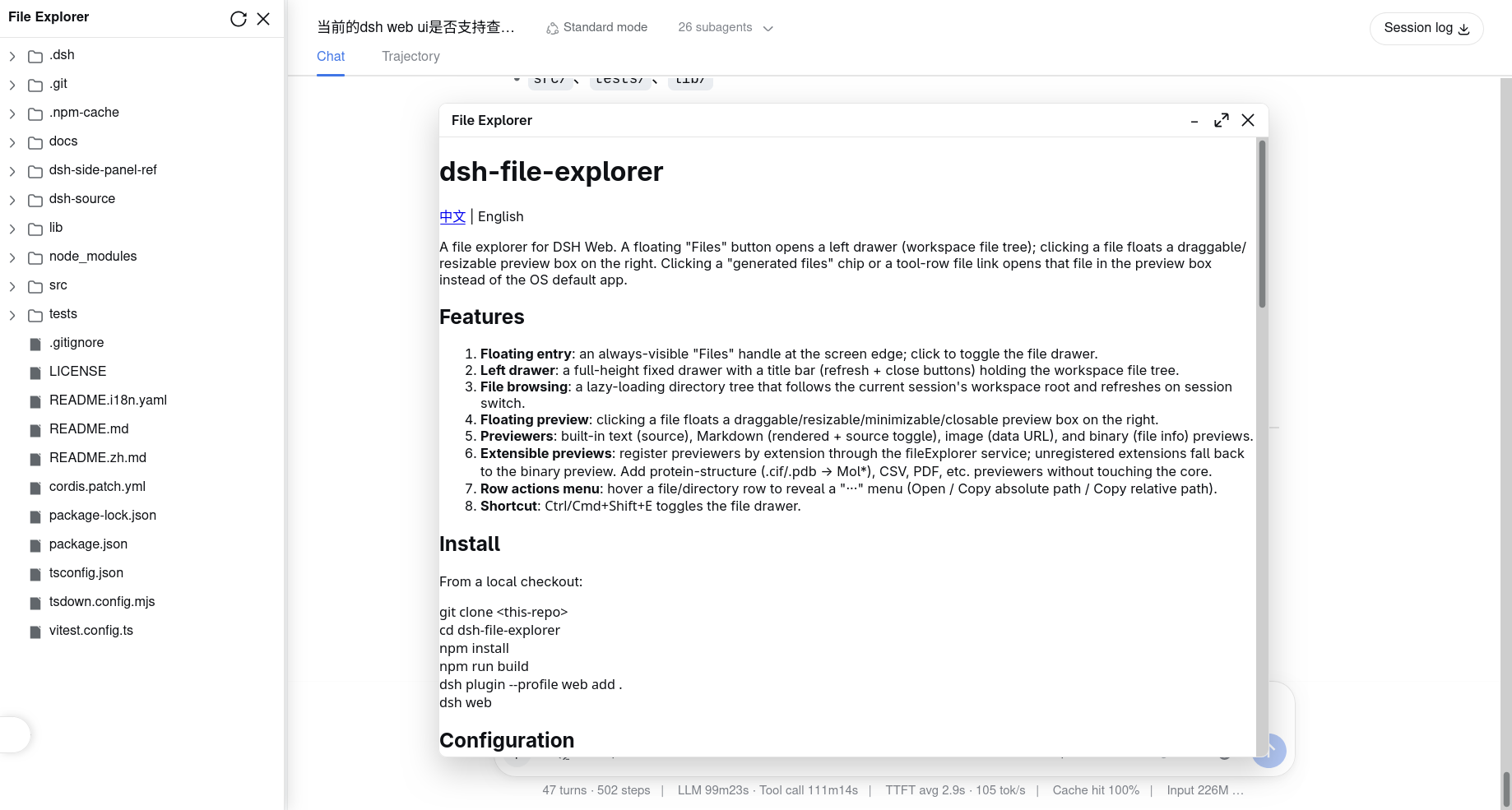
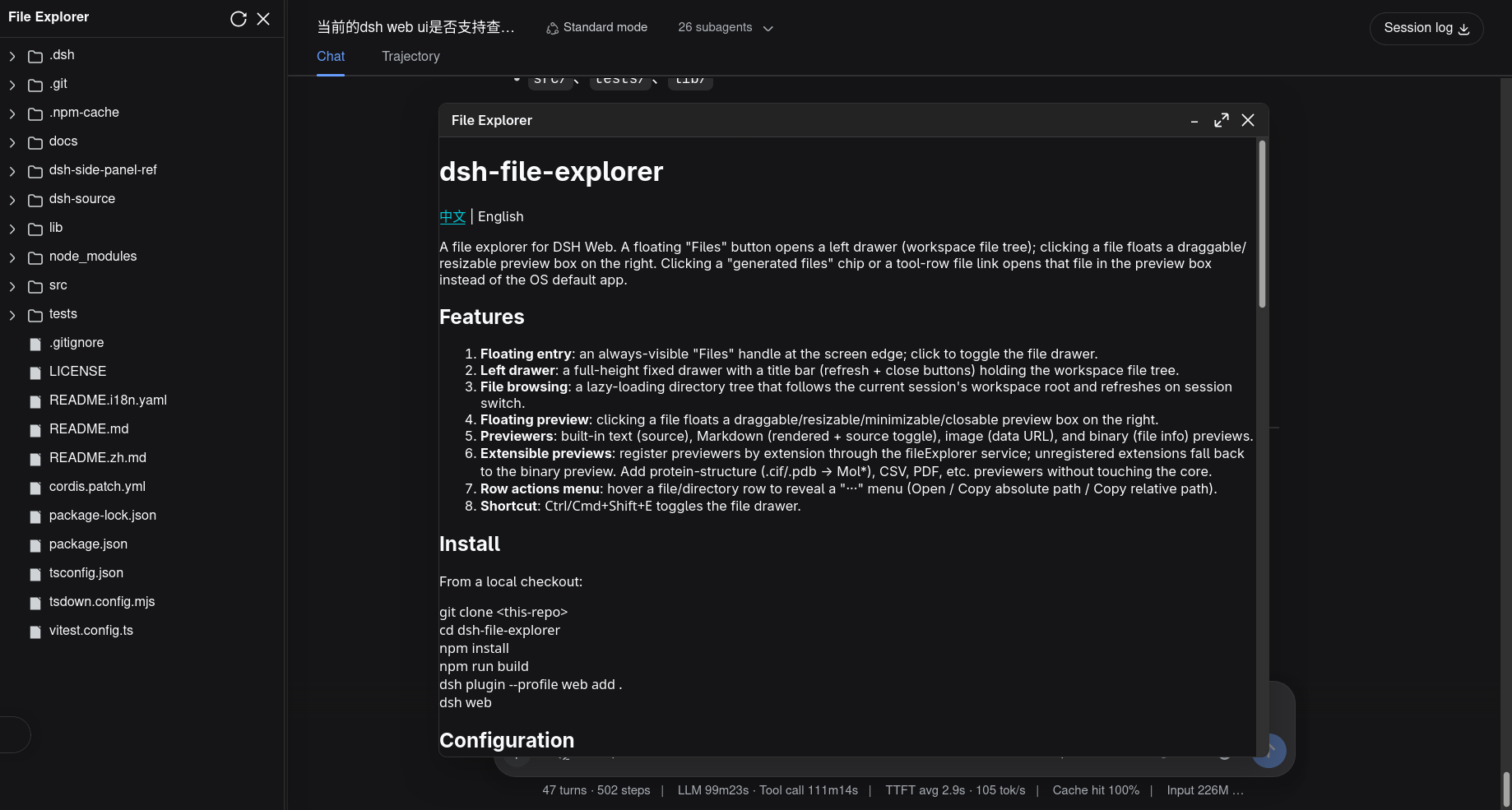
A file explorer for DSH Web. A floating "Files" button opens a left drawer (workspace file tree); clicking a file floats a draggable/resizable preview box on the right. Clicking a "generated files" chip or a tool-row file link opens that file in the preview box instead of the OS default app.
これは DeepSeek Harness(DSH)プラグインです。当サイトは GitHub README、インストール情報、メンテナンス状況、公開セキュリティシグナルをまとめています。
上流で中国語 README が提供されていないため、リポジトリのオリジナルコンテンツを表示しています。
dsh-file-explorer
中文 | English
A file explorer for DSH Web. A floating "Files" button opens a left drawer (workspace file tree); clicking a file floats a draggable/resizable preview box on the right. Clicking a "generated files" chip or a tool-row file link opens that file in the preview box instead of the OS default app.
Screenshots
| Light | Dark |
|---|---|
 |  |
Features
- Floating entry: an always-visible "Files" handle at the screen edge; click to toggle the file drawer.
- Left drawer: a full-height fixed drawer with a title bar (refresh + close buttons) holding the workspace file tree.
- File browsing: a lazy-loading directory tree that follows the current session's workspace root and refreshes on session switch.
- Floating preview: clicking a file floats a draggable/resizable/minimizable/closable preview box on the right.
- Previewers: built-in text (source), Markdown (rendered + source toggle), image (data URL), and binary (file info) previews.
- Extensible previews: register previewers by extension through the
fileExplorerservice; unregistered extensions fall back to thebinarypreview. Add protein-structure (.cif/.pdb→ Mol*), CSV, PDF, etc. previewers without touching the core. - Row actions menu: hover a file/directory row to reveal a "···" menu (Open / Copy absolute path / Copy relative path).
- Shortcut:
Ctrl/Cmd+Shift+Etoggles the file drawer.
Install
From the git repository (recommended):
dsh plugin --profile web add github:wolfsonliu/dsh-file-explorer
dsh web
Or from a local checkout:
git clone https://github.com/wolfsonliu/dsh-file-explorer
cd dsh-file-explorer
npm install
npm run build
dsh plugin --profile web add .
dsh web
Configuration
The bundle enables the following defaults:
- insert:
    - id: file-explorer
      name: '@dsh-external/dsh-file-explorer'
      config:
        maxTextBytes: 2097152
        maxImageBytes: 10485760
| Config | Default | Description |
|---|---|---|
maxTextBytes | 2 MiB | Max size of a single text file to preview |
maxImageBytes | 10 MiB | Max size of a single image file to preview |
Data layer
The host half registers a /file-explorer/api exact route via ctx.webServer.register(). Actions (action query param):
list: lists one directory level (directories first, by name), returningBrowserEntry[].preview: reads one file, returning a discriminatedFilePreview(text/image/empty/binary/too-large).resolve-path: resolves a workspace-relative path to an absolute path and parent path.write: writes UTF-8 text to a workspace file (POST body{ path, content }), returning the saved relative path.
All paths pass a workspace-containment check (inside(root, input), including realpath symlink resolution); out-of-workspace paths are rejected. Text/binary is detected by a NUL-byte scan; images map extensions to MIME and return a data URL.
Model Experience
This plugin is a pure UI surface — it emits no session events and does not modify session logs, so it is invisible to the model. The host half only reads file content for browser preview, independent of agent tool execution.
Known Limitations and Deferred Work
- Preview only, no editing: text editing (CodeMirror 6) and autosave are a later phase.
- Single-file preview: no multi-tab or inline diff.
- No polling refresh: the tree only refreshes manually (↻) or on session switch.
- File-link interception is best-effort: it relies on DSH's CSS class names (
_fileLink,data-produced-files-row); update the selectors if the upstream UI changes. - Large files: whole-file reads are bounded by
maxTextBytes/maxImageBytes; streaming is not implemented.
Developing preview plugins
dsh-file-explorer exposes registration entries via the cordis service fileExplorer: registerPreview (add a previewer), registerFileAction (add a file-row menu item), and writeFile (write UTF-8 text back to a workspace file). Domain experts can ship extensions as separate plugins (named @dsh-external/dsh-file-explorer-preview-<domain>) without touching the core.
// preview plugin client entry
import type { PreviewProps } from '@dsh-external/dsh-file-explorer/client'

export const inject = ['fileExplorer']

export function apply(ctx: {
  fileExplorer: { registerPreview(ext: string, comp: React.ComponentType<PreviewProps>, priority?: number): () => void }
  effect(cb: () => (() => void), label?: string): void
}): void {
  ctx.effect(() => ctx.fileExplorer.registerPreview('cif', CifPreview, 10))
}

function CifPreview(props: PreviewProps) {
  // when props.preview.kind === 'text', props.preview.content is the file text
  return renderStructure(props.preview.content)
}
Notes:
- Service name:
fileExplorer. Inject it withinject: ['fileExplorer'], then callctx.fileExplorer.registerPreview(ext, component, priority?). - Priority: higher wins; built-ins use
0, use10to override. Later registration wins on ties. - Contract types:
import type { PreviewProps } from '@dsh-external/dsh-file-explorer/client'. - registerPreview returns a disposer: call it in
ctx.effectcleanup to unregister on unload/HMR.
Extensions
dsh-file-explorer is designed for extension through the fileExplorer service. Known extensions:
| Extension | Description | Repository |
|---|---|---|
dsh-file-explorer-preview-code | CodeMirror 6 code preview with editing | wolfsonliu/dsh-file-explorer-preview-code |
dsh-file-explorer-preview-molstar | Mol* molecular-structure preview (.cif / .pdb) | wolfsonliu/dsh-file-explorer-preview-molstar |
More extensions are welcome — build your own by following Developing preview plugins.
Development
npm install
npm run check     # tsc type check
npm test          # vitest unit tests
npm run build     # tsc + tsdown (host ESM + client CJS bundle)
References
- dsh-side-panel — a DSH Web side panel plugin; the architectural reference for this project's host route and file-link interception.
- DeepSeek Harness — the DSH framework this plugin extends.
License
セキュリティとインストールエビデンス
このスコアは公開リポジトリメタデータと当サイトに登録されたインストールエビデンスのみに基づくもので、コードセキュリティ監査とは異なります。
公開プラグインカタログから取得し、公開 GitHub リポジトリにリンクしています。
リポジトリは MIT ライセンスを宣言しています。
過去180日以内にコードの更新があります。
再現可能な正確なインストールメタデータはまだ登録されていません。リポジトリの説明に従って手動で確認してください。
確認したパッケージメタデータにインストールライフサイクルスクリプトは宣言されていません。