
Codex 订阅接入
Sign in to ChatGPT and use a Codex subscription directly in DeepSeek Harness. No OpenAI API key or Codex CLI installation is required. DSH conversations, tools, permissions, search choice, and quota stay in one place.
これは DeepSeek Harness(DSH)プラグインです。当サイトは GitHub README、インストール情報、メンテナンス状況、公開セキュリティシグナルをまとめています。
DSH Codex Subscription


在 DeepSeek Harness 中直接使用 ChatGPT / Codex 订阅:保留 DSH 原有的会话、 工具和权限,并在设置页查看 Codex 额度。
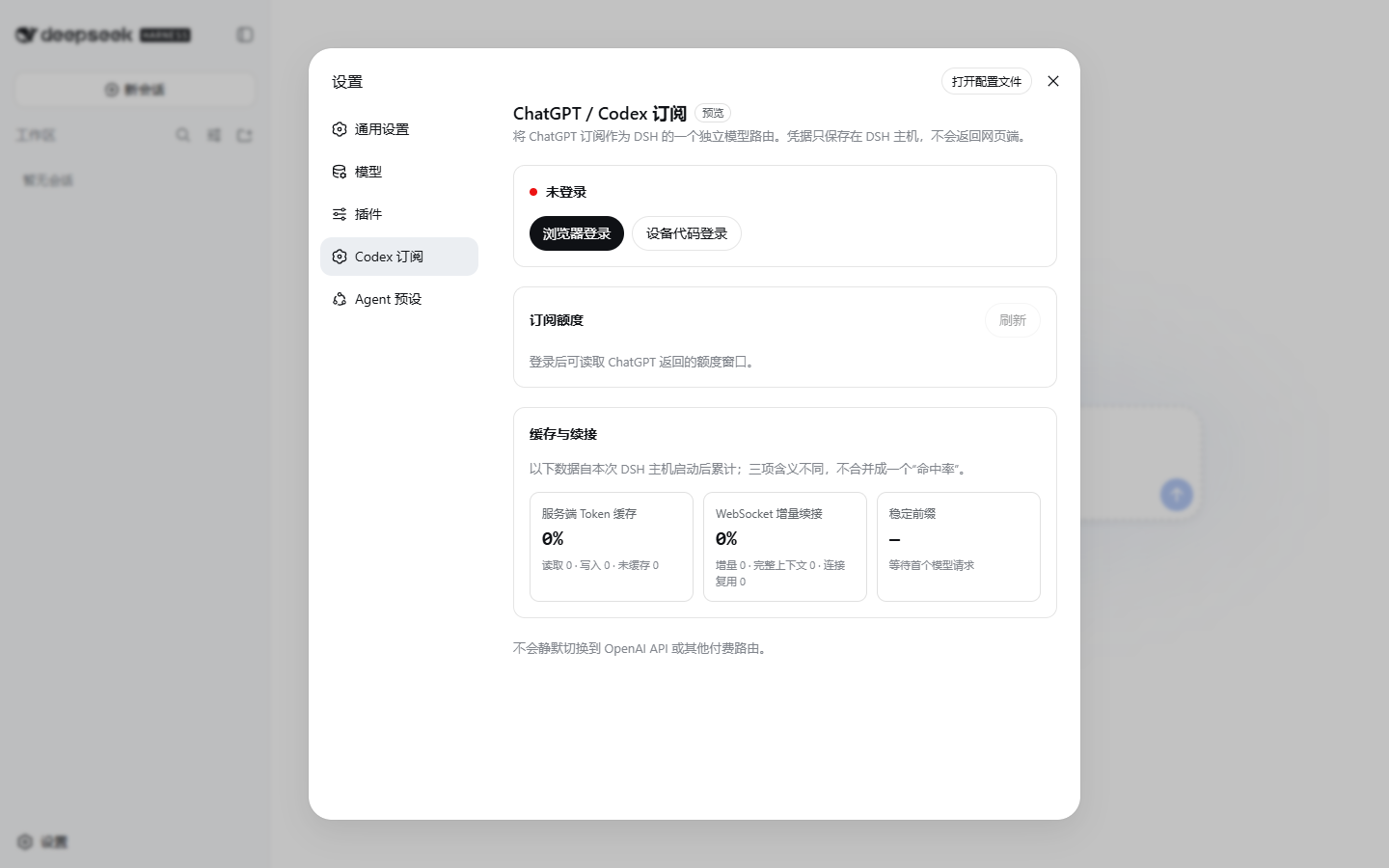
截图使用示例额度,不含真实账户或凭据信息。
功能
- DSH 原生 Codex 模型路由,无需启动另一套 Agent 或 Codex CLI;
- 在 DSH 设置中完成 ChatGPT 登录,凭据留在主机;
- 按服务端实际返回展示额度窗口、剩余比例、已用比例、重置时间和更新时间;
- 单独展示账户返回的 Codex-Spark 等独立额度;
- 当前只有每周额度时不虚构 5 小时窗口,以后服务端恢复时自动显示;
- Credits 余额和月度消费上限仅在账户或工作区真实返回时显示;
- 可用额度重置次数仅在服务端返回时显示,不会自动兑换;
- 订阅路由不可用时明确报错,不会静默切换到 OpenAI API 或其他付费路由。
安装
要求:DeepSeek Harness 0.1.0-rc.6,以及当前具有 Codex 使用资格的 ChatGPT
账户。
Windows(推荐)
依次运行下面三行。普通安装版和 DSH-Portable 都可以使用;便携版不需要 另外安装 Node.js、pnpm,也不需要配置系统 PATH。
$installer = Join-Path $env:TEMP 'dsh-codex.ps1'
Invoke-WebRequest -UseBasicParsing 'https://github.com/WSL043/dsh-codex-subscription/releases/download/v0.2.2/dsh-codex.ps1?build=20260815.2' -OutFile $installer
powershell.exe -NoProfile -ExecutionPolicy Bypass -File $installer -Action Install
Bypass 只用于这一次子进程,不会修改系统的 PowerShell 执行策略。
脚本会自动寻找正在运行或位于常用目录的 DSH-Portable,并把插件写入它自己的数据 目录。如果便携文件夹改过名字或位置,先启动一次 DSH-Portable,再执行上面的命令。 安装完成后,手动关闭并重新打开 DSH,让新插件生效;脚本不会擅自重启程序。
已有 dsh 命令
macOS、Linux,或已经安装 Node.js、pnpm 并能直接运行 dsh 的用户,可以使用:
dsh plugin --profile web add https://github.com/WSL043/dsh-codex-subscription/releases/download/v0.2.2/dsh-codex-subscription-v0.2.2.tgz
安装后检查:
dsh plugin --profile web list dsh-codex-subscription --depth 0
dsh --profile web --dump-config
Windows 脚本已经自动执行这两项检查。配置中应只出现一个
codex-subscription 条目。随后打开
设置 -> Codex 订阅 完成登录,再从 DSH 的模型选择器选择 Codex 模型。
让 Agent 操作
把下面这个文档链接直接发给 Agent。文档中已经包含安装、更新、卸载和验收规则:
https://raw.githubusercontent.com/WSL043/dsh-codex-subscription/main/AGENTS.md
也可以直接打开 AGENTS.md 查看。
额度说明
- 界面只显示服务端实际返回的窗口,不写死“5 小时 + 每周”;
- Codex-Spark 等独立额度不会与普通 Codex 额度合并;
- Credits 不是每个订阅账户固定获得的第二份额度,也不是 OpenAI API 余额;
- 页面百分比是使用状态,不是账单金额或计费承诺。
更新
Windows:
$installer = Join-Path $env:TEMP 'dsh-codex.ps1'
Invoke-WebRequest -UseBasicParsing 'https://github.com/WSL043/dsh-codex-subscription/releases/download/v0.2.2/dsh-codex.ps1?build=20260815.2' -OutFile $installer
powershell.exe -NoProfile -ExecutionPolicy Bypass -File $installer -Action Update
已有 dsh 命令:
dsh plugin --profile web add https://github.com/WSL043/dsh-codex-subscription/releases/download/v0.2.2/dsh-codex-subscription-v0.2.2.tgz
dsh plugin --profile web list dsh-codex-subscription --depth 0
dsh --profile web --dump-config
Windows 脚本会自动清理 v0.2.1 的旧包名并迁移登录凭据,不会留下第二份插件。
如果从 v0.2.1 使用 dsh 命令手动更新,在上面的 add 成功后再运行:
dsh plugin --profile web remove @wsl043/dsh-codex-subscription
两种方式都会保留 DSH profile 和 OAuth 凭据。 如果 DSH 正在运行,更新后手动重启它。
卸载
Windows:
$installer = Join-Path $env:TEMP 'dsh-codex.ps1'
Invoke-WebRequest -UseBasicParsing 'https://github.com/WSL043/dsh-codex-subscription/releases/download/v0.2.2/dsh-codex.ps1?build=20260815.2' -OutFile $installer
powershell.exe -NoProfile -ExecutionPolicy Bypass -File $installer -Action Uninstall
已有 dsh 命令:
dsh plugin --profile web remove dsh-codex-subscription
移除包不会删除 DSH profile 或其他插件。只有同时希望删除已保存的 OAuth 凭据时, 才先在设置页退出登录。
使用边界
- 本项目接入 ChatGPT 订阅,不会把订阅转换成 OpenAI API Key;
- ChatGPT Codex 后端和 DeepSeek Harness 都可能变化,兼容性以当前发布说明为准;
- 本项目为社区项目,与 DeepSeek、OpenAI 无隶属或背书关系。
问题反馈请使用 GitHub Issues。 敏感问题请先阅读 SECURITY.md。
セキュリティとインストールエビデンス
このスコアは公開リポジトリメタデータと当サイトに登録されたインストールエビデンスのみに基づくもので、コードセキュリティ監査とは異なります。
公開プラグインカタログから取得し、公開 GitHub リポジトリにリンクしています。
リポジトリは MIT ライセンスを宣言しています。
過去180日以内にコードの更新があります。
再現可能な正確なインストールメタデータはまだ登録されていません。リポジトリの説明に従って手動で確認してください。
確認したパッケージメタデータにインストールライフサイクルスクリプトは宣言されていません。