
桌面通知
Show a system-level Web Notification when the model finishes a reply in the DeepSeek Harness Web UI — whether or not the page is focused.
이것은 DeepSeek Harness(DSH) 플러그인입니다. 이 사이트는 GitHub README, 설치 정보, 유지보수 상태, 공개 보안 시그널을 모아 보여줍니다.
업스트림에서 중국어 README를 제공하지 않아 저장소 원본 내용을 표시합니다.
dsh-web-notification
English | 简体中文
Show a system-level Web Notification when the model finishes a reply in the DeepSeek Harness Web UI — whether or not the page is focused.
Features
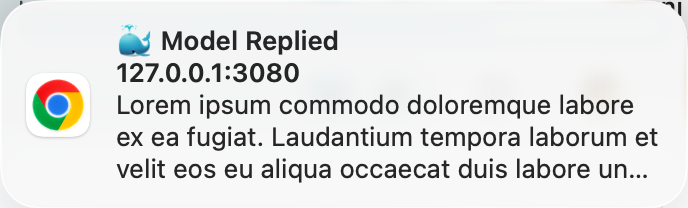
- Fires a system notification on every completed reply: title
🐳 Model Replied, body = the user message of this turn- Falls back to the session title when no user message is available
- Requests notification permission automatically at boot and on the first user gesture (Safari requires a gesture)
- Deduplicates per turn, so a reply never notifies twice
- No UI injection: mounts no visible elements
Screenshots
How It Works
- Detection: the client watches every open session's snapshot
turnEnds(Map<turn, endSeq>); a turn count increase means one reply completed — multi-session replies each fire their own notification. The triggering user message text is read from thechatnodes. - Display: every notification uses a unique tag (
dsh-reply-done-<sessionId>-<turn>) withrenotify: true. Same-tag notifications have replace semantics — while the previous one is still visible, the replacement does not re-show a banner on macOS/Chrome. - Packaging:
build.mjswrapssrc/client/index.jsin thewindow.__ModuleLoader__.load({ id, factory })handshake, which the browser module table executes.
Installation (Users)
Prerequisites: dsh installed (npx @deepseek-ai/dsh) and the web profile initialized.
# 1. Install the bundle
npx @deepseek-ai/dsh plugin --profile web add https://github.com/2h0n/dsh-web-notification/archive/refs/tags/v0.1.0.tar.gz

# 2. Restart
npx @deepseek-ai/dsh web
Verify: no dsh-web-notification errors in the browser console; send two messages in the same session and confirm each reply fires a notification; restart once more and confirm the plugin is still there.
npx @deepseek-ai/dsh plugin --profile web addforwards its arguments to pnpm inside the profile directory, and because the package declaresdsh.bundle, it automatically appends the package todsh.profile.bundles. If you install with a barepnpm addinstead, add the bundles entry manually.- If installation fails with
ERR_PNPM_TARBALL_INTEGRITY(stale lockfile checksums from other moving-branch dependencies in the profile), runpnpm install --update-checksumsfirst and retry.
Development (Developers)
Requirements
- Node.js 22.19+ or 24+ (matching the DeepSeek Harness supported range; the build is dependency-free — no npm packages to install)
Directory Structure
dsh-web-notification/
├── package.json          # Manifest: exports + dsh.bundle.patch + dsh.client
├── cordis.patch.yml      # Patch entry (plugin rows), referenced by dsh.bundle.patch
├── dsh.plugin.json       # Plugin manifest
├── build.mjs             # Build script (zero dependencies)
├── src/
│   ├── index.js          # Plugin entry (Node side): no-op (no host logic)
│   └── client/index.js   # Client plugin (browser side): all logic (the only file you edit)
└── lib/                  # Build output (do not edit; generated by build.mjs)
    ├── index.js
    └── client.js         # Browser bundle in __ModuleLoader__ handshake format
Local Development
The official way: install the local checkout into the profile (npx @deepseek-ai/dsh plugin add links the directory and registers the bundle automatically):
# 1. Build
node build.mjs

# 2. Install the local checkout
npx @deepseek-ai/dsh plugin --profile web add "$PWD"

# 3. Restart
npx @deepseek-ai/dsh web
If pnpm is not available, link it manually (equivalent result):
ln -s "$PWD" ~/.dsh/profiles/web/node_modules/dsh-web-notification
# And edit ~/.dsh/profiles/web/package.json by hand:
#   dependencies:        "dsh-web-notification": "file:$PWD"
#   dsh.profile.bundles: append "dsh-web-notification"
Iteration loop after editing code (symlinked, no reinstall needed):
node build.mjs            # regenerate lib/
npx @deepseek-ai/dsh web  # restart (file: symlink — no reinstall needed)
Removing
The official way (removes the dependency and its bundle layer together):
npx @deepseek-ai/dsh plugin --profile web remove dsh-web-notification
For a manually linked install, undo the steps:
rm ~/.dsh/profiles/web/node_modules/dsh-web-notification
# And edit ~/.dsh/profiles/web/package.json:
#   remove "dsh-web-notification" from dependencies and dsh.profile.bundles
Restart npx @deepseek-ai/dsh web afterwards.
License
MIT
보안 및 설치 증거
이 점수는 공개 저장소 메타데이터와 이 사이트에 등록된 설치 증거에만 기반하며, 코드 보안 감사와 다릅니다.
공개 플러그인 카탈로그에서 왔으며, 공개 GitHub 저장소로 연결됩니다.
저장소가 MIT 라이선스를 선언했습니다.
최근 180일 내 코드 업데이트가 있습니다.
재현 가능한 정확한 설치 메타데이터가 아직 등록되지 않았습니다. 저장소 설명에 따라 직접 확인하세요.
검사한 패키지 메타데이터에 설치 라이프사이클 스크립트가 선언되지 않았습니다.