
护眼主题
A DeepSeek Harness Web profile bundle that replaces cool white interface colors with six warm semantic themes while leaving the native Appearance preference intact.
이것은 DeepSeek Harness(DSH) 플러그인입니다. 이 사이트는 GitHub README, 설치 정보, 유지보수 상태, 공개 보안 시그널을 모아 보여줍니다.
업스트림에서 중국어 README를 제공하지 않아 저장소 원본 내용을 표시합니다.
DSH Eye Care
English | 中文
Warm Light, Warm Dark, System-Aware.
A DeepSeek Harness Web profile bundle that replaces cool white interface colors with six warm semantic themes while leaving the native Appearance preference intact.
What it does
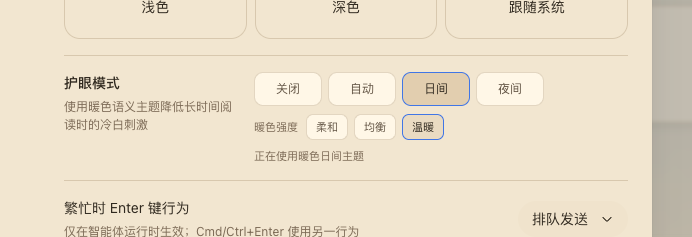
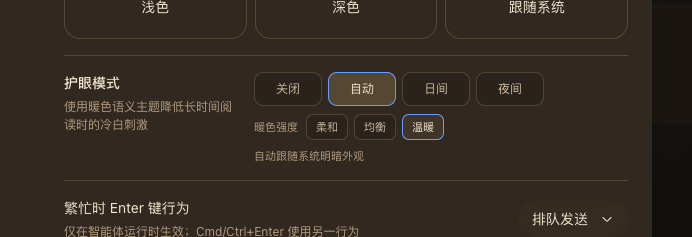
DSH Web's built-in Light and Dark themes are cool-toned. Eye care adds a warm light palette, a warm dark palette, and an automatic scheme without a global sepia filter or image transform.
- Four operating modes:
off,auto,light, anddark. - Three warmth levels:
soft,balanced, andwarm. - Six concrete themes registered through the official ThemeService.
- Real semantic tokens for backgrounds, text, borders, buttons, sidebar, bubbles, inputs, code blocks, scrollbars, and Shiki colors.
- Native Appearance stays authoritative: choosing Light, Dark, or System turns eye care off and keeps that newly selected theme.
- Loopback persistence stores the selection in Host settings; remote browsers keep the selection in the current process.
Preview
The screenshots above show the General settings row in warm day mode and warm night mode. Day and Night are explicit; Auto follows prefers-color-scheme at the selected warmth. The row also renders an aria-live status and keyboard-visible focus states.
Install
Install the public npm package into the Web profile:
dsh plugin --profile web add @anionex/dsh-eye-care
For local development, replace the package name with the checkout's absolute path or a locally packed tarball. DSH_HOME defaults to ~/.dsh; point it at a temporary directory to try the bundle without changing your main profiles.
Restart or start the Web UI:
dsh web
Open Settings → General → Eye care and choose a mode and warmth.
Theme matrix
| Scheme | Soft | Balanced | Warm |
|---|---|---|---|
| Light | eye-care-light-soft | eye-care-light-balanced | eye-care-light-warm |
| Dark | eye-care-dark-soft | eye-care-dark-balanced | eye-care-dark-warm |
How it works
The Host half registers the eye-care Settings namespace and exposes a loopback-only Connection RPC channel /eye-care. Writes are serialized and fenced by expectedRevision; a conflict re-reads the Host snapshot and retries the latest intent.
The browser half registers the six themes, injects the General-settings row, and owns the controller lifecycle. The controller subscribes to theme/change and prefers-color-scheme, restores the pre-eye-care theme on disable or unload, and unregisters every theme on dispose. Remote browsers do not inject the Host RPC and therefore stay process-local.
Compatibility and limitations
- Requires a DeepSeek Harness Web profile with the standard
settings,connection,locale,slots, andthemeservices. - A native Appearance change is treated as an explicit opt-out by design.
- Remote browser sessions do not persist eye care back to the Host.
- There is no global color filter; all colors come from named semantic tokens.
- The package is pre-release and follows the profile bundle format; its generated theme ids are stable while the bundle is installed.
Development
cd dsh-eye-care
pnpm install --frozen-lockfile
pnpm run check
pnpm run test
pnpm run build
Run the optional clean-profile installation test:
DSH_EYE_CARE_PROFILE_E2E=1 pnpm exec vitest run tests/profile-install.e2e.spec.ts
License
보안 및 설치 증거
이 점수는 공개 저장소 메타데이터와 이 사이트에 등록된 설치 증거에만 기반하며, 코드 보안 감사와 다릅니다.
공개 플러그인 카탈로그에서 왔으며, 공개 GitHub 저장소로 연결됩니다.
저장소가 MIT 라이선스를 선언했습니다.
최근 180일 내 코드 업데이트가 있습니다.
재현 가능한 정확한 설치 메타데이터가 아직 등록되지 않았습니다. 저장소 설명에 따라 직접 확인하세요.
검사한 패키지 메타데이터에 설치 라이프사이클 스크립트가 선언되지 않았습니다.