
原生能力指南
Use what DeepSeek Harness already ships before building more.
이것은 DeepSeek Harness(DSH) 플러그인입니다. 이 사이트는 GitHub README, 설치 정보, 유지보수 상태, 공개 보안 시그널을 모아 보여줍니다.
업스트림에서 중국어 README를 제공하지 않아 저장소 원본 내용을 표시합니다.
dsh-native-playbook
Use what DeepSeek Harness already ships before building more.


dsh-native-playbook maps everyday tasks to built-in
DeepSeek Harness capabilities and checks
whether those capabilities are available in the current DSH profile.
task → native capability → availability → recommended action
Why
DSH already includes tools for files, shell commands, background jobs, code search, subagents, workflows, goals, web access, sessions, and more. The difficult part is knowing which capability fits a task and whether the active profile has everything it needs.
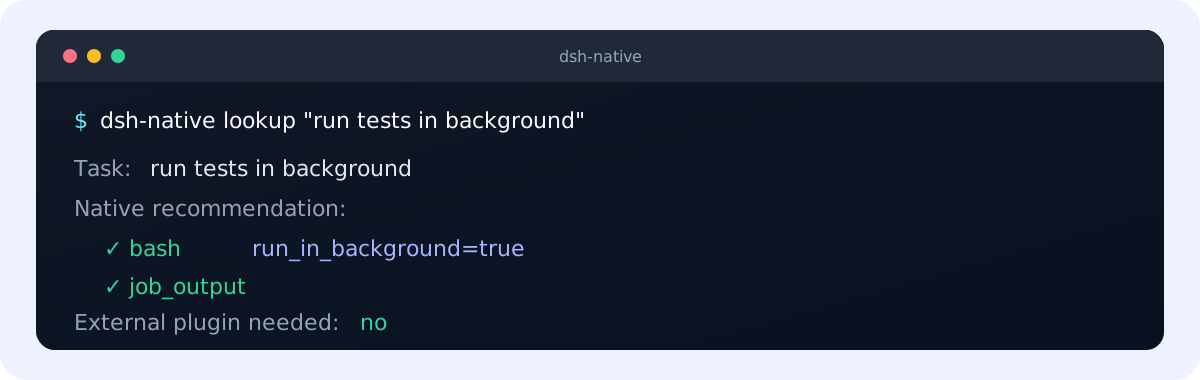
Run tests in the background
→ bash(run_in_background=true) → job_output

Find every symbol reference
→ lsp → grep fallback when no LSP provider is ready

Let another agent investigate while I keep working
→ subagent → list_agents / send_message
Highlights
- Native-first recommendations — check DSH before adding another plugin or workaround.
- Real profile awareness — distinguish ready, opt-in, disabled, and provider-dependent paths.
- DSH runtime plugin — expose the
native_capabilitytool inside a DSH profile. - Agent Skill — give Codex and compatible agents focused task recipes.
- CLI and Node API — use the same results in terminals, scripts, and integrations.
- Offline by default — static lookup has no telemetry and makes no install-time network request.
Install
DSH plugin
Install directly from GitHub into a DSH profile:
dsh plugin --profile web add github:cyanseek/dsh-native-playbook
Verify that the plugin is part of the profile:
dsh --profile web --dump-config
Remove it with:
dsh plugin --profile web remove dsh-native-playbook
Git-based installation builds the package from source. If pnpm asks you to approve the package build, follow the command shown by pnpm and run the install again.
Agent Skill
Install the Skill for Codex:
npx skills@latest add cyanseek/dsh-native-playbook \
  --skill dsh-native-playbook \
  --agent codex \
  --yes
For a shared project installation, the CLI can also copy the Skill into a DSH-compatible Skill directory:
pnpm dsh-native install --target project
pnpm dsh-native install --target dsh
CLI from a checkout
Requirements: Node.js 22 or 24 and pnpm 10 or later.
git clone https://github.com/cyanseek/dsh-native-playbook.git
cd dsh-native-playbook
corepack enable
pnpm install --frozen-lockfile
pnpm build

pnpm dsh-native lookup "run tests in background"
pnpm dsh-native status --profile web
The package is not yet published to npm. Use the GitHub or checkout routes above.
Usage
Inside an installed DSH profile, ask naturally:
Which native DSH capability should I use to run tests in the background?
The native_capability tool returns the native recommendation and current availability.
The CLI supports human-readable and JSON output:
dsh-native lookup "<task>" [--profile <name>] [--json]
dsh-native status --profile <name> [--json]
dsh-native list [--profile <name>] [--json]
dsh-native explain <capability> [--profile <name>] [--json]
dsh-native doctor [--json]
dsh-native install --target project|dsh [--json]
Examples:
pnpm dsh-native lookup "find all symbol references" --json
pnpm dsh-native lookup "build a custom plugin for background jobs" --json
pnpm dsh-native explain subagent --profile headless
Availability states
| State | Meaning |
|---|---|
ready | The active profile can use the capability. |
platform-dependent | Availability depends on the operating system. |
opt-in | DSH provides it, but the profile has not enabled it. |
requires-provider | The tool exists, but a provider is still required. |
disabled | The capability is present but disabled in the profile. |
Package presence alone is never treated as proof that a capability is ready.
Node API
import {
  inspectDshProfile,
  lookupNativeCapability,
} from 'dsh-native-playbook'

const profile = await inspectDshProfile({ profile: 'web' })
const result = await lookupNativeCapability('run a long test in background', { profile })
The public API includes lookupNativeCapability, listNativeCapabilities,
explainNativeCapability, inspectDshProfile, and loadTaskMap.
Scope and compatibility
- This is a community DSH extension, not an official DeepSeek project.
- It covers native capability selection; it is not a third-party plugin marketplace.
- Static lookup works without DSH. Profile-aware status requires a working
dshcommand and an existing profile. - Capability mappings are verified against a pinned revision of the official DSH source.
- No API function prompts, sends telemetry, or reads credentials.
Development
pnpm install --frozen-lockfile
pnpm lint
pnpm typecheck
pnpm test
pnpm build
pnpm validate:skill
pnpm validate:plugin
pnpm validate:dsh-plugin
pnpm verify:upstream
pnpm smoke:json
CI runs the same checks on Linux, macOS, and Windows with Node.js 22 and 24.
Contributing
Missing task mappings, better native fallbacks, profile corrections, and concise recipes are welcome. See CONTRIBUTING.md.
Security
Please report vulnerabilities according to SECURITY.md. Do not include credentials or private profile dumps in public issues.
License
보안 및 설치 증거
이 점수는 공개 저장소 메타데이터와 이 사이트에 등록된 설치 증거에만 기반하며, 코드 보안 감사와 다릅니다.
공개 플러그인 카탈로그에서 왔으며, 공개 GitHub 저장소로 연결됩니다.
저장소가 MIT 라이선스를 선언했습니다.
최근 180일 내 코드 업데이트가 있습니다.
재현 가능한 정확한 설치 메타데이터가 아직 등록되지 않았습니다. 저장소 설명에 따라 직접 확인하세요.
검사한 패키지 메타데이터에 설치 라이프사이클 스크립트가 선언되지 않았습니다.