
Markdown 大纲
A minimal but practical DeepSeek Harness plugin that adds an md outline tool. It outlines and lints Markdown documents: a nested heading tree plus structural warnings that are tedious to check by hand and easy to get wrong in long docs (book drafts, skill sets, specs).
이것은 DeepSeek Harness(DSH) 플러그인입니다. 이 사이트는 GitHub README, 설치 정보, 유지보수 상태, 공개 보안 시그널을 모아 보여줍니다.
업스트림에서 중국어 README를 제공하지 않아 저장소 원본 내용을 표시합니다.
dsh-plugin-md-outline
🇨🇳 中文文档 | 🇺🇸 English
A minimal but practical DeepSeek Harness plugin that adds an md_outline tool.
It outlines and lints Markdown documents: a nested heading tree plus structural
warnings that are tedious to check by hand and easy to get wrong in long docs
(book drafts, skill sets, specs).
Topic:
dsh-plugin— add this topic to the GitHub repo so the ecosystem can discover it (see Publishing thedsh-plugintopic below).
What it does
| Check | Why it matters |
|---|---|
| Heading tree (H1–H6, with line numbers) | Navigate and audit long documents at a glance. |
| Heading-level skips (e.g. H1 → H3) | Catches broken document hierarchy. |
| Duplicate heading text | Flags accidental repeats that break anchors/TOC. |
| Missing H1 / multiple H1 | Enforces a single document title. |
| Unclosed code fences | The classic long-doc bug — a fence left open makes everything after it "code". Headings inside fences are correctly ignored. |
Preview
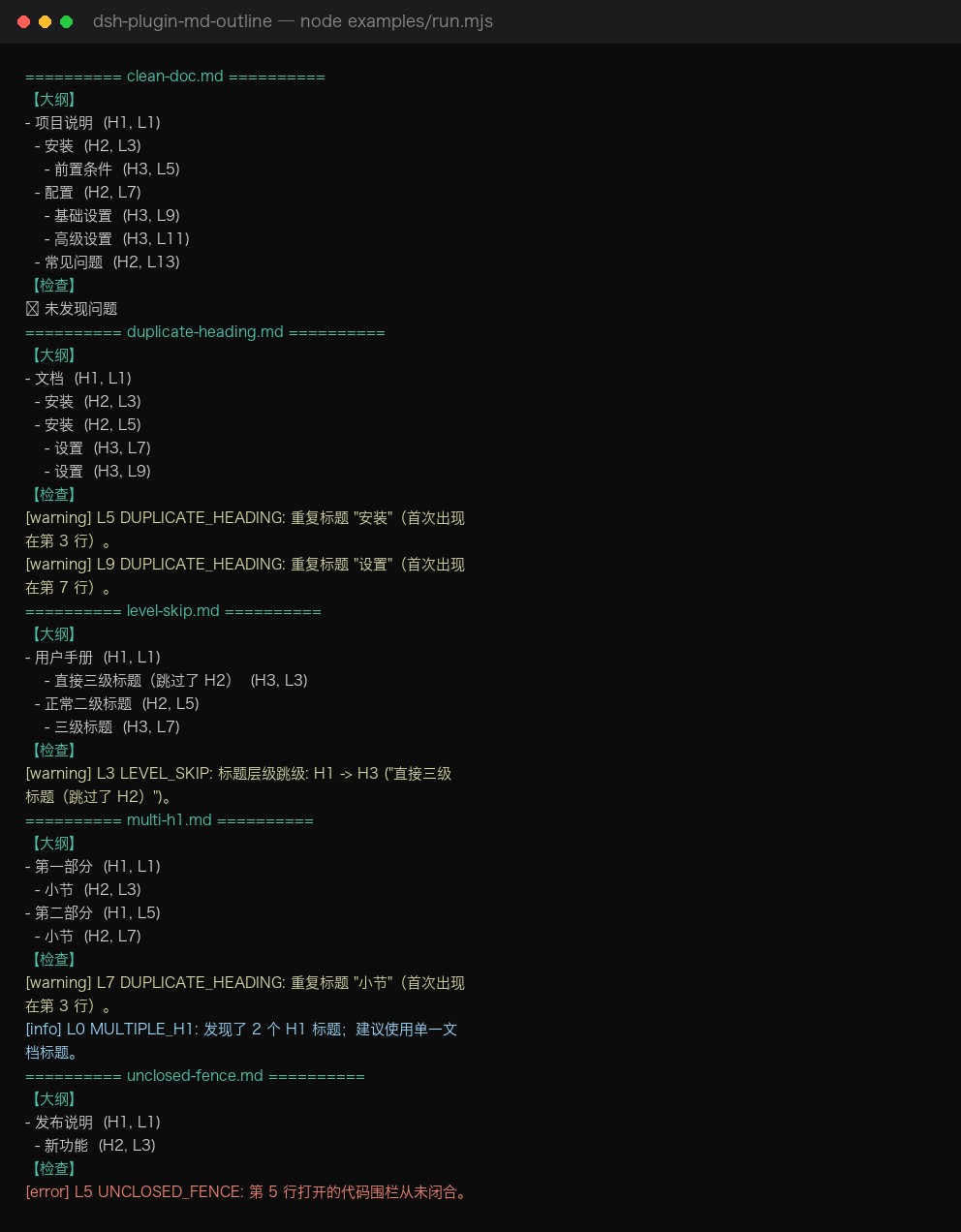
Terminal preview from node examples/run.mjs (covers all 5 sample docs
— clean, level skip, duplicate headings, multiple H1, unclosed fence):
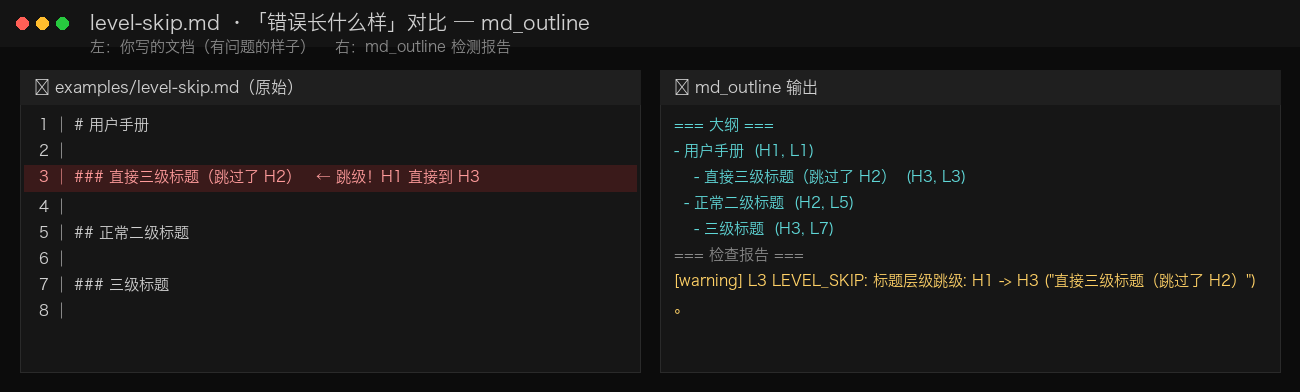
What a bad doc looks like — examples/level-skip.md
The left side is the source as written; the right side is what md_outline reports.
The H1 → H3 jump on line 3 is flagged with line number and reason.
To regenerate: python3 docs/gen_screenshot.py (writes docs/screenshot.png).
Install
One-click install (any machine, any profile):
dsh plugin add https://github.com/d-ouyang/dsh-plugin-md-outline.git
dsh --profile demo --dump-config | grep -i md-outline   # confirm the layer is present
Requires the dsh CLI (DeepSeek Harness). This plugin is plain ESM JavaScript:
no build step, no allowBuilds prompt, installs straight from a git repo.
Local checkout also works:
dsh plugin --profile demo add /path/to/dsh-plugin-md-outline
To remove:
dsh plugin remove dsh-plugin-md-outline
Usage
In the Web UI (or any surface with tools), just ask the model:
Outline
~/book/draft.mdand tell me about structural issues.
Or call it directly in Code Mode:
await tools.md_outline({ path: '~/book/draft.md', mode: 'both' })
await tools.md_outline({ path: '~/skills', mode: 'lint', recursive: true })
await tools.md_outline({ path: '~/notes/spec.md', mode: 'outline', maxDepth: 2 })
Parameters
| Name | Type | Required | Notes |
|---|---|---|---|
path | string | yes | A .md/.markdown/.mdx file, or a directory. |
mode | 'outline' | 'lint' | 'both' | no | Default both. |
maxDepth | number (1–6) | no | Limit outline nesting. |
recursive | boolean | no | Scan subdirectories when path is a dir (default true). |
The canonical return value is structured ({ files, summary }) for programmatic
use in Code Mode; the model-facing card shows the human-readable summary.
How it is built (cookbook recap)
This plugin follows the official authoring path:
- Tool contract —
docs/user/develop/basic/tool.mdanddocs/cookbook/adding-a-tool.md:defineTool({ name, description, parameters, output, execute })registered viactx.tools.register(...). - Bundle packaging —
docs/user/develop/basic/publish.md: a bundle is an npm package with adsh.bundlemanifest and acordis.patch.ymllayer that inserts the plugin row by package name. - No build — written in plain ESM JavaScript so a
github:install loads without running anypreparescript.
dsh-plugin-md-outline/
├── package.json        # dsh.bundle manifest + peer dep on @deepseek-ai/dsh-tools
├── cordis.patch.yml    # the layer applied when a profile adds this bundle
├── index.js            # plugin entry: name / inject / apply -> registers md_outline
├── md-outline-core.js  # pure, dependency-free analysis (unit-tested)
├── test.mjs            # `node test.mjs` validates the core logic
├── examples/           # sample docs + run.mjs (real output shown in docs/USAGE.md)
├── docs/USAGE.md       # 🇨🇳 full usage guide with real test results
├── README.md
└── README.zh-CN.md
Develop
node test.mjs                 # unit-test the pure logic
node examples/run.mjs         # run all sample docs and print real outlines + warnings
node --check index.js        # syntax check the plugin entry
See docs/USAGE.md (中文) for the full usage guide and real test output.
The runtime contract depends on @deepseek-ai/dsh-tools being present in the dsh
installation (it is — the harness itself uses it). Declared as a peerDependency,
so it is never fetched from a registry.
Publishing the dsh-plugin topic
The dsh-plugin GitHub topic is what makes community plugins discoverable. Add it
in repo Settings → Topics, or via the API once the repo exists:
# after `git push`, set the topic through the GitHub API (needs a token)
curl -X PUT -H "Authorization: Bearer $GITHUB_TOKEN" \
  -H "Accept: application/vnd.github+json" \
  https://api.github.com/repos/d-ouyang/dsh-plugin-md-outline/topics \
  -d '{"names":["dsh-plugin","markdown","deepseek-harness"]}'
License
MIT
보안 및 설치 증거
이 점수는 공개 저장소 메타데이터와 이 사이트에 등록된 설치 증거에만 기반하며, 코드 보안 감사와 다릅니다.
공개 플러그인 카탈로그에서 왔으며, 공개 GitHub 저장소로 연결됩니다.
저장소가 MIT 라이선스를 선언했습니다.
최근 180일 내 코드 업데이트가 있습니다.
재현 가능한 정확한 설치 메타데이터가 아직 등록되지 않았습니다. 저장소 설명에 따라 직접 확인하세요.
검사한 패키지 메타데이터에 설치 라이프사이클 스크립트가 선언되지 않았습니다.