
更新检查
A DeepSeek Harness (DSH) web plugin that checks whether your local Harness is up to date — right from Settings.
이것은 DeepSeek Harness(DSH) 플러그인입니다. 이 사이트는 GitHub README, 설치 정보, 유지보수 상태, 공개 보안 시그널을 모아 보여줍니다.
dsh-update-checker
A DeepSeek Harness (DSH) web plugin that checks whether your local Harness is up to date — right from Settings.
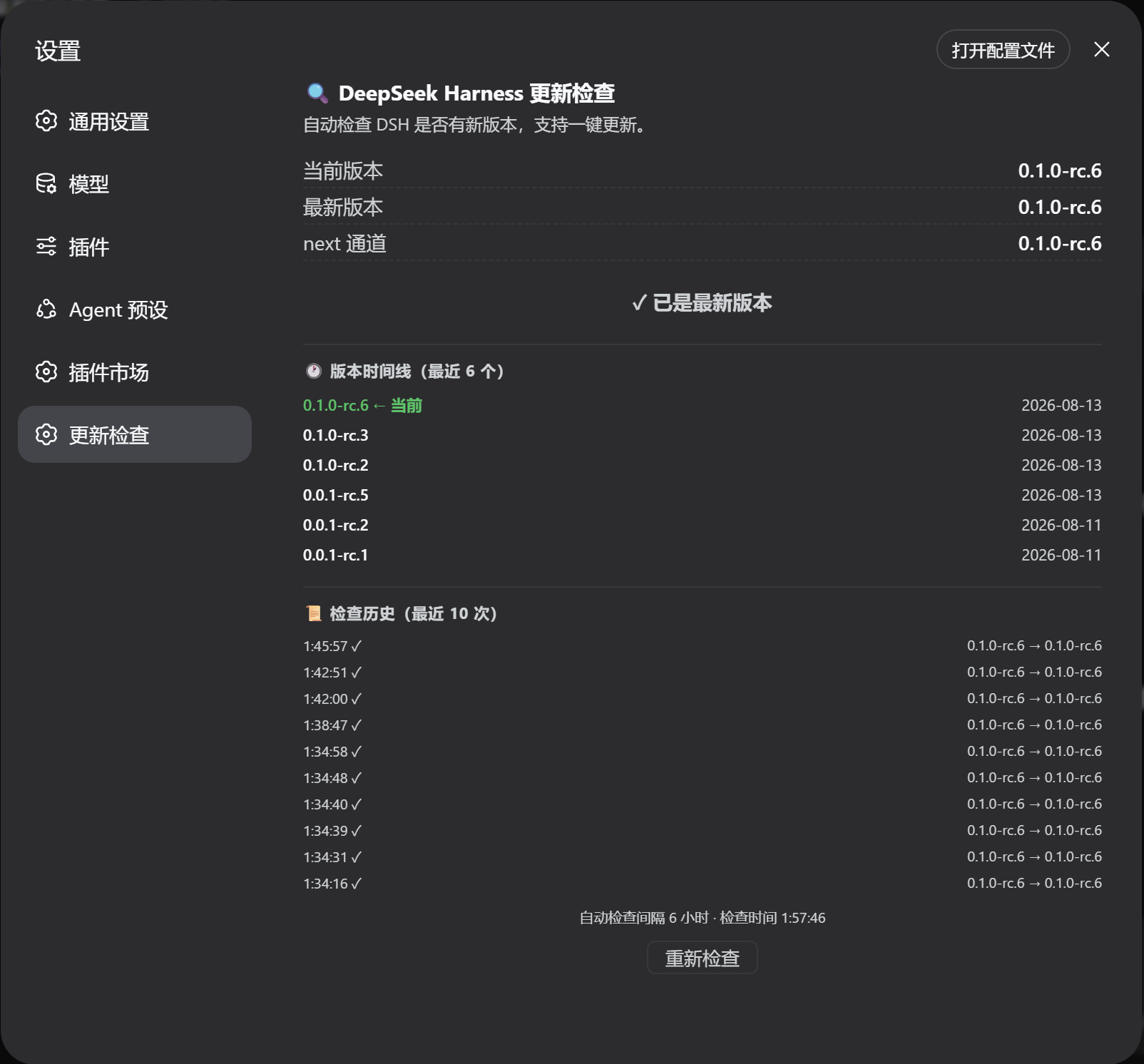
English: Check DeepSeek Harness updates from Settings (local
dsh --versionvs npmlatest/next).中文: 在设置页一键自检 DeepSeek Harness 是否有新版本(本地
dsh --versionvs npm 最新版)。
Features
- Update check: reads the local version via
dsh --version, compares it with the npm registrylatest/nextdist-tags of@deepseek-ai/dsh - One-click update: when a new version is found, click a button to run
npx -y @deepseek-ai/dsh@latestand watch the live install progress in the page - Version timeline: shows the most recent 8 published versions with release dates, highlighting your current version
- Auto-check & notifications: re-checks every 6 hours while the Settings page is open; a browser system notification fires when a new version is detected
- Check history: the last 10 checks are saved to
~/.dsh/dsh-update-checker-history.jsonand shown in the page - Semantic version comparison (handles
rcprerelease segments correctly)
Install
From GitHub:
dsh plugin --profile web add github:duntansen/dsh-update-checker
Then restart dsh web and open the GUI. Open Settings → Update Check to use it.
Usage
Open Settings → Update Check — a full page with all features:
The page shows:
- Current / latest / next versions and a status badge (
✓ up to date/⬆ update available) - One-click update button (
⬇ Update to x.y.z) when an update is available — shows live terminal output, then prompts to restartdsh webwhen done - Version timeline: the most recent 8 releases with dates, your current version highlighted in green
- Check history: recent check times and version transitions
- Re-check button and the last check time
Auto-check: the plugin checks when the Settings page opens and then every 6 hours while it stays open. When a new version is detected, a browser notification is fired (the first time, the browser asks for notification permission).
How it works
- Host: registers HTTP routes via the
webServerservice:GET /dsh-update-check— local version + npm latest/next + timeline + historyGET /dsh-update-check/status— live update task output (polled)POST /dsh-update-check/update— start the update (same-origin protected, single instance)
- Local version is read with
dsh --version; npm registry data via globalfetch. Commands run cross-platform (Windowscmd.exe/ POSIX/bin/sh). - Client: a
settings.sectionentry (__ModuleLoader__CJS bundle, no build step) that calls the routes above and renders the page.
Project layout
dsh-update-checker/
├── package.json        # dsh bundle patch + web client declaration
├── cordis.patch.yml    # inserts the plugin row into a profile layer stack
├── assets/
│   └── screenshot.png  # README screenshot
└── lib/
    ├── index.js        # host entry: HTTP routes + version comparison
    └── client.js       # client entry: Settings page
License
MIT
보안 및 설치 증거
이 점수는 공개 저장소 메타데이터와 이 사이트에 등록된 설치 증거에만 기반하며, 코드 보안 감사와 다릅니다.
공개 플러그인 카탈로그에서 왔으며, 공개 GitHub 저장소로 연결됩니다.
저장소가 MIT 라이선스를 선언했습니다.
최근 180일 내 코드 업데이트가 있습니다.
재현 가능한 정확한 설치 메타데이터가 아직 등록되지 않았습니다. 저장소 설명에 따라 직접 확인하세요.
검사한 패키지 메타데이터에 설치 라이프사이클 스크립트가 선언되지 않았습니다.