
Johnny-xuan/dsh-paste-to-path
A universal path-backed attachment dock for DeepSeek Harness.
이것은 DeepSeek Harness(DSH) 플러그인입니다. 이 사이트는 GitHub README, 설치 정보, 유지보수 상태, 공개 보안 시그널을 모아 보여줍니다.
업스트림에서 중국어 README를 제공하지 않아 저장소 원본 내용을 표시합니다.
dsh-paste-to-path
A universal attachment dock for DSH.
English | 简体中文
dsh-paste-to-path adds a general-purpose attachment Dock to the DSH Web composer.
Paste, drop, or choose images, PDFs, Word and Excel documents, archives, code, logs, and other files, then review and manage them together before sending.
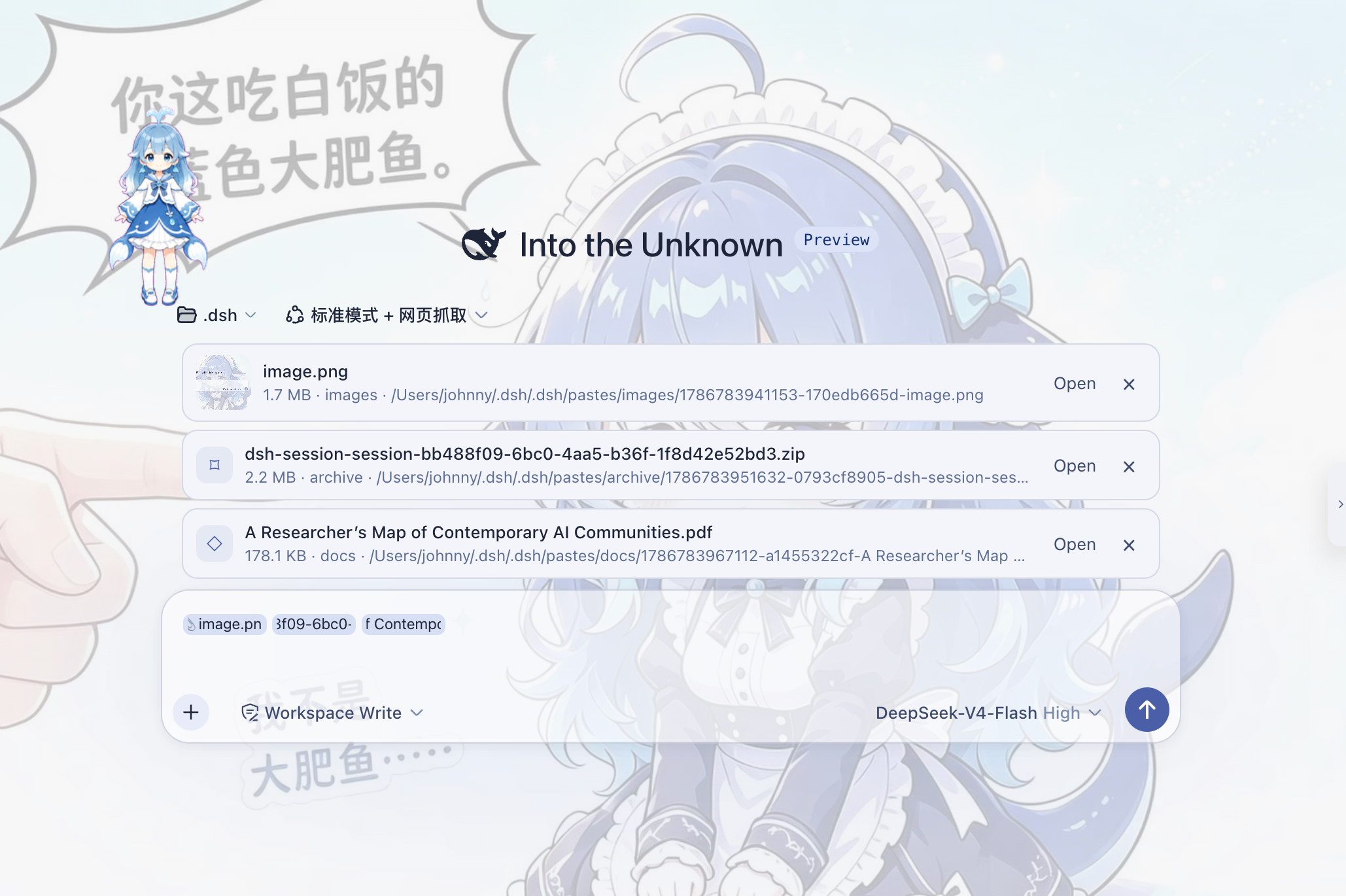
Images, PDFs, archives, and other formats share one attachment Dock.
The DSH 0.1.0-rc.6 through 0.1.0-rc.8 Web composer natively accepts PNG, JPEG, WebP, and GIF. PDFs, Office documents, archives, and other formats do not have the same unified attachment entry point. Even an image may fail when the selected model does not support image input or the active adapter is text-only.
dsh-paste-to-path does not extend the model's native content types. It takes a simpler route:
File
  ↓
DSH Host
  ↓
Local path
  ↓
Agent
  ↓
Your own tools
Send images to your own vision tool, PDFs to a document reader, and archives to shell or extraction tools.
The plugin owns attachment intake, management, and path delivery. Your Agent tool stack decides how to read the file.
Path flow at a glance
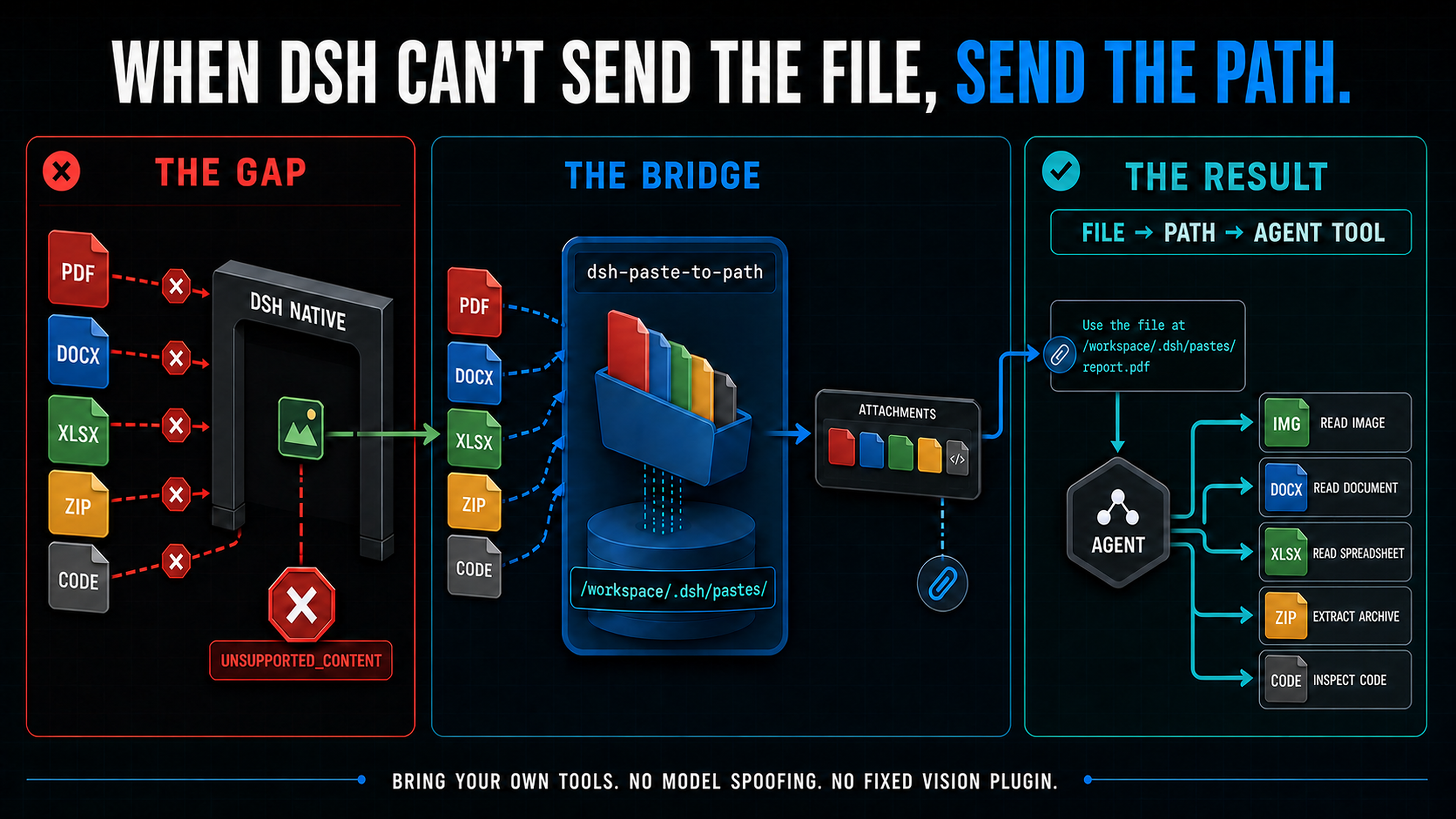
The file is saved on the DSH Host, then its path is given to the Agent.
What it does
Universal attachment Dock
Paste, drop, or choose a file and an attachment card appears above the composer. The plugin's paperclip button accepts any file type and routes it through this Dock rather than DSH's native image rail.
Each card shows the file name, size, category, and path. You can remove it before sending.
Images also have thumbnails and lightbox previews.
File-manager clipboard support
The plugin catches every real File object exposed by the browser, including empty files. It can also turn a pasted file: URI or absolute path into a card when that path already exists on the DSH Host.
Path conversion is transactional: every candidate path must exist on the DSH Host. If any candidate is unavailable, the original clipboard text is pasted normally without an attachment error or a partial conversion.
Browsers do not consistently expose non-image files copied from Windows Explorer, Finder, or Linux file managers. If the paste event contains neither file bytes nor a usable Host path, an ordinary web page cannot reconstruct the hidden OS clipboard entry. To address Issue #2, the plugin reads Explorer's FileDropList at this point when DSH runs on a local Windows Host through a direct localhost connection; remote clients never access the Host clipboard. In other cases, use the plugin's paperclip button or drag and drop. A path from a remote browser's device is not a path on the DSH Host.
One flow for many file types
Images, PDFs, Office documents, code, logs, archives, and other binary files all use the same attachment flow:
File → Save on Host → Path reference → Agent
You do not need a separate model-input protocol for every file type.
Turn long pasted text into an attachment
Normal text still pastes normally.
When pasted content crosses the configured threshold, the plugin can save it as a .txt file instead of putting tens of thousands of characters directly into the composer.
The default threshold is 8000 characters.
Edit text files before sending
Text and code attachments can be edited directly in the Dock when they are below the configured size limit.
The default limit is 1 MiB.
Open files with the system application
For a local DSH deployment, host.openPath can open an attachment with the system's default application.
Installation
Install into a DSH Web profile:
dsh plugin --profile web add dsh-paste-to-path
You can also install the current GitHub branch directly:
dsh plugin --profile web add github:Johnny-xuan/dsh-paste-to-path
Restart DSH after installation:
dsh web
The package includes a dsh.bundle manifest, so the required loader patch is loaded with the plugin.
How it works
When you paste, drop, or choose a file, the plugin catches it and saves a private copy on the DSH Host:
<workspace>/.dsh/pastes/<category>/
The composer does not contain the file's contents. It keeps an attachment reference instead.
If you paste an absolute path that already exists on the DSH Host, the plugin links that existing file instead of copying it. Linked files are never editable from the Dock.
When you send the message, DSH's reference codec expands that reference into a short path instruction:
Paste / drop file
        │
        ▼
Save on DSH Host
        │
        ▼
Attachment Dock
shows the file card
        │
        ▼
Send message
        │
        ▼
reference codec
creates a path instruction
        │
        ▼
Agent receives the path
        │
        ▼
Uses an available tool to read it
The implementation uses DSH's extension mechanisms:
conversation.input.dockconversation.input.left- input-trigger reference codec
settingsScope
No DSH core modification is required.
What the Agent receives
The plugin does not put file bytes in the initial model request.
For example, a PDF expands to:
Document attachment: /absolute/path/to/report.pdf
Read it using an appropriate tool for this file format.
An image expands similarly:
Image attachment: /absolute/path/to/image.png
Inspect it using an available image-reading method.
Text, code, archives, and other formats receive equivalent path instructions.
The instructions do not require a particular tool. The Agent decides what to do next from the tools that are actually available in the current session.
Bring your own tools
dsh-paste-to-path does not parse file contents.
Connect whichever tools fit your Agent environment, for example:
- images → your own
read_imageor vision tool - PDF / Word / Excel → document readers
- scans → OCR
- code / logs → shell or filesystem tools
- ZIP / TAR → archive extractors
The plugin does not install these tools or assume that the current model has their capabilities.
Any compatible tool that can access the file path on the DSH Host can read the stored attachment.
If the Agent has no suitable tool, the file still enters the Dock and is saved on the Host, but the Agent cannot understand its contents.
Why paths
In DSH's native attachment path, supported file formats and model capabilities are closely related.
In DSH 0.1.0-rc.6 through 0.1.0-rc.8, the native Web image intake accepts:
- PNG
- JPEG
- WebP
- GIF
Other MIME types do not enter the same native image path.
An image that passes the format check may still fail if it reaches a model without image input or a text-only adapter.
dsh-paste-to-path separates two concerns:
Give the file to the Agent
and:
Understand the file's contents
The plugin handles only the first.
The file becomes an ordinary file on the Host. The Agent's tool layer handles the second.
Configuration
Default configuration is provided by cordis.patch.yml:
- insert:
    - id: paste-to-path
      name: dsh-paste-to-path
      config:
        longTextAsAttachment: true
        longTextThreshold: 8000
        pathTextAsAttachment: true
        windowsClipboardFallback: true
        maxBytes: 26214400
        editableTextMaxBytes: 1048576
| Option | Default | Description |
|---|---|---|
longTextAsAttachment | true | Save long pasted text as a .txt attachment |
longTextThreshold | 8000 | Character threshold for long-text conversion |
pathTextAsAttachment | true | Link pasted absolute paths that exist on the DSH Host |
windowsClipboardFallback | true | Read Explorer's FileDropList on a direct localhost Windows Host when the browser hides file bytes |
maxBytes | 25 MiB | Maximum size of one attachment |
editableTextMaxBytes | 1 MiB | Maximum text-file size editable in the Dock |
On DSH 0.1.0-rc.7 and newer, these values are also available under Settings → Plugins → Paste to Path. Version 0.0.3 uses DSH's official third-party settings scope; changes are persisted through DSH settings and apply without restarting the plugin. The reset button returns all six values to the profile defaults shown above.
The attachment Dock, notifications, and settings card follow DSH's Language preference and include English and Simplified Chinese. The path instructions serialized for the Agent remain stable English protocol text and do not change with the UI language.
DSH 0.1.0-rc.6 does not expose third-party settings namespaces to the Web settings page, and a remote Web UI may also lack a writable scope. In either case, configure the paste-to-path entry in that profile's cordis.patch.yml. Attachment handling remains active with the Host-provided configuration even when the settings card is unavailable.
File storage
With a workspace, attachments are stored under:
<workspace>/.dsh/pastes/<category>/
Without a workspace, storage falls back to:
$DSH_HOME/tmp-paste/<category>/
Files copied into plugin storage use permissions:
0600
An existing Host path pasted as an attachment is linked in place. The plugin does not copy it, change its permissions, or allow Dock editing of the original file.
Removing an attachment from the Dock removes only its reference from the current draft. It does not delete the file from disk.
The path therefore remains valid for undo, re-send, or later reference.
Privacy
Files chosen, dropped, or exposed as browser File objects are uploaded to your own DSH Host and saved on its local filesystem. Existing Host paths are only linked in place.
The plugin itself does not:
- upload files directly to a model provider
- upload files to a third-party file service
- parse file contents during upload
The initial model request contains only the file path and a short instruction.
If the Agent later uses another tool or external service to process the file, that tool's own behavior and configuration apply.
Design boundary
dsh-paste-to-path owns only this part:
File
  ↓
Attachment Dock
  ↓
Host filesystem
  ↓
Path reference
This part:
Path
  ↓
Vision / PDF Reader / OCR / Shell / ...
belongs to the Agent's tool layer.
The plugin therefore does not:
- modify or replace a model adapter
- pretend that the model supports vision
- bind the workflow to a fixed vision, OCR, or document tool
- parse attachment contents during transport
- create a native DSH
imagecontent block
Compatibility
Version 0.0.3 is tested with:
DeepSeek Harness 0.1.0-rc.6
DeepSeek Harness 0.1.0-rc.7
DeepSeek Harness 0.1.0-rc.8
The attachment Dock works across all three versions. On rc.6, edit plugin configuration in cordis.patch.yml; the visual settings card requires rc.7 or newer. Version 0.0.3 registers both the legacy list-slot id and the newer keyed-slot namespace so the same package can load on rc.6 through rc.8.
DSH is currently a developer preview. Changes to its extension interfaces may require a corresponding plugin update.
보안 및 설치 증거
이 점수는 공개 저장소 메타데이터와 이 사이트에 등록된 설치 증거에만 기반하며, 코드 보안 감사와 다릅니다.
공개 플러그인 카탈로그에서 왔으며, 공개 GitHub 저장소로 연결됩니다.
GitHub 메타데이터에서 라이선스가 감지되지 않았습니다.
최근 180일 내 코드 업데이트가 있습니다.
재현 가능한 정확한 설치 메타데이터가 아직 등록되지 않았습니다. 저장소 설명에 따라 직접 확인하세요.
검사한 패키지 메타데이터에 설치 라이프사이클 스크립트가 선언되지 않았습니다.
missing-license