
DSH Workbench
DeepSeek Harness Web
이것은 DeepSeek Harness(DSH) 플러그인입니다. 이 사이트는 GitHub README, 설치 정보, 유지보수 상태, 공개 보안 시그널을 모아 보여줍니다.
업스트림에서 중국어 README를 제공하지 않아 저장소 원본 내용을 표시합니다.
DSH Workbench


A file workspace for DeepSeek Harness
DSH Workbench turns file operations in DeepSeek Harness into a focused, Codex-like file workspace.
Click a file path in a DSH Web session and inspect it in a persistent right-side panel—without losing the conversation context.
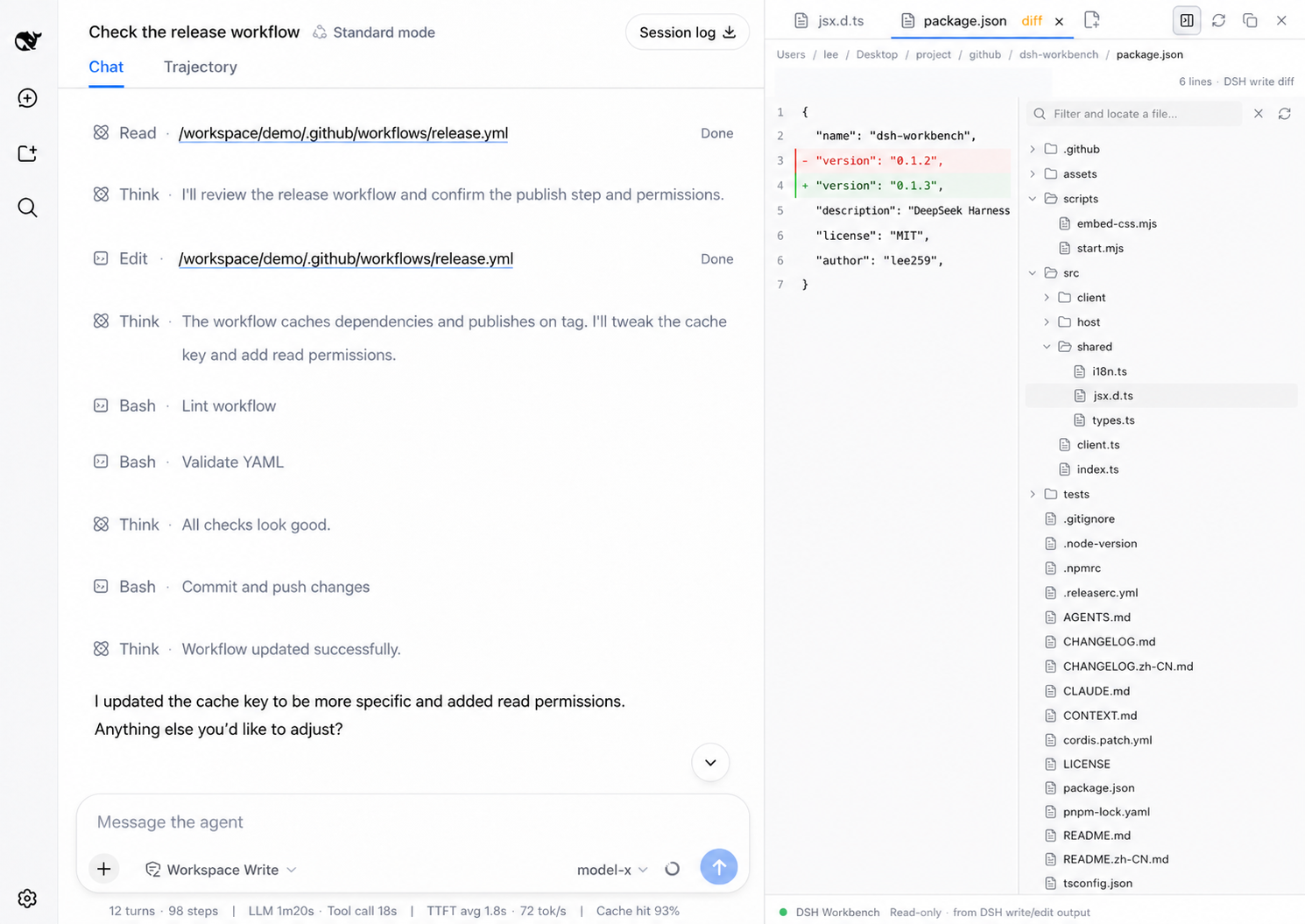
The demo shows a real DSH Web session with the conversation on the left and the Workbench reading package.json on the right. Read-only files stay readable as source; captured writes and edits open as focused diffs.
read       → read-only source view
write/edit → captured DSH diff
Why it is useful
- Keep the conversation and the file you are inspecting visible together.
- See real DSH write/edit changes, with the captured before/after content.
- Read files as normal source code—no fake Git HEAD diff and no noisy activity timeline.
- Open several files, switch between tabs, refresh them, copy content or paths, and resize the panel.
- Use desktop-style shortcuts:
⌥⌘Bto toggle the panel,⌘Wto close a file, and⌘1–⌘9to switch tabs. - UI copy follows the DSH language setting (中文 / English).
Install
Published package
Install the released plugin into the web profile, then restart DSH Web:
dsh plugin --profile web add dsh-workbench@0.2.4
dsh web
If the dsh command is not available yet, use the package-manager fallback:
pnpm dlx @deepseek-ai/dsh plugin --profile web add dsh-workbench@0.2.4
pnpm dlx @deepseek-ai/dsh web
Local development
To run the version currently checked out from GitHub:
git clone https://github.com/lee259/dsh-workbench.git
cd dsh-workbench
pnpm install
pnpm run build
dsh plugin --profile web add "$(pwd)"
dsh web
After changing the plugin, run pnpm run build again and restart dsh web.
One-command local start
For local development or a quick test:
pnpm start -- /absolute/path/to/your/project
This builds the plugin, registers the local bundle in the target project, and starts DSH Web. Without a path, it uses the current directory.
How previews work
| DSH operation | Workbench view |
|---|---|
read | Read-only CodeMirror source view |
write | Diff against the captured write baseline |
edit | Diff against the captured edit baseline |
| Workspace file mention | Read-only source view |
The host listens to official session events (tool/call, tool/result, and tool/code-dispatch). When dsh-tool-fs provides meta.diffs, those diffs are preferred. The plugin never invents a Git HEAD diff when no DSH write was captured.
Development
pnpm install
pnpm test
pnpm start -- /absolute/path/to/your/project
The plugin follows the standard Cordis contract:
- Host:
name,inject,apply(ctx)fromsrc/index.ts - Client:
dsh.client,exports["./client"], andwindow.__ModuleLoader__.load - Styles:
src/client/styles.css - UI strings:
src/shared/i18n.ts
Roadmap
Done
- Read-only previews for
readand file mentions - Captured DSH diffs for
write/edit - Persistent, resizable right-side workspace
- Multi-file tabs, refresh, copy actions, and desktop shortcuts
- Chinese / English UI following DSH locale
Next
- Browser-level interaction tests for the sidebar and real DSH tool rows
- Better integration with native DSH panel controls and layout slots
- File search and quick navigation inside the workspace
- More precise diff navigation and change summaries
Exploring
- Optional lightweight file tree for the active workspace
- Open-in-editor and reveal-in-folder actions
- Pluggable workspace panels for future DSH tools
Release
CI runs pnpm test on pushes and pull requests to main. Publishing is triggered by pushing a v* tag:
git tag v0.2.0
git push origin main --tags
The publish workflow uses npm Trusted Publishing with GitHub Actions provenance. Configure it on npmjs.com for lee259/dsh-workbench and .github/workflows/publish.yml.
License
보안 및 설치 증거
이 점수는 공개 저장소 메타데이터와 이 사이트에 등록된 설치 증거에만 기반하며, 코드 보안 감사와 다릅니다.
공개 플러그인 카탈로그에서 왔으며, 공개 GitHub 저장소로 연결됩니다.
저장소가 MIT 라이선스를 선언했습니다.
최근 180일 내 코드 업데이트가 있습니다.
재현 가능한 정확한 설치 메타데이터가 아직 등록되지 않았습니다. 저장소 설명에 따라 직접 확인하세요.
검사한 패키지 메타데이터에 설치 라이프사이클 스크립트가 선언되지 않았습니다.