
minivv/dsh-agent-skills
Discover and manage Agent Skills inside DeepSeek Harness
이것은 DeepSeek Harness(DSH) 플러그인입니다. 이 사이트는 GitHub README, 설치 정보, 유지보수 상태, 공개 보안 시그널을 모아 보여줍니다.
dsh-agent-skills





在 DeepSeek Harness 的设置页中查看、启停和管理本地 Agent Skills。
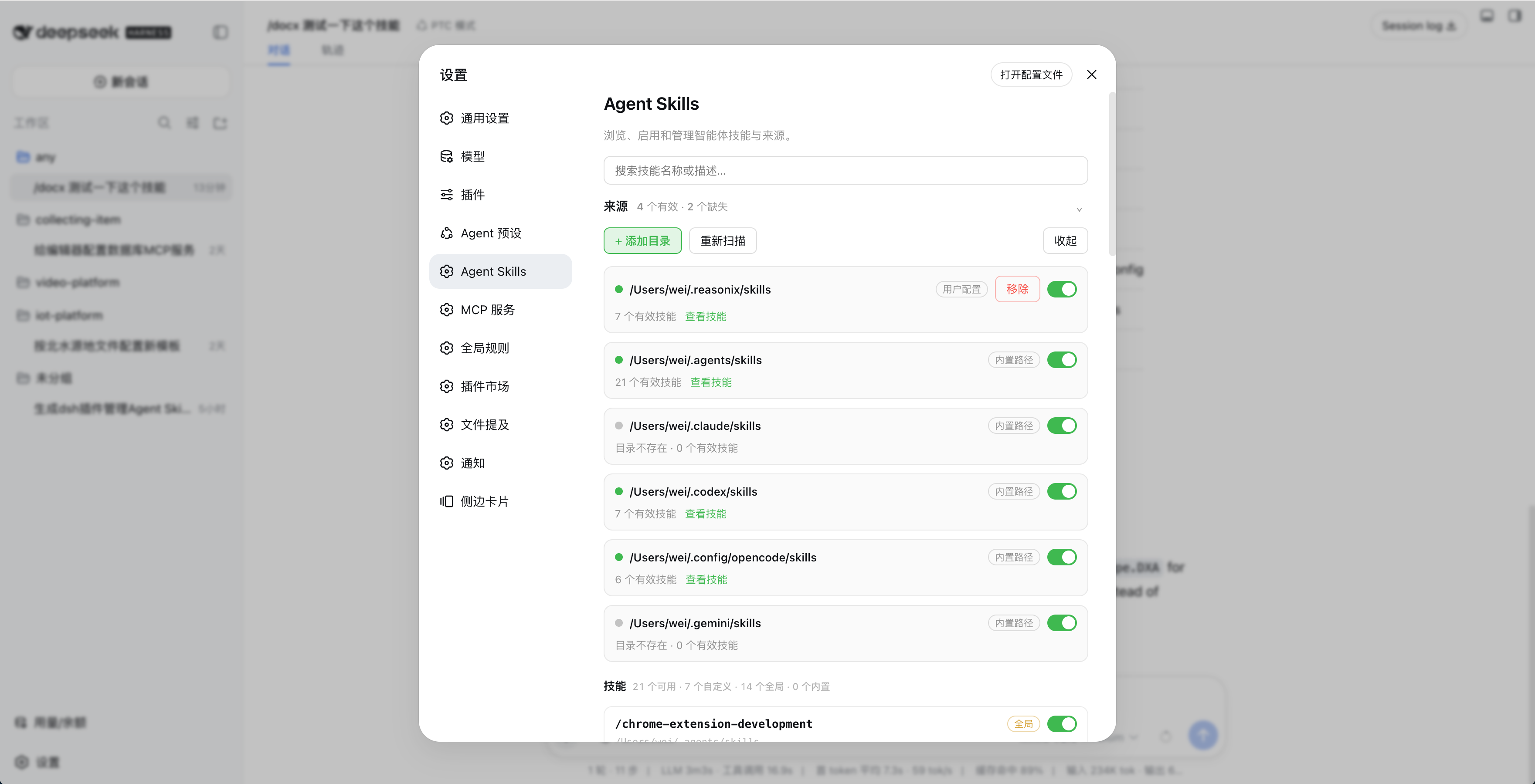
功能
- 自动扫描
~/.agents/skills、~/.claude/skills、~/.codex/skills、~/.config/opencode/skills和~/.gemini/skills - 支持自定义技能目录
- 按目录或单个技能启停
- 搜索、查看描述并监听技能文件变化
- 不修改原始
SKILL.md
安装
npm(推荐)
dsh plugin --profile web add dsh-agent-skills
安装后打开「设置 → Agent Skills」,点击「开启接管 DSH 技能」,再点击「重启 DSH」。
DSH 插件市场
在「设置 → 插件市场」中搜索 Agent Skills,或查看 DSH 插件市场。
GitHub
dsh plugin --profile web add github:minivv/dsh-agent-skills
Git 安装可能需要授权 pnpm 执行构建脚本。
使用
- 在「设置 → Agent Skills」中检查自动发现的目录,或点击「+ 添加目录」。
- 使用目录和技能开关控制可用技能。
- 出现技能变更提示后,点击「刷新页面」。
- 修改技能文件后,点击「重新扫描」或等待自动刷新。
点击「取消接管」并重启 DSH,可恢复 DSH 原来的技能来源。
设置保存在 $DSH_HOME/agent-skills/state.json。
技能格式
skills/
├── my-skill/
│   └── SKILL.md
└── another-skill.md
SKILL.md 需要 YAML frontmatter,name 使用小写 kebab-case:
---
name: my-skill
description: Explain when this skill should be used.
---

# Instructions
卸载
先在设置页点击「取消接管」和「重启 DSH」,再运行:
dsh plugin --profile web remove dsh-agent-skills
如果设置页无法打开,先恢复 DSH 技能来源:
DSH_INSTALL_ROOT="$(npm root -g)/@deepseek-ai/dsh" \
  node ~/.dsh/profiles/web/node_modules/dsh-agent-skills/scripts/uninstall-preset.mjs

dsh plugin --profile web remove dsh-agent-skills
开发
要求 Node.js 20+。
npm install
npm run typecheck
npm run build
npm test
npm pack --dry-run
注意
- 技能名必须匹配
[a-z0-9]+(?:-[a-z0-9]+)* - DSH 升级后如果开关失效,重新开启接管并重启 DSH
链接
License
보안 및 설치 증거
이 점수는 공개 저장소 메타데이터와 이 사이트에 등록된 설치 증거에만 기반하며, 코드 보안 감사와 다릅니다.
공개 플러그인 카탈로그에서 왔으며, 공개 GitHub 저장소로 연결됩니다.
저장소가 MIT 라이선스를 선언했습니다.
최근 180일 내 코드 업데이트가 있습니다.
재현 가능한 정확한 설치 메타데이터가 아직 등록되지 않았습니다. 저장소 설명에 따라 직접 확인하세요.
prepare이(가) 감지되었습니다. 설치 전에 스크립트를 검토하세요.
lifecycle-scripts