
DeepSeek 用量面板
DeepSeek Harness Web GUI
이것은 DeepSeek Harness(DSH) 플러그인입니다. 이 사이트는 GitHub README, 설치 정보, 유지보수 상태, 공개 보안 시그널을 모아 보여줍니다.
업스트림에서 중국어 README를 제공하지 않아 저장소 원본 내용을 표시합니다.
dsh-deepseek-usage
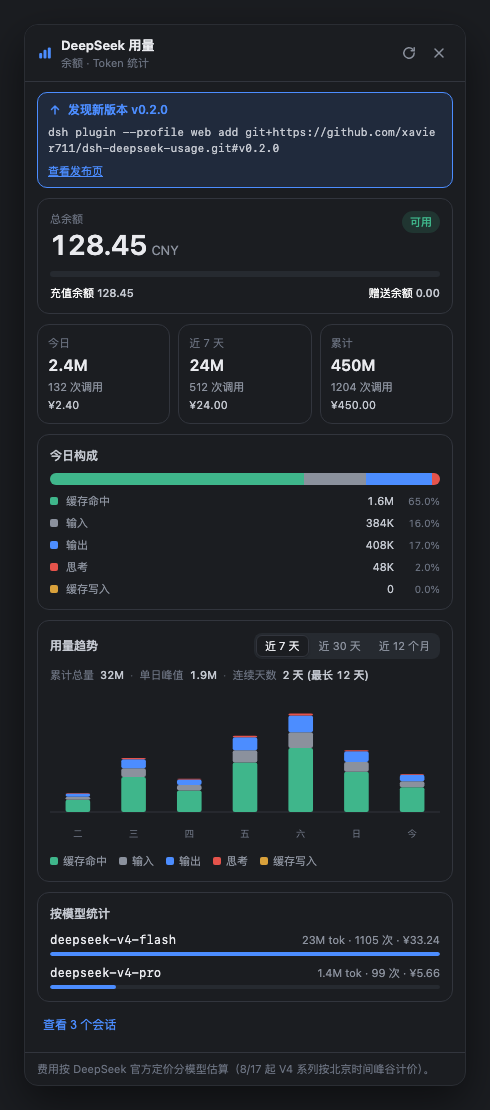
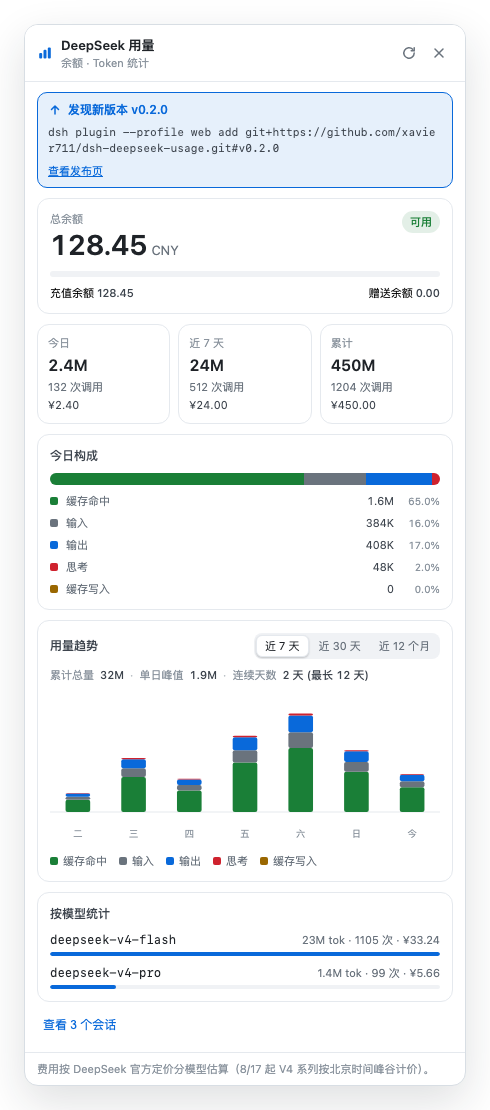
A DeepSeek usage panel plugin for the DeepSeek Harness Web GUI. It adds a 「Usage / 用量」 entry at the bottom of the left sidebar showing:
- Account balance — queried live from the official endpoint
GET /user/balance(total, topped-up, granted). - Local usage — replays your own session logs (which store the official per-request
usagerecords) and shows: today / last 7 days / all time, a 7-day chart, today's token composition, per-session breakdown, and per-model statistics. - Cost estimate — priced per model at official DeepSeek rates (CNY per 1M tokens), including the V4 peak/off-peak pricing effective 2026-08-17 (peak hours in Beijing time are applied automatically).
Note: DeepSeek's API does not expose an account-level usage endpoint (all candidate paths return 404 in practice). The usage data therefore comes from your local session logs — which contain the exact
usagevalues returned by the official API for every request.
Screenshots
The panel opens from the 「用量」 entry at the sidebar foot. All figures below are synthetic sample data — no real balance, keys, tokens, or session content.
| Dark theme | Light theme |
|---|---|
 |  |
Install (pick one)
You need Node.js first (download from nodejs.org).
Option A: Install straight from GitHub (recommended, one command)
Paste this into a terminal:
dsh plugin --profile web add git+https://github.com/xavier711/dsh-deepseek-usage.git#v0.2.0
Don't have dsh installed globally? Use this instead (npx downloads it on first run):
npx --yes @deepseek-ai/dsh plugin --profile web add git+https://github.com/xavier711/dsh-deepseek-usage.git#v0.2.0
Tip: if the installer complains that
pnpmis missing, runnpm install -g pnpmand retry.
Option B: Clone + one-shot script
git clone https://github.com/xavier711/dsh-deepseek-usage.git
cd dsh-deepseek-usage
./install.sh     # auto-uses npx when dsh is not on PATH
Option C: npm (once published)
dsh plugin --profile web add @xavier711/dsh-deepseek-usage
After installing (any option)
- Restart the web server:
Ctrl+Cin the terminal runningdsh web, then rundsh webagain (ornpx --yes @deepseek-ai/dsh web). - Refresh the browser page: the 「用量」 entry appears at the sidebar foot, just above Settings.
Because the package declares
dsh.bundle, the plugin row is activated automatically — no manual config editing.
Optional: configure an API key (for the balance card)
Add a line to ~/.dsh/.credentials.yaml (replace sk-xxxx with your key):
DEEPSEEK_API_KEY: sk-xxxx
Or set the DEEPSEEK_API_KEY environment variable. Without a key, local usage statistics still work; the balance card just shows a hint.
Uninstall
dsh plugin --profile web remove @xavier711/dsh-deepseek-usage
Then restart dsh web and refresh the page.
Privacy
The plugin never embeds an API key (no key material in the package). The key is resolved at runtime from the recipient's own machine — ~/.dsh/.credentials.yaml or the environment — and only on the host (server) side; the browser bundle never sees it. Safe to share.
Layout
lib/index.js       host half — /dsh-usage/balance + /dsh-usage/local routes
lib/client.js      browser half — sidebar action + panel (hand-built bundle, no build step)
cordis.patch.yml   the plugin's own patch layer (dsh.bundle — auto-activated on install)
install.sh         one-shot installer
Configuration (optional, usually not needed)
Override row config by id in ~/.dsh/profiles/web/cordis.patch.yml:
- id: deepseek-usage
  config:
    balanceTtlMs: 60000        # balance cache TTL (ms)
    maxSessions: 100           # most-recent sessions to replay
    sessionConcurrency: 4      # parallel session-log reads
    balanceTimeoutMs: 10000    # balance request timeout
    newPricingAt: 1786924800000      # peak/off-peak pricing effective date (2026-08-17 00:00 Beijing)
    peakHours: [[9,12],[14,18]]      # Beijing peak windows
    # pricing: per-model rates (CNY per 1M tokens), see the source repo
Updating
You installed a pinned snapshot, so updates are not automatic — but you
don't need to check for them: the plugin queries the GitHub releases feed
(hours-cached) whenever you open the usage panel and shows a 「New version
available」 banner with the exact update command. Simply run it, restart
dsh web, and refresh the page:
dsh plugin --profile web remove @xavier711/dsh-deepseek-usage
dsh plugin --profile web add git+https://github.com/xavier711/dsh-deepseek-usage.git#v0.2.0
Troubleshooting
I see dsh: warning: ... declares no dsh.bundle — installed as a plain dependency
You installed an older snapshot of the repository (pnpm caches git
dependencies by commit, so an install that happened before this package
declared dsh.bundle keeps the old version). Fix it by reinstalling from
the pinned tag:
dsh plugin --profile web remove @xavier711/dsh-deepseek-usage
dsh plugin --profile web add git+https://github.com/xavier711/dsh-deepseek-usage.git#v0.2.0
Then restart dsh web and refresh the page.
The 「用量」 entry does not appear after installing
Make sure the web server was restarted after the install (Ctrl+C in the
dsh web terminal, then run it again) and that you hard-refresh the browser
page (Cmd/Ctrl+Shift+R).
HTTP routes
GET /dsh-usage/balance—{ ok, isAvailable, currency, totalBalance, grantedBalance, toppedUpBalance, ... }GET /dsh-usage/local—{ ok, sessionCount, errorSessions, pricing, buckets: { today, week, total }, days: [...7], models: [...], sessions: [...] }
보안 및 설치 증거
이 점수는 공개 저장소 메타데이터와 이 사이트에 등록된 설치 증거에만 기반하며, 코드 보안 감사와 다릅니다.
공개 플러그인 카탈로그에서 왔으며, 공개 GitHub 저장소로 연결됩니다.
저장소가 MIT 라이선스를 선언했습니다.
최근 180일 내 코드 업데이트가 있습니다.
재현 가능한 정확한 설치 메타데이터가 아직 등록되지 않았습니다. 저장소 설명에 따라 직접 확인하세요.
검사한 패키지 메타데이터에 설치 라이프사이클 스크립트가 선언되지 않았습니다.