
智能家居控制
DeepSeek Harness agent
이것은 DeepSeek Harness(DSH) 플러그인입니다. 이 사이트는 GitHub README, 설치 정보, 유지보수 상태, 공개 보안 시그널을 모아 보여줍니다.
업스트림에서 중국어 README를 제공하지 않아 저장소 원본 내용을 표시합니다.
Home Assistant control for DeepSeek Harness agents.
Read entity states · query history · call services — every state-changing call sits behind a human approval gate.
中文 ·



Zero runtime dependencies beyond the harness itself. Uses Home Assistant's built-in REST API — no MQTT, no WebSocket, no extra daemon.
✨ What it looks like
Click any image to open the live demo — docs/demo.html simulates the full DSH conversation, and its live console talks to the bundled HA emulator (no real Home Assistant needed).
| ① Ask | ② Approval gate | ③ Done — state changed |
|---|---|---|
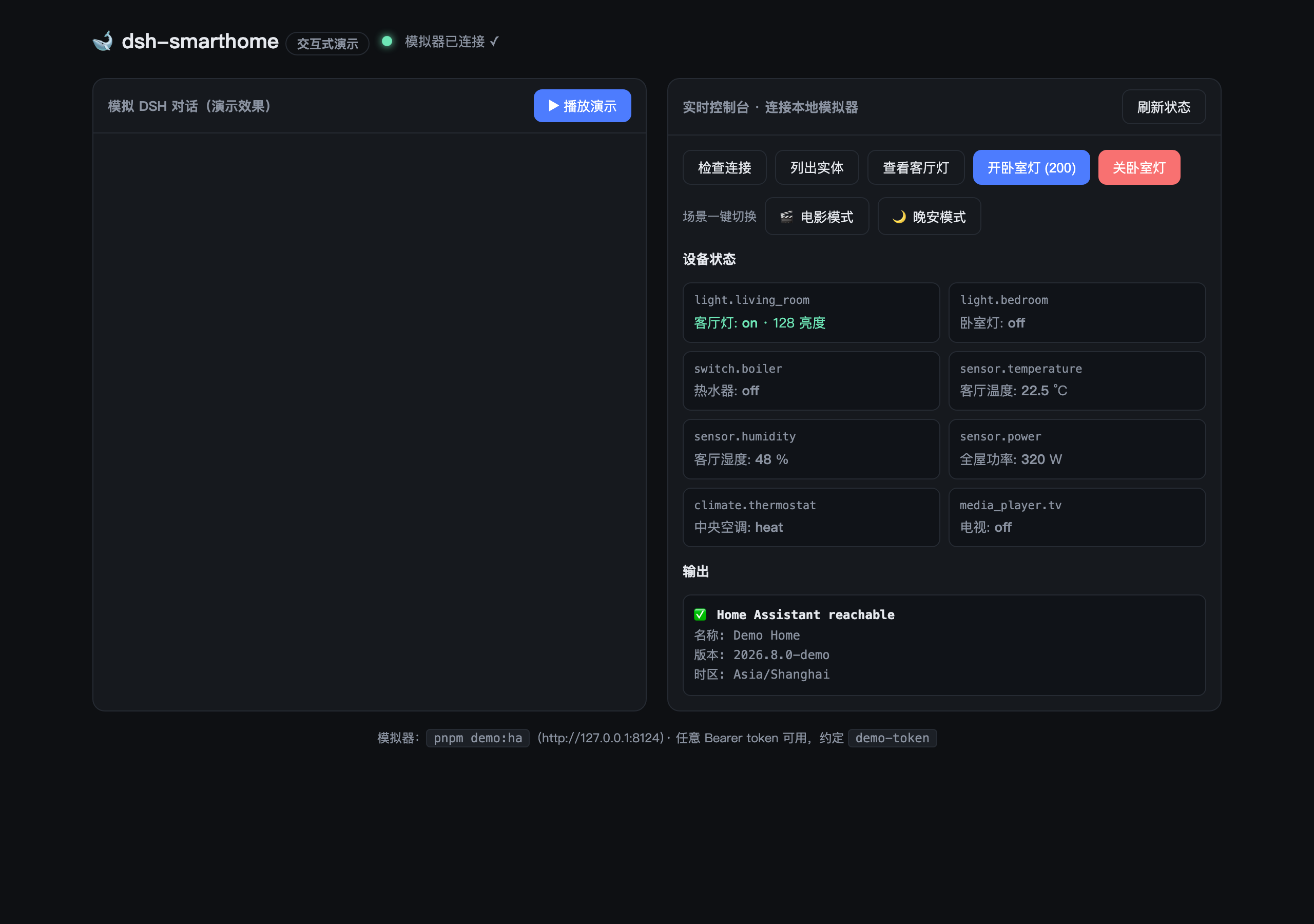 | 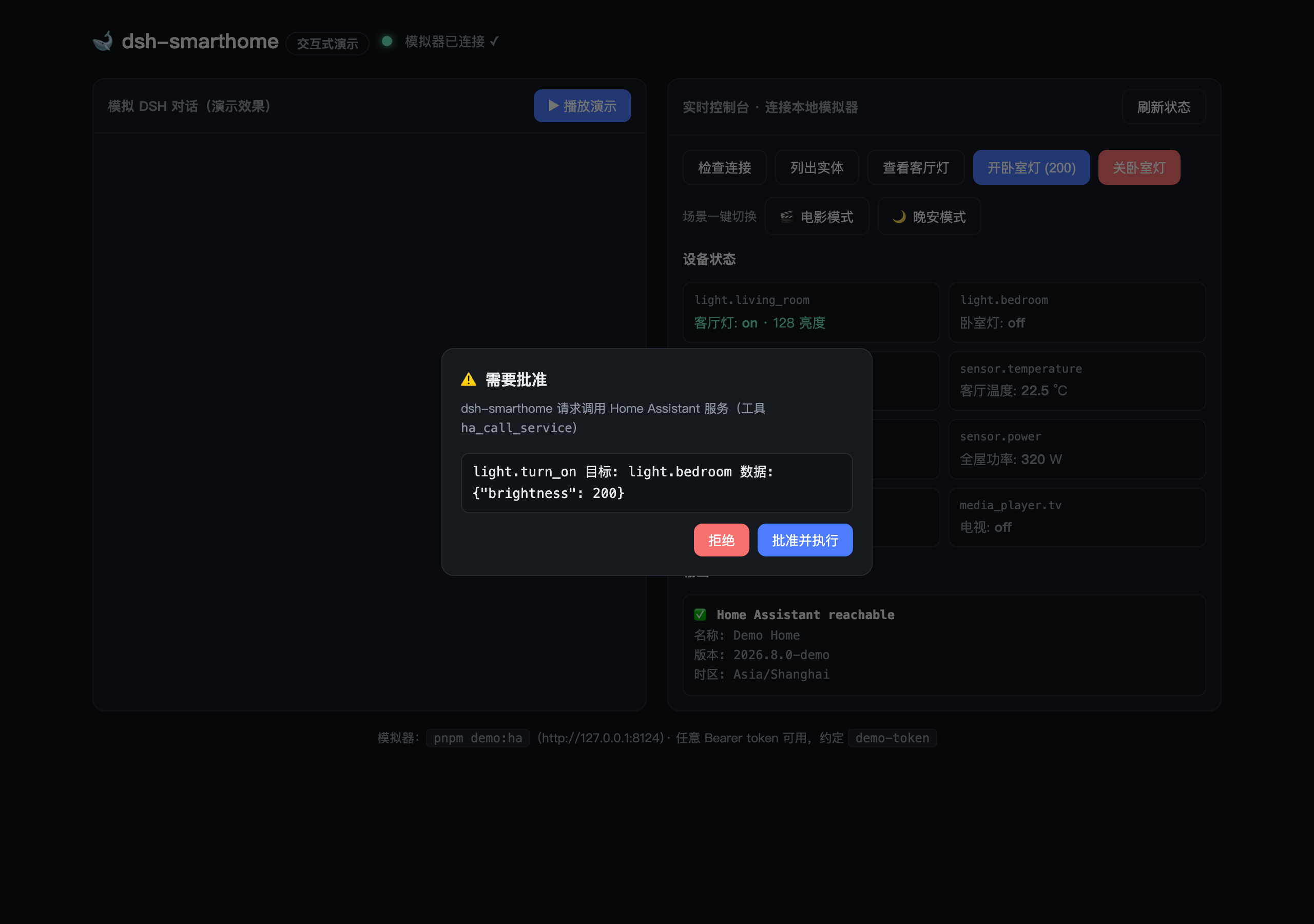 | 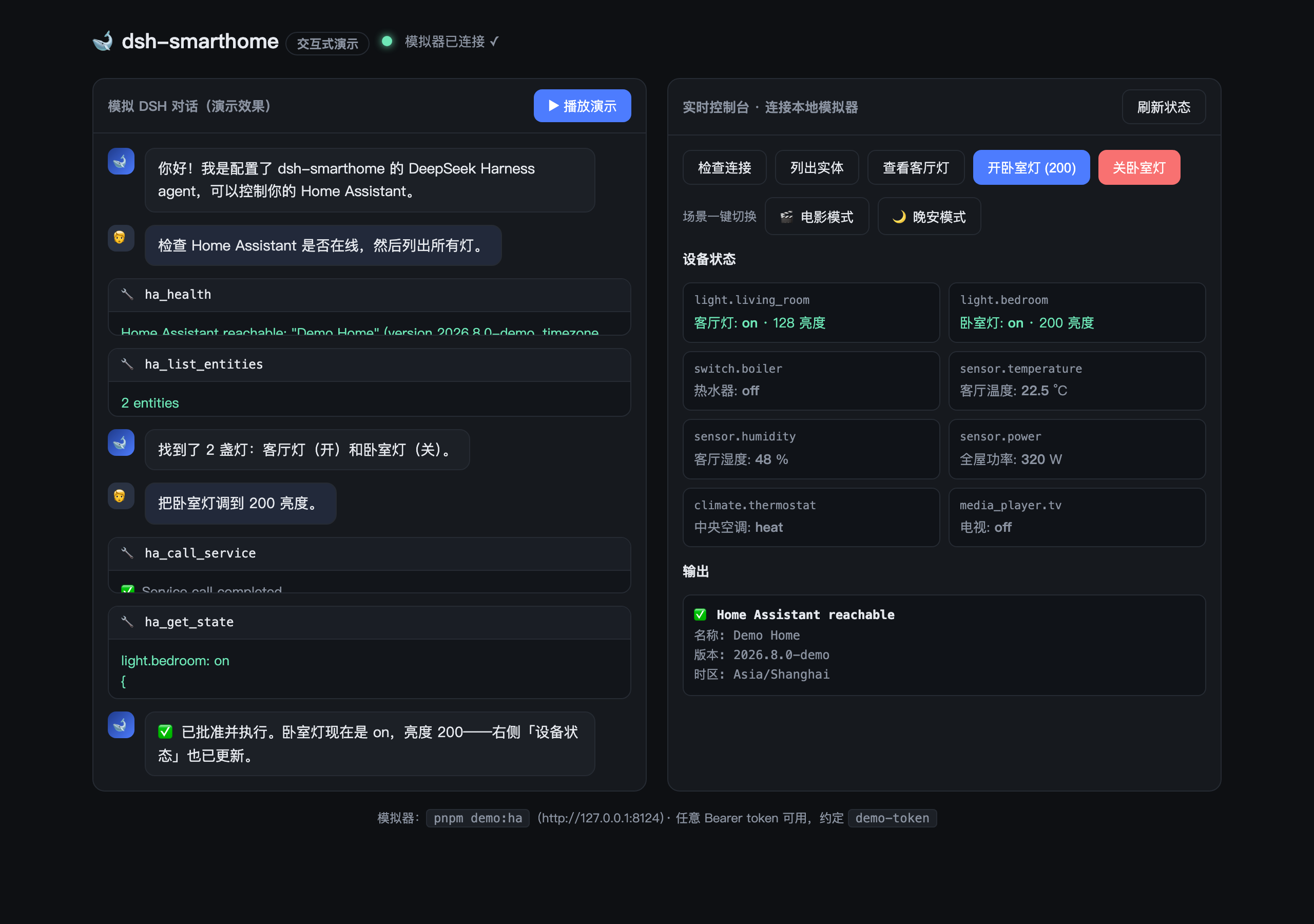 |
The agent lists your lights with ha_list_entities. | ha_call_service pauses for a human approval dialog. | Approved — ha_get_state confirms the light turned on. |
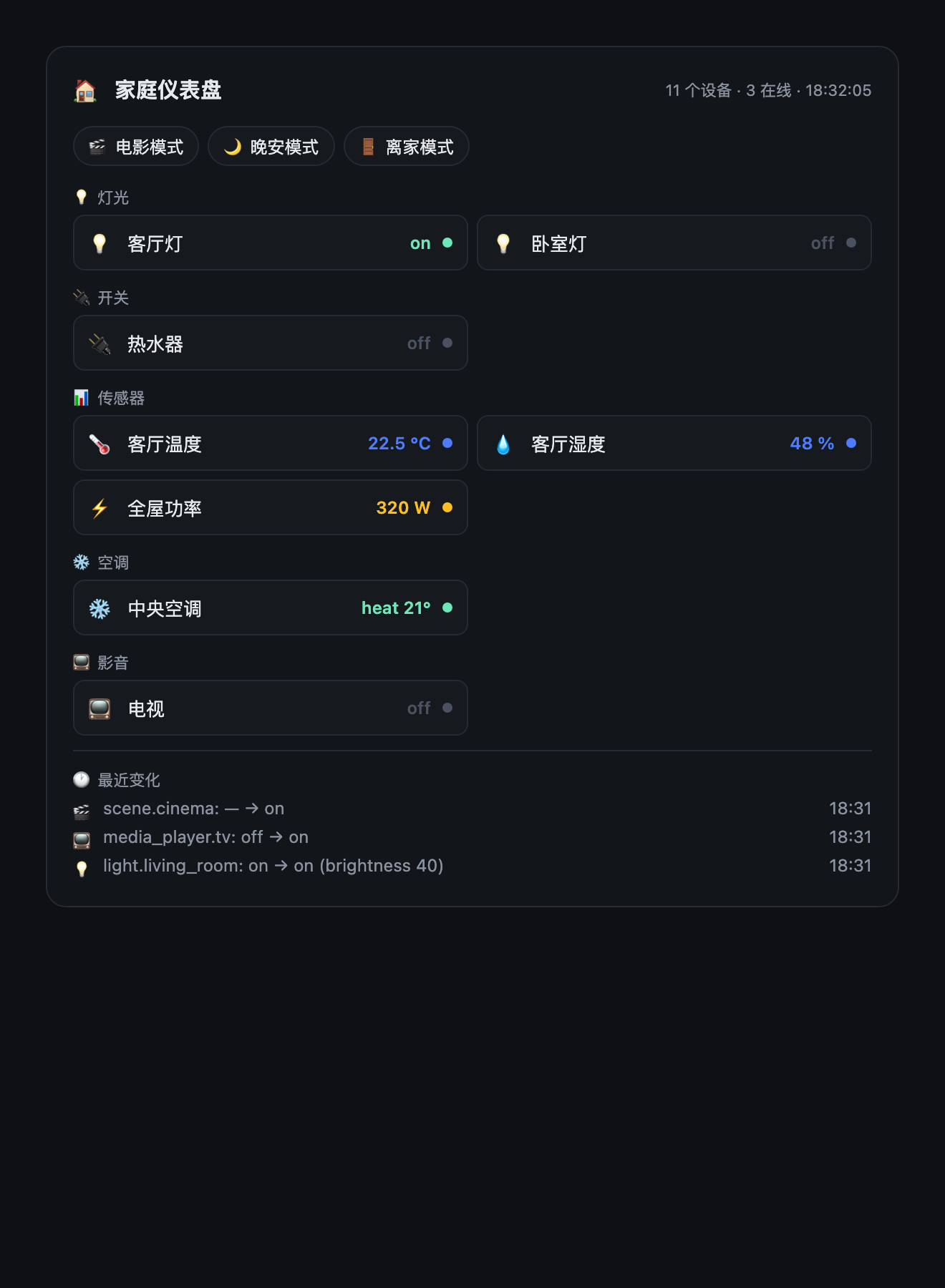
And the Web UI dashboard card — call ha_dashboard and get a live snapshot of the whole home rendered right in the conversation:
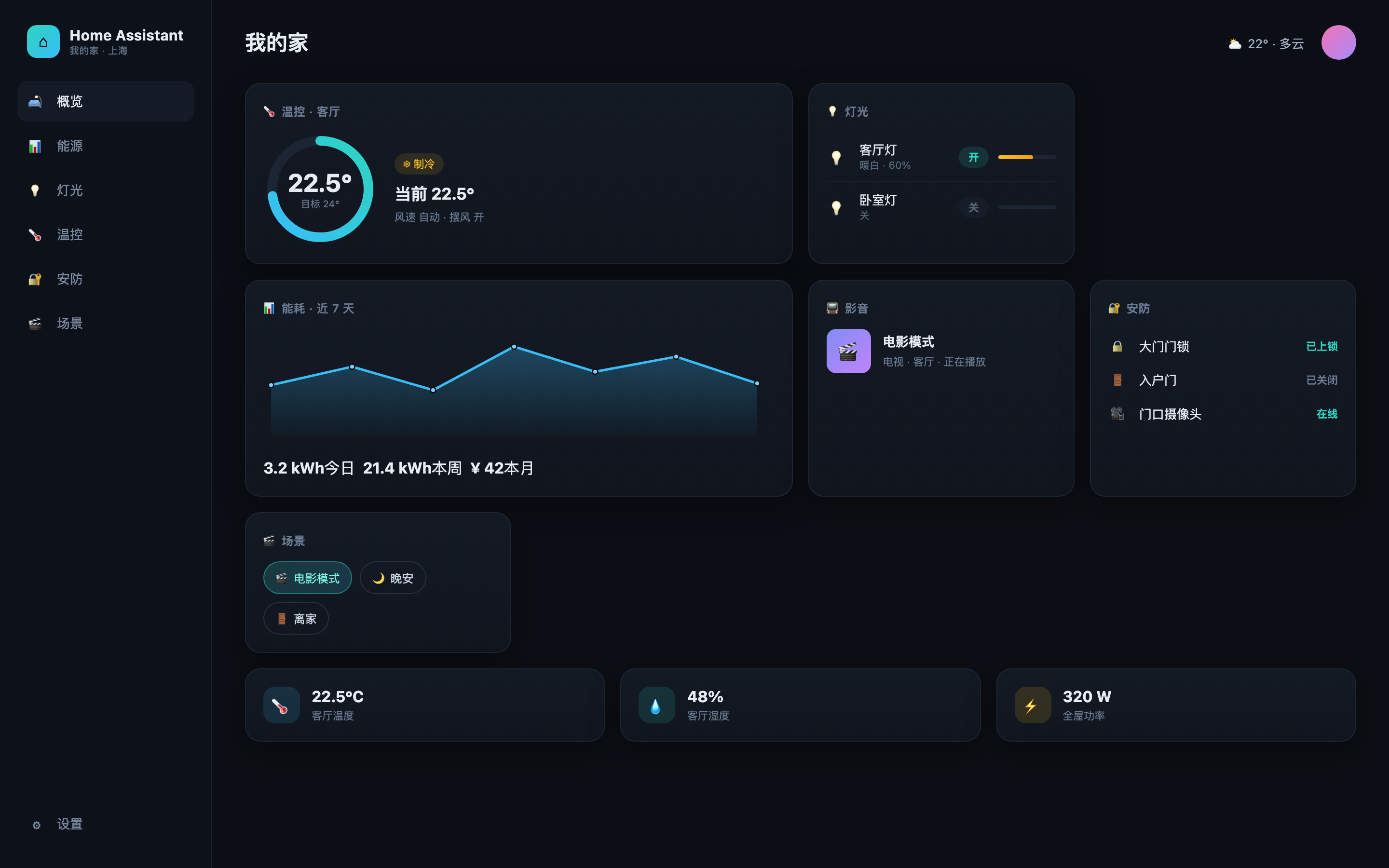
The Home Assistant it plugs into — a typical smart-home dashboard like this one (illustration):
🎯 What can it do?
Talk to your home the way you talk to an assistant — every write goes through a human approval gate first.
| You say | What happens |
|---|---|
| "Check the whole house — which devices are still on?" | Agent scans with ha_list_entities / ha_get_state and summarizes |
| "Show me the home dashboard." | ha_dashboard renders a live dashboard card in the conversation — devices, scenes and recent changes at a glance |
| "Set the bedroom light to 200 brightness." | ha_call_service → approval dialog → executes → state updates instantly |
| "Turn off every light in the living room." | Area targeting — one call controls the whole room |
| "Start cinema mode." | Scene activation: dimmed lights + TV on — a whole cascade of devices in one shot (ha_events shows each change live) |
| "What changed in the house in the last hour?" | Real-time state_changed events from the WebSocket feed |
| "Is the living room warm enough? Compare with the bedroom." | ha_get_state / ha_render_template over sensors |
| "Turn everything off, I'm leaving." | One scene (scene.away) or a multi-entity service call |
💡 Why it's good — how useful is it?
- One-line install:
dsh plugin --profile web add dsh-smarthome, then just talk to the agent. - Safe by default: every state-changing call stops for human approval;
allowedDomainsis a second deny-list belt. The agent can never touch your home without you saying yes. - Natural language control: no apps to fiddle with, no API docs to memorize — "dim the lights" just works.
- Always current: state changes reach the agent in real time over WebSocket, so it never "thinks" the light is still on when you switched it off.
- Lightweight: zero runtime dependencies — plain REST + Node's built-in WebSocket. No MQTT broker, no extra daemon.
- Try it without Home Assistant: the repo ships a demo emulator + interactive demo page — 5 minutes to a full feel of the plugin.
- Engineered, not hacked together: 36 tests including a full real agent-loop end-to-end suite, strict TypeScript, CI.
💻 Your computer is the control center
dsh-smarthome runs right where dsh runs — on your computer. No phone app, no separate bridge, no context switch:
- 👀 Monitor while you work — the dashboard card (
ha_dashboard) and the real-time event feed (ha_events) keep the whole house visible next to your editor: what's on, what just changed. - 🎙️ Control by voice — add a community voice plugin to dsh (search the
dsh-plugintopic for voice; e.g. dsh-voice does zero-key speech input + read-aloud,dsh-voice-chatdoes real-time speech) and just speak: "turn the bedroom light to 200" → approval → done. Hands-free while you keep typing. - 🖥️ Everything in one window — code, watch the house, and control devices without ever leaving dsh. Every state-changing call still waits for your approval.
🛠 Features
| Tool | Description | Approval |
|---|---|---|
ha_health | Verify the connection; return instance name, version, timezone, WebSocket status | read |
ha_list_entities | List entities, filter by domain (light, switch, sensor…) and text | read |
ha_list_areas | List rooms (areas) via the WebSocket API, e.g. living_room | read |
ha_list_devices | List physical devices via the WebSocket device registry | read |
ha_get_state | Full state + attributes of one entity | read |
ha_history | State-change timeline over a time window | read |
ha_events | Recent real-time state changes buffered from the WebSocket | read |
ha_list_scenes | List one-click scenes (cinema, goodnight, away…) | read |
ha_dashboard | Full home snapshot rendered as a dashboard card in the Web UI | read |
ha_call_service | Call any service — by entity, by area (whole room), by device, or scene | ask |
ha_render_template | Render a Jinja2 template server-side | ask |
Example prompts:
"Check that Home Assistant is reachable, then list the lights in the living room."
"Set the living room light to 60% brightness." (triggers an approval request)
"Show me the boiler switch history for the last 24 hours."
"Turn off every light in the bedroom." (area targeting — one call, whole room)
"Start cinema mode." (scene activation — lights dim, TV turns on)
"What changed in the house in the last hour?" (real-time
ha_events)
📦 Install
Requires dsh ≥ 0.1.0-rc.6 (current npm latest).
# From npm (recommended — prebuilt):
dsh plugin --profile web add dsh-smarthome

# Or from GitHub (source install — pnpm builds on the fly):
# dsh plugin --profile web add github:YLifeOnlyOnce/dsh-smarthome
# If pnpm refuses to run the prepare build on a git dependency, allow it once:
#   add this to <profile>/pnpm-workspace.yaml, then re-run the add:
#     allowBuilds:
#       dsh-smarthome: true
Restart dsh --profile web after installing. Manage it in Settings → Plugins.
🧪 Try it without Home Assistant (demo mode)
No HA instance? The repo ships a fake HA emulator with a small living demo home whose state actually changes when you call services — perfect for trying the plugin before wiring up real hardware.
git clone https://github.com/YLifeOnlyOnce/dsh-smarthome
cd dsh-smarthome
pnpm install
pnpm demo:ha          # serves a fake Home Assistant at http://127.0.0.1:8124
In another terminal, configure the plugin (add to your profile's cordis.patch.yml):
- id: smarthome
  config:
    baseUrl: http://127.0.0.1:8124
    tokenEnv: HOME_ASSISTANT_TOKEN
Then start dsh and try:
HOME_ASSISTANT_TOKEN=demo-token dsh --profile web
"Check that Home Assistant is reachable, then list the lights."
"Turn on the bedroom light at 200 brightness." — an approval request pops up; approve it, and
ha_get_statewill show the light is actuallyonwithbrightness: 200."Turn off every light in the living room." — area targeting via the WebSocket area registry.
"What changed in the last minute?" — real-time
state_changedevents from the WebSocket feed.
The emulator also drifts the temperature sensor every few seconds, so ha_history and ha_events always have fresh data. Any Bearer token works; demo-token is just the convention.
Want to preview the UI without running dsh at all? Open docs/demo.html in a browser: it replays a simulated DSH conversation (tool cards + the approval dialog), and its live console talks to the emulator directly when it's running.
Ready-to-paste configs (demo / real HA / no-approval) live in examples/cordis.patch.yml.
⚙️ Configuration
Create a long-lived access token in Home Assistant: Profile → Security → Long-lived access tokens.
Override the plugin row in your profile's cordis.patch.yml (later layers win):
- id: smarthome
  config:
    baseUrl: http://192.168.1.10:8123   # your Home Assistant instance
    token: ''                           # prefer tokenEnv over committing a token
    tokenEnv: HOME_ASSISTANT_TOKEN      # env var holding the token
    timeoutMs: 15000
    requireApproval: true               # human approval for state-changing calls
    allowedDomains: []                  # e.g. ["light", "switch"]; empty = all domains
    maxHistoryEvents: 200
    wsEnabled: true                     # real-time events + area registry (WebSocket)
    eventBufferSize: 50                 # rolling ha_events buffer size
Then run dsh with the variable set:
HOME_ASSISTANT_TOKEN=<token> dsh --profile web
baseUrl defaults to http://homeassistant.local:8123 (the standard Home Assistant mDNS host). If no token is configured the plugin still loads — every tool call fails with a clear "not configured" message instead of crashing the harness.
How the token is resolved
tokenEnv is a credential reference resolved through the harness's credential seam: when the credentials service is present, the value is read from its layered sources (process environment → <cwd>/.env → $DSH_HOME/.env), falling back to process.env directly otherwise. The token is re-resolved per request / per socket connection, so a rotated credential reaches the very next call without a restart.
🔒 Security
- A Home Assistant token can control everything in your instance — there is no per-entity scope. That is why
requireApprovaldefaults totrueandha_call_service/ha_render_templatealways route through the harness approval seam. allowedDomainsis a second belt: when set, service calls on other domains are denied outright.- Prefer
tokenEnvovertokenso the secret never lands in a committed config file.
🛠 Development
pnpm install
pnpm typecheck   # strict TS against the published @deepseek-ai/* types
pnpm build       # bundle lib/ (ESM + d.ts)
pnpm test        # 24 tests: client suite + real ToolRuntime integration + full agent-loop E2E
node scripts/capture-demo.mjs   # regenerate the README screenshots
📋 Compatibility
Real Home Assistant compatibility
- Uses the v1 REST API (
/api/states,/api/services/…,/api/history/…,/api/template,/api/config) and the WebSocket API (/api/websocket: auth,subscribe_events,config/area_registry/list,config/device_registry/list) — the same protocols the official HA frontend speaks. - Requires a long-lived access token (Profile → Security → Long-lived access tokens).
- Caveats: self-signed HTTPS certificates are not supported (use
http://or a valid cert); a restricted token that cannot call services will failha_call_service.
DeepSeek Harness is in developer preview and changes fast. This plugin is verified against the published @deepseek-ai/dsh@0.1.0-rc.6 line; if a harness update breaks it, please open an issue.
📄 License
MIT
보안 및 설치 증거
이 점수는 공개 저장소 메타데이터와 이 사이트에 등록된 설치 증거에만 기반하며, 코드 보안 감사와 다릅니다.
공개 플러그인 카탈로그에서 왔으며, 공개 GitHub 저장소로 연결됩니다.
저장소가 MIT 라이선스를 선언했습니다.
최근 180일 내 코드 업데이트가 있습니다.
재현 가능한 정확한 설치 메타데이터가 아직 등록되지 않았습니다. 저장소 설명에 따라 직접 확인하세요.
검사한 패키지 메타데이터에 설치 라이프사이클 스크립트가 선언되지 않았습니다.