
Humanize 交互式开发
Derived from the GAAC (GitHub-as-a-Context) project.
이것은 DeepSeek Harness(DSH) 플러그인입니다. 이 사이트는 GitHub README, 설치 정보, 유지보수 상태, 공개 보안 시그널을 모아 보여줍니다.
업스트림에서 중국어 README를 제공하지 않아 저장소 원본 내용을 표시합니다.
Humanize
Current Version: 1.18.0
Derived from the GAAC (GitHub-as-a-Context) project.
A Claude Code plugin that provides iterative development with independent AI review. Build with confidence through continuous feedback loops.
What is RLCR?
RLCR stands for Ralph-Loop with Codex Review, inspired by the official ralph-loop plugin and enhanced with independent Codex review. The name also reads as Reinforcement Learning with Code Review -- reflecting the iterative cycle where AI-generated code is continuously refined through external review feedback.
Core Concepts
- Iteration over Perfection -- Instead of expecting perfect output in one shot, Humanize leverages continuous feedback loops where issues are caught early and refined incrementally.
- One Build + One Review -- Claude implements, Codex independently reviews. No blind spots.
- Ralph Loop with Swarm Mode -- Iterative refinement continues until all acceptance criteria are met. Optionally parallelize with Agent Teams.
- Capability Anchors -- Generated plans include a feature/capability map, and RLCR rounds keep Claude and Codex anchored to the relevant capability node.
- Begin with the End in Mind -- Before the loop starts, Humanize verifies that you understand the plan you are about to execute. The human must remain the architect. (Details)
How It Works
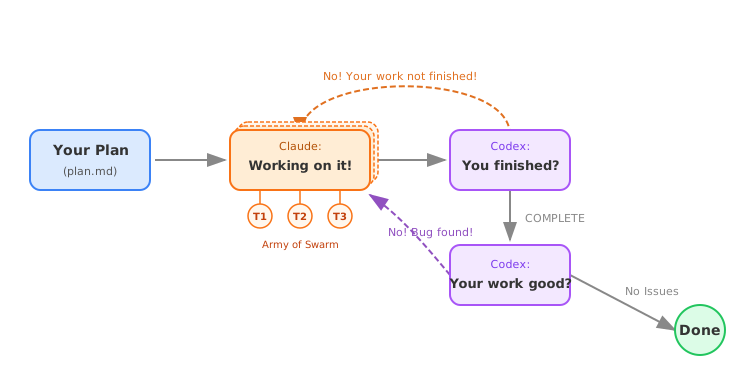
The loop has two phases: Implementation (Claude works, Codex reviews summaries) and Code Review (Codex checks code quality with severity markers). Issues feed back into implementation until resolved.
Install
# Add PolyArch marketplace
/plugin marketplace add PolyArch/humanize
# If you want to use development branch for experimental features
/plugin marketplace add PolyArch/humanize#dev
# Then install humanize plugin
/plugin install humanize@PolyArch
Requires codex CLI for review. See the full Installation Guide for prerequisites and alternative setup options.
DeepSeek Harness
Humanize is also available as a standard DeepSeek Harness profile bundle.
The DeepSeek V4 Flash Max builder agent runs the RLCR loop inside a DSH
session while the Codex review agent independently gates progress. The
bundle registers these skills: humanize, humanize-rlcr, ask-codex,
humanize-gen-plan, and humanize-refine-plan; it also mounts the Humanize
trajectory view in the latest DSH web client.
# Install the standard bundle into the web profile.
dsh plugin --profile web add github:dsh-external/dsh-humanize#<commit-or-tag>
Git installs build the web client through the bundle's prepare script. If
pnpm blocks that build, add the exact package key it prints to
$DSH_HOME/profiles/web/pnpm-workspace.yaml under allowBuilds, then rerun the
command. Configure the builder model (deepseek-v4-flash-max) in the DSH model
settings — the full walkthrough is in the
Installation Guide for DeepSeek Harness.
Quick Start
-
Generate an idea draft from a loose thought (optional — skip if you already have a draft):
/humanize:gen-idea "add undo/redo to the editor"Output goes to
.humanize/ideas/<slug>-<timestamp>.mdand a companiondirections.jsonartifact. Pass a.mdpath to expand existing rough notes.--ncontrols how many parallel directions explore the idea (default 6). -
Explore directions as parallel prototypes (optional — skip if you want to go straight to planning):
/humanize:explore-idea .humanize/ideas/<slug>-<timestamp>.directions.jsonDispatches bounded parallel prototype workers (one per direction), each running in an isolated git worktree. After all workers complete, writes
.humanize/explore/<run-id>/explore-report.mdfor audit/ranking details and.humanize/explore/<run-id>/final-idea.mdas the plan-ready synthesis. Worker worktrees are optional prototype fast paths; the default follow-up is to generate a clean plan fromfinal-idea.md. -
Generate a plan from your draft or explored final idea:
/humanize:gen-plan --input .humanize/explore/<run-id>/final-idea.md --output docs/plan.mdAdd
--coachto run mandatory short-answer stage quizzes after each planning stage. Normal plan decision questions stay separate; quiz mismatches are treated as design drift, AI design correction, or background gaps before the agent expands the next planning layer. Generated plans include aFeature Map / Capability Mapbefore the task breakdown so each task carries its global capability context. -
Refine an annotated plan before implementation when reviewers add comments (
CMT:...ENDCMT,<cmt>...</cmt>, or<comment>...</comment>):/humanize:refine-plan --input docs/plan.md -
Run the loop:
/humanize:start-rlcr-loop docs/plan.mdWhen the plan has a capability map, RLCR records a
Capability Anchorin each round contract and Goal Tracker active task so Claude coding and Codex review stay aligned with the map. -
Consult Gemini for deep web research (requires Gemini CLI):
/humanize:ask-gemini What are the latest best practices for X? -
Monitor progress (in another terminal, not inside Claude Code):
source <path/to/humanize>/scripts/humanize.sh # Or just add it into your .bashec or .zshrc
humanize monitor rlcr       # RLCR loop
humanize monitor skill      # All skill invocations (codex + gemini)
humanize monitor codex      # Codex invocations only
humanize monitor gemini     # Gemini invocations only
Documentation
- Usage Guide -- Commands, options, environment variables
- Install for Claude Code -- Full installation instructions
- Install for Codex -- Codex skill runtime setup
- Install for Kimi -- Kimi CLI skill setup
- Configuration -- Shared config hierarchy and override rules
- Bitter Lesson Workflow -- Project memory, selector routing, and delta validation
License
MIT
보안 및 설치 증거
이 점수는 공개 저장소 메타데이터와 이 사이트에 등록된 설치 증거에만 기반하며, 코드 보안 감사와 다릅니다.
공개 플러그인 카탈로그에서 왔으며, 공개 GitHub 저장소로 연결됩니다.
GitHub 메타데이터에서 라이선스가 감지되지 않았습니다.
최근 180일 내 코드 업데이트가 있습니다.
재현 가능한 정확한 설치 메타데이터가 아직 등록되지 않았습니다. 저장소 설명에 따라 직접 확인하세요.
검사한 패키지 메타데이터에 설치 라이프사이클 스크립트가 선언되지 않았습니다.
missing-license